- Version
- 1.0.49 [Wineskin]
- Studio or maker
- vedinad
- Languages
- Russian, English, German, Spanish, Italian, Chinese (Traditional), Chinese (Simplified), Korean, Polish, Portuguese, Thai, Turkish, Ukrainian, French, Czech, Japanese
- Activation
- Not required
- Chip type
- Apple Silicon
- Tried out on
- macOS Tahoe, Mac mini 2024 M4
- First released
- 19.09.2025
- Voice languages
- Music only
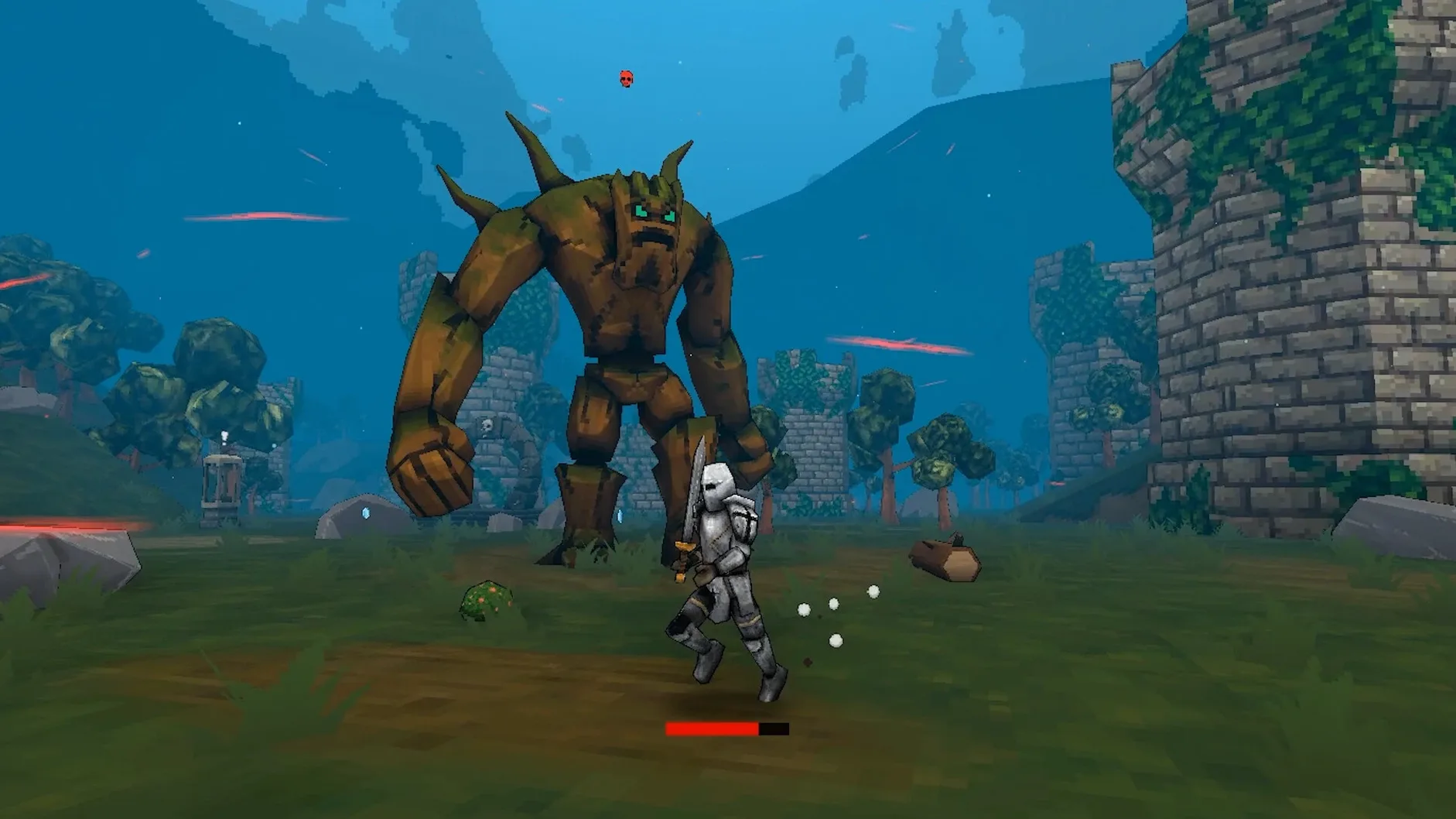
240 quests stand between you and the end of Megabonk, and every one of them plays out on a map that didn't exist a minute before. That is the core loop: you drop into a randomly generated arena, fight whatever shows up, and see how far you get before the run ends.
Minute to minute, you are moving, dodging, and picking your shots. Enemies swarm from all sides, so you learn to read the crowd and find the gaps. Between fights you grab whatever drops—new weapons, upgrades, or healing—and decide whether to push forward or hang back and scavenge. The random maps mean no two runs feel the same, which keeps the repetition honest.
The Mac build runs through Wineskin and is made for Apple Silicon, so it should feel at home on an M-series Mac. The interface is available in sixteen languages, including English, German, and Russian, which makes it easy to recommend to students. If you like roguelikes that test your reflexes rather than your patience, Megabonk fits that slot neatly.
How to get through a full run, start to finish
I show this workflow to students who are new to the genre. The steps work for any of the twenty characters, but I usually start people with the balanced starter so they can feel the rhythm before they try a trickier kit.
- Pick a character and read their unique ability once. Each of the twenty has a special trait — some boost damage, some give extra health, some change how items work. Knowing it from the start changes how you move through the map.
- Let the map generate and take a few seconds to look at the layout. Random maps can have chokepoints, open areas, or corridors. You do not need a full plan, but noticing where enemies might funnel saves you from being surrounded right away.
- Fight the first wave while staying near the edge of the map. Early enemies are slower. You learn their attack patterns and gain XP for your first level-up. Level-ups give random upgrades with different rarity, so you work with what you get.
- Collect items as they drop, but do not stop moving. More than seventy items exist, and they have synergies with each other. You will not memorize them all in one run. Grab what you see, check its effect briefly, and keep dodging.
- Push toward the boss when the wave count feels manageable. Each run has a boss somewhere ahead. The maps are not linear, so you might find the boss early or late. Either way, you need enough XP and items to survive the encounter.
- If you die, start a new run with a different character. Each death teaches something — a map layout, an enemy type, an item combination. With 240 quests across multiple runs, you always have something new to try.
Tested on a 2024 Mac mini with M4, built for Apple Silicon
The build is version 1.0.49, packaged with Wineskin for ARM architecture. It was tested on macOS Tahoe running on a 2024 Mac mini with M4, so it is built for Apple Silicon machines. You do not need an Intel Mac or any extra compatibility layer beyond the Wineskin wrapper. Activation is not required — you mount the downloaded image, drag the app into your Applications folder, and launch it from Launchpad. If you see an error at startup, the mounted image includes a Fix file that you run once. After that, the game should start normally on subsequent launches.
The interface supports sixteen languages, including English, German, Spanish, Italian, Traditional and Simplified Chinese, Korean, Polish, Portuguese, Thai, Turkish, Ukrainian, French, Czech, Japanese, and Russian. Music is listed as the only voice language. No online connection is needed, and no account is required. This makes it straightforward to install on a school Mac or a personal machine without extra steps.
Between Vampire Survivors and Broforce, Megabonk has its own feel
If you already play roguelike survival games on Mac, you might know Vampire Survivors, 20 Minutes Till Dawn, or Broforce. Megabonk sits somewhere between them but has its own feel.
Vs. Vampire Survivors: Vampire Survivors is about survival within a fixed time limit, with automatic attacks and heavy focus on passive upgrades. Megabonk asks you to aim and move actively, and the maps are randomly generated rather than looping the same arena. The 240 quests give you directed goals, which Vampire Survivors does not emphasize as much.
Vs. 20 Minutes Till Dawn: Similar in structure — waves of enemies, upgrade between rounds. Megabonk has twenty characters instead of a single class, and the random map generation changes your positioning from run to run. 20 Minutes Till Dawn uses manually designed maps, so you can memorize spawn points. Megabonk keeps you guessing.
Vs. Broforce: Broforce is a run-and-gun with fixed levels and a satirical tone. Megabonk is more survival-focused: you do not have checkpoints or a story campaign. The roguelike randomness and item synergies make each run feel like its own puzzle rather than a speedrun challenge.
None of these are better or worse. If you prefer structured levels with a set path, the other games might suit you. If you want variety per run and a larger roster of characters, Megabonk gives you that.
An eighth grader with twenty minutes between classes picks a random character
One of my eighth graders has twenty minutes between her last lesson and her train. She opens Megabonk on her MacBook, picks one of the twenty characters at random, and does a quick run. She knows she will not finish all 240 quests in one sitting. Instead, she learns one new item interaction per run. On Tuesday she found out that a certain healing item stacks with a damage upgrade she had ignored before. On Thursday she tried a character whose ability lets her move faster after taking damage — she lasted longer than usual because she adjusted her dodging pattern.
She does not save or pause. She plays until the run ends, closes the laptop, and walks to the platform. The random maps and random upgrades mean she never knows exactly what she will get, so the twenty minutes feel distinct each time. That is the appeal for her: a roguelike that fits into a real schedule without needing a long commitment. If you search for megabonk mac torrent, you will find the version that works on Apple Silicon without extra configuration. That is what she uses.
- Architecture: Apple Silicon
Questions I keep getting
How many quests does Megabonk have?
The game includes 240 quests, giving you plenty of objectives to work through across runs.
What languages are supported in Megabonk?
The interface is available in 16 languages, including Russian, English, German, Spanish, and Japanese.
Does Megabonk run on Apple Silicon Macs?
Yes, the build is marked for ARM architecture and uses Wineskin, so it should run on M-series Macs.
How to install
- Mount the downloaded image and drag the app into the Applications folder alias. This keeps the game where macOS expects it.
- After copying finishes, launch the app from Launchpad. That is the usual way to start it.
- If the game shows an error at startup, run the Fix file from the mounted image. It clears up common first-launch hiccups.
Similar games


Sign in or join the club to leave a comment.
Nobody has commented yet.