- Version
- 0.30.7
- Studio or maker
- VectorStorm Pty Ltd
- Languages
- Russian, English, German, Chinese (Simplified), Portuguese, French
- Activation
- Not required
- Chip type
- Apple Silicon, Intel 64-bit
- Tried out on
- macOS Tahoe, Mac mini 2024 M4
- First released
- 6.01.2020
- Voice languages
- Music only
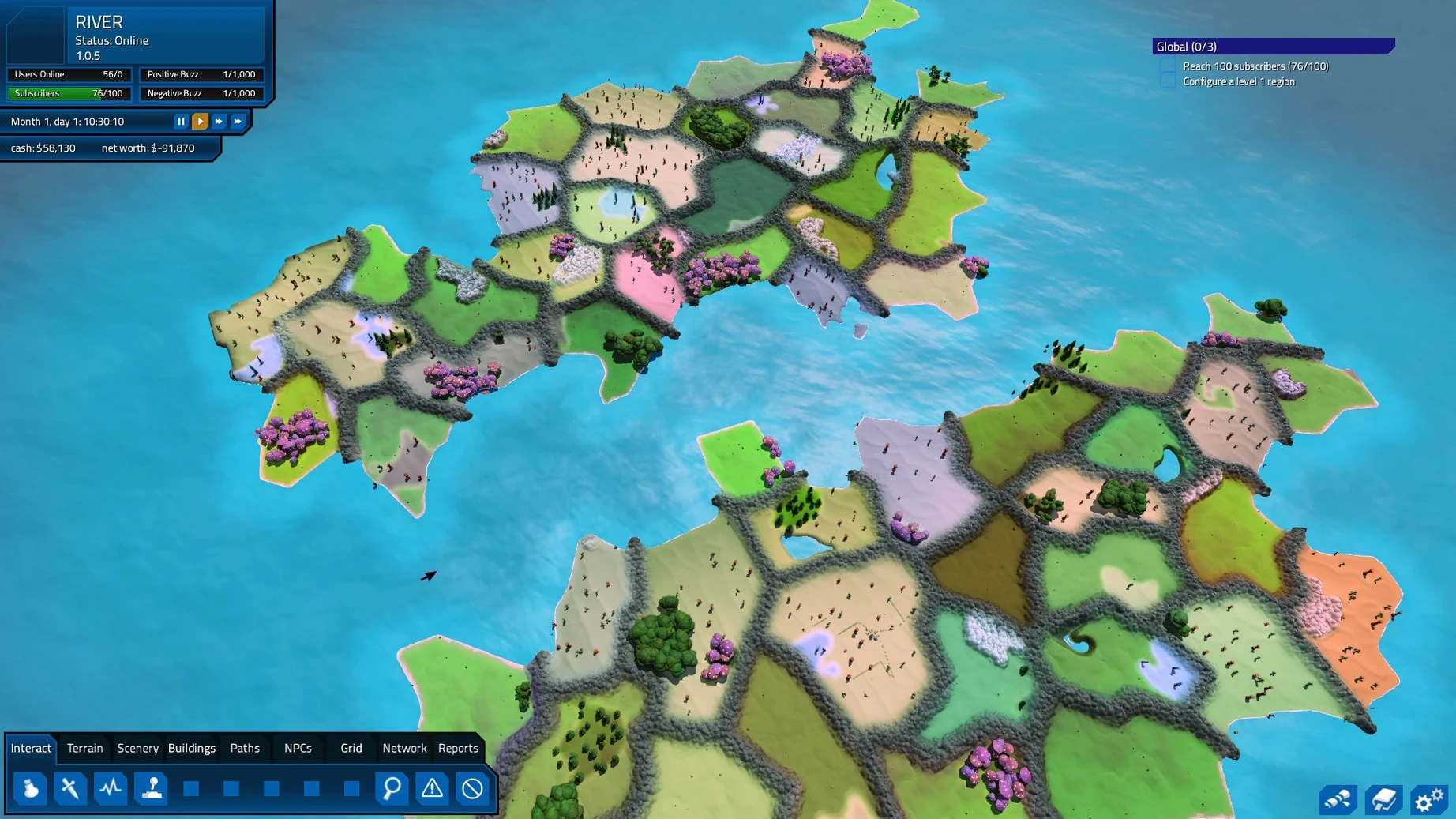
MMORPG Tycoon 2 is a single-player game about building and managing a simulated MMORPG, letting you run your own virtual world from the ground up.
Design classes, monsters, and manage subscribers
- Create player classes and balance combat for AI subscribers.
- Design monsters and dungeons, then adjust the difficulty.
- Use moderation tools to warn, help, or remove troublesome subscribers.
- Manage the game's soundtrack and audio content.
- Play in English, German, Russian, French, Portuguese, or Simplified Chinese.
Runs smoothly on Intel and Apple Silicon Macs
The game runs on both Intel and Apple Silicon Macs. On a Mac mini 2024 M4 running macOS Tahoe, performance is smooth with the default settings. Controls use standard mouse and keyboard input, and the interface scales well on modern displays. The current version 0.30.7 fixes several graphical flickers and crashes related to travel planning and dungeon destruction, making for a more stable experience.
Do I need an internet connection to play?
I get asked about MMORPG Tycoon 2 fairly often in the game club, especially by students who want to try something behind the scenes. A few questions come up repeatedly.
Do I need an internet connection to play? No. Despite the name, this is a single-player simulation. You build and manage a fake MMORPG for AI players.
Will it run on my older Mac? The game supports both Apple Silicon and Intel 64-bit systems, so it covers most Macs from the last several years. I have seen it work on Intel models without trouble. If your Mac runs macOS Tahoe or a recent version before it, you should be fine.
Is it complicated to learn? The first few minutes involve placing a village and a few monsters, then watching AI players explore. The simulation layers on gradually — quest chains, moderation, microtransactions — so you learn one system at a time. The interface is clear enough that I hand it to new club members without much explanation.
Can I change the language? Yes. The game includes Russian, English, German, Simplified Chinese, Portuguese, and French. You pick from the settings menu before starting a new world.
Works well alongside browser and note-taking apps
MMORPG Tycoon 2 works well alongside the usual desktop tools. I keep it in a virtual desktop with a browser and a note-taking app open, since running a virtual MMO world can involve a bit of planning. The game window resizes cleanly, and it does not force full-screen mode, so you can check a spreadsheet or a wiki on the side.
On macOS, the installation is straightforward: mount the disk image, drag the application to the Applications folder, and open it from Launchpad. No extra libraries or terminal commands. The game respects macOS sound settings, so audio from the AI players' travels comes through your usual output device without configuration.
For club sessions, I often save the game state, close the app, and resume later — the save files are small and sit neatly inside the user folder. Backing them up with Time Machine or a cloud folder is easy, and the game does not lock you into a proprietary save format.
Launch from Launchpad and plan your MMO world
Let me walk through an evening session with MMORPG Tycoon 2, the way I might show a student at the school game club.
I start by launching the game from Launchpad. The main menu loads quickly, and I select a new world. I name it something like "Greenshore Valley" and choose a temperate terrain template. The terrain tool lets me raise a few hills and place a river before I add anything else. My students enjoy this step — it feels like drawing a map for a story.
Next, I place a small village near the river and connect it with roads to a second village I put in the hills. I add a few basic monsters nearby: slimes and wolves, with low stats so new AI players can defeat them. I also set up a simple quest chain: "Collect three slime drops, return to the village elder, receive a copper sword." The quest system in the game lets you chain these tasks together, and the AI players follow them automatically.
I spawn a handful of AI players, assign them classes — warrior, mage, rogue — and watch them explore. Within minutes, they are fighting monsters, completing the quest, and leveling up. One player keeps dying to wolves near the hills, so I adjust the wolf spawn rate down a notch. The balance tools let me tweak combat difficulty on the fly.
After the first hour, I introduce moderation. A few players are using macros to grind slimes in an unfair way. I issue a warning through the moderation panel, and the behavior stops. Another player seems stuck — they cannot find the quest giver. I use the help tool to move them closer to the village elder. The players do not know I am doing this, which is exactly how a real GM would handle it.
I also experiment with the free-to-play model. I enable microtransactions for cosmetic items and watch how many players engage with them. It is interesting to watch player behavior shift when the monetization changes.
By the end of the session, my world has three villages, a dungeon, a dozen quest chains, and about thirty AI players at various levels. I save, close the game, and know I can pick up exactly where I left off next week. That kind of session is what makes MMORPG Tycoon 2 a good fit for our club — it is a sandbox that rewards curiosity without demanding too much time upfront.
- Fixed walk-through issues with some solid buildings.
- Fixed bugs with undoing and redoing monster zone painting.
- Fixed several building and scenery models to reduce flicker and minor graphical issues.
- Fixed a crash in overcrowded regions during travel planning while editing.
- Fixed a rare crash after destroying a dungeon.
- Both Intel and Apple Silicon Macs
How to install
- Mount the downloaded disk image.
- Drag the app into the Applications folder shortcut.
- After the copy finishes, open the app from Launchpad.
Similar games


Sign in or join the club to leave a comment.
Nobody has commented yet.