- Version
- 89.8193.37.17 fix
- Studio or maker
- Beamdog
- Languages
- English, German, Spanish, Italian, French
- Activation
- DRM-free
- Chip type
- Apple Silicon, Intel 64-bit
- Tried out on
- macOS Tahoe, Mac mini 2024 M4
- First released
- 27.03.2018
- Voice languages
- English, German, Polish, French
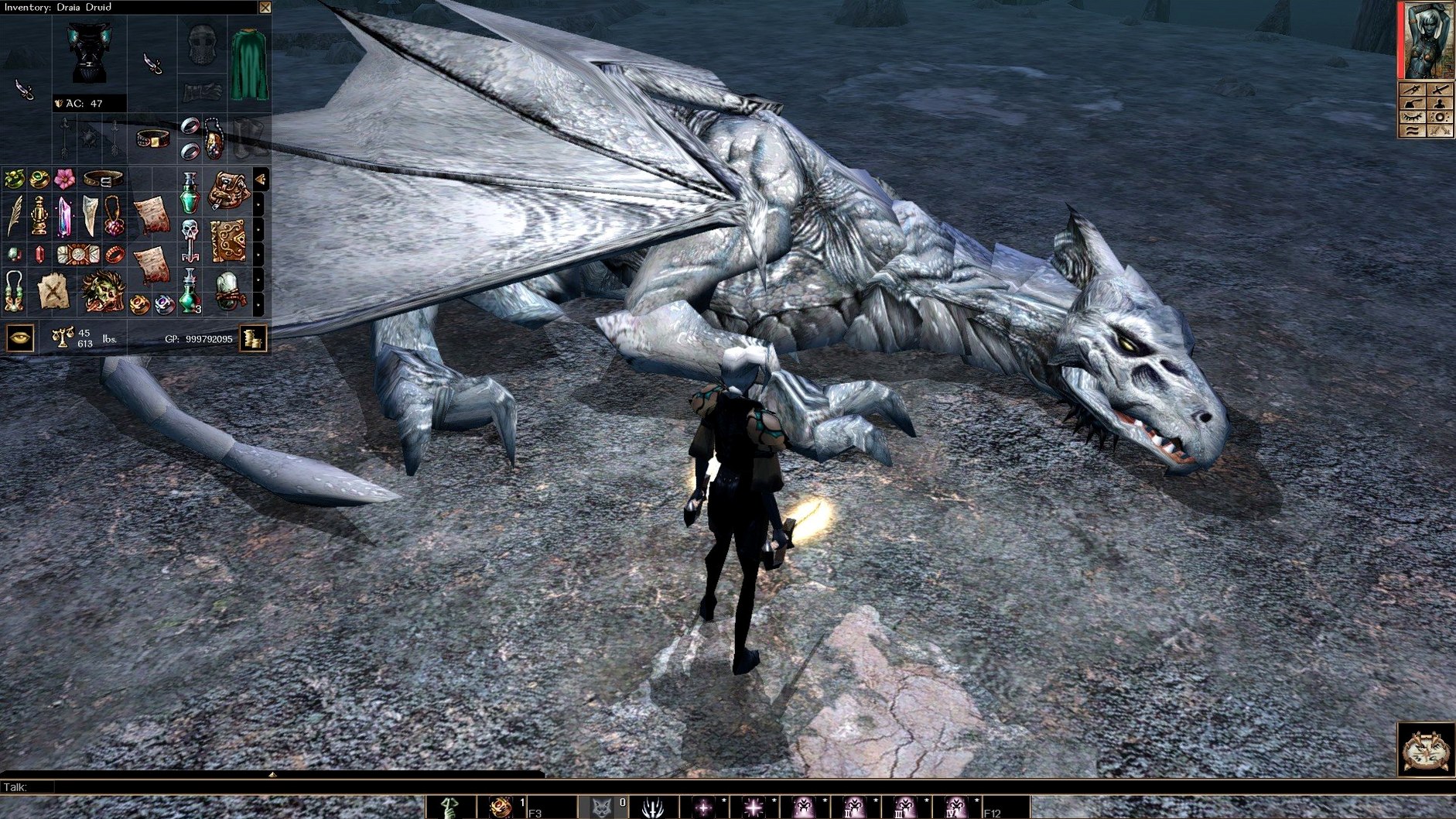
This one is for the person who wants a Dungeons & Dragons game that does not rush you. Neverwinter Nights Enhanced Edition on Mac puts you in the Forgotten Realms, where your job is to explore, talk to people, and fight when talking stops working.
Creating a character from scratch and playing through the included campaign
- Creating a character from scratch — choosing appearance, personality traits, and a class that fits how you want to play.
- Playing through the included campaign or the three premium modules that come with the game.
- Building your own adventures with the tools inside the game, then sharing them or finding more on Steam Workshop.
- Multiplayer sessions with the rebuilt system, if you want company.
Dungeons & Dragons rules and compatibility with old mods
- The game uses Dungeons & Dragons rules, so combat is turn-based in a way — you pause, plan, then watch it play out.
- It works with save games, modules, and mods from the original Neverwinter Nights, so old files still run.
- The interface scales to 1080p and 4K, and full-screen post-processing effects are on by default.
- Languages available: English, German, Spanish, Italian, French, Polish.
Spending ten minutes on a human rogue before diving in
The character creation screen gives you enough sliders and menus to spend half an hour on a face, but I have learned to rough it in ten minutes and adjust later. I choose a human rogue this time, set her personality to curious but cautious, and move on.
The opening area of the campaign serves as a gentle tutorial. You walk around a town, talk to every named person you see, and collect the first handful of quests. I make a point of checking every container — barrels, crates, cabinets — because the game does not highlight interactive objects. You just hover the cursor until it changes. That takes some getting used to.
Combat starts small. A few rats, then a handful of goblins. I pause the action by pressing the spacebar, issue commands like "attack that one" or "use a healing potion on yourself," then unpause and watch it play out. The dice rolls happen behind the scenes. You see the damage numbers float up, but the Dungeons & Dragons rules decide whether you hit or miss.
After an hour I have cleared two maps, earned a level up, and found a magical dagger that glows faintly. I save the game manually before quitting. The rebuilt multiplayer system is tempting, but tonight I prefer the quiet pace of single-player.
Ignoring the pause button and treating it like an action game
The most common one is ignoring the pause button. New players treat it like an action game, click enemies frantically, and wonder why their character dies in two hits. You are meant to pause, assess the situation, and issue orders. Treat the spacebar as your best friend.
Another mistake is skipping dialogue too fast. The choices you make during conversations can close off quests or change who fights alongside you later. I have seen students reload an hour of progress because they clicked through a negotiation and ended up fighting a merchant they needed.
Beginners also forget to manage their inventory. The game gives you a bottomless bag, but your character has weight limits. If you carry too much armor and junk, you move slowly and cannot dodge attacks. I recommend dropping anything that does not have a green name or a use in the next ten minutes.
On Mac you cannot build modules yourself, but you can still download and install modules from Steam Workshop or community websites. The game reads them fine.
Fixing washed-out or too-dark graphics by turning off depth of field
Snag one: The game starts but looks washed out or too dark. This is usually the post-processing effects. You can adjust contrast, vibrance, and depth of field in the video options. Turn depth of field off first — it blurs distant scenery and can make the game feel muddy.
Snag two: A mod or module from the original Neverwinter Nights does not load. The Enhanced Edition is backward compatible, but some very old community modules rely on Hak Pak files that need to be placed in the right folder. Check that your downloaded files are in Documents/Neverwinter Nights/nwm or hak, not in the application bundle itself.
Snag three: The interface feels too small or too large on screen. The UI scales with resolution, so if you run at 1080p or 4K it should fit. If it still looks off, try changing the resolution in the graphics settings. The game remembers your preference between sessions.
Snag four: Multiplayer is not finding other players. The rebuilt system is more stable than the original, but server lists can be sparse depending on the time of day. You can also host your own game and share your IP address with friends. Make sure your firewall allows the game through.
Snag five: The game crashes on launch. Check that your macOS is compatible. The game runs on both Apple Silicon and Intel Macs, but older versions of macOS may need an update. If it still fails, reinstall from the disk image — sometimes a partial download is the culprit.
- Current version 89.8193.37.17 is a fix release.
- macOS version: not stated
- Architecture: Intel and Apple Silicon
Questions I keep getting
Can I still use my old save files from the original Neverwinter Nights?
Yes, the enhanced edition works with save games, modules, and mods from the original game.
Does the game support mods?
Yes, the official page says it supports Steam Workshop for mods and modules.
What languages is the game available in?
The game interface is available in English, German, Spanish, Italian, French, and Polish.
How to install
- Mount the downloaded disk image.
- Run the standard installer.
- Choose where to install the game when the setup asks.
- The Applications folder is a good place for it.
Similar games


Sign in or join the club to leave a comment.
Nobody has commented yet.