
- Version
- 1.9.1
- Studio or maker
- SouthPAW Games
- Languages
- Russian, English, German, Spanish, Chinese (Traditional), Chinese (Simplified), Korean, Polish, Portuguese, French, Japanese
- Activation
- Not required
- Chip type
- Apple Silicon, Intel 64-bit
- Tried out on
- macOS Sonoma, MacBook Air (M1. 2020)
- First released
- 21.01.2021
- Voice languages
- Music only
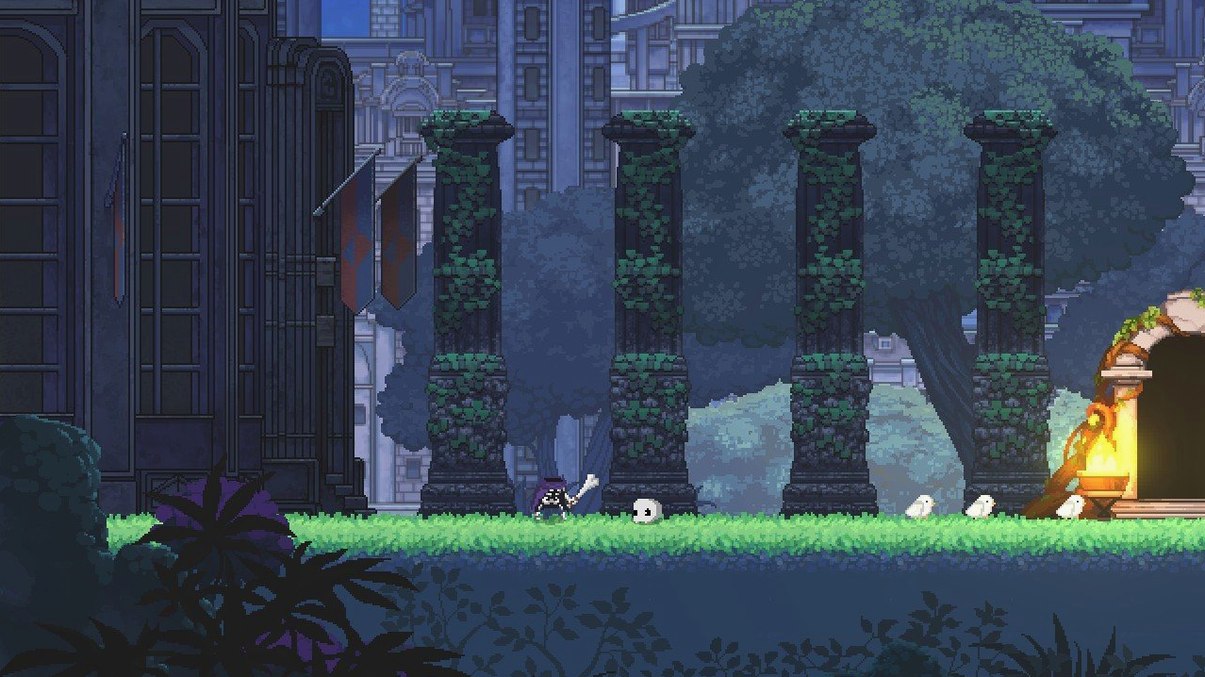
Anyone who enjoys a fast-paced roguelike with a sense of humor will find themselves right at home in Skul: The Hero Slayer. You play as a skeleton named Skul, who starts small but grows powerful by collecting and swapping skulls. Each skull changes your attack style and abilities, so the core loop is about experimenting: find a new skull, equip it, see how it handles, then switch to the other slot when you need a different move set.
Minute to minute, you're running and jumping through side-scrolling levels that shift each run. Enemies are mostly adventurers, which fits the game's reversal of the usual hero-monster story. You dodge, attack, and use special skills tied to your current skull. The maps change every time, so you can't rely on memorizing enemy placements; you have to react and adapt on the fly.
When you die, you start over, but you keep some progress through unlocks. The roguelike structure means each run feels fresh, especially as you discover new skull combinations. The game supports a good range of languages, including English, German, Spanish, and several others, which is handy for classroom use or club discussions about game design.
Launching Skul after the last bell
On a Wednesday afternoon, after the last bell and before the game club kids arrive, I open Skul for a quick run. I mount the disk image, drag the game to Applications, and launch it. The first thing I do is check which skulls I have available — two slots, so I can carry a pair and swap mid-fight. I start with a basic skull, something I know well, and a new one I haven't tried much.
The first level begins. I run right, dodging adventurers who swing swords and throw spells. The map layout is different from last time, so I explore cautiously. I find a chest and get a replacement skull: a magic-focused one with a wide area attack. I equip it in my second slot and keep going. When I meet a tough enemy, I switch to the new skull, test its range, then swap back to my original for close combat. That two-skull system is what keeps me coming back — you can adapt mid-battle without stopping.
By the time I reach the chapter boss, I have a strategy based on the two skulls I settled on. The boss has patterns I need to learn, but because my skulls give me different attack speeds and powers, I can adjust my approach. After a few attempts, I beat it and move to the next chapter. The whole session takes about twenty minutes, and I finish knowing I'll try a completely different skull combination next time.
Skul's skull-swapping versus Dead Cells' weapon unlocks
If you play Dead Cells on Mac, you know that fast combat and fluid movement are central. Skul shares that feel, but the skull-swapping mechanic makes it distinct. In Dead Cells, you unlock weapons and skills over time, but your loadout stays fixed for each run until you find new gear. In Skul, you carry two skulls from the start and can change them on the spot, which encourages more experimentation during a single run.
Another game to consider is Hades, though it isn't natively available for macOS without workarounds. Hades focuses on boons from gods that stack and modify your attacks over a run. Skul is more straightforward: each skull gives you a complete moveset, so you don't need to track multiple stat boosts. That makes it easier to pick up for a short session, especially in a school club setting where students have limited time.
A third comparison is The Mummy Demastered, a side-scroller with exploration and upgrades. Its combat is slower and more deliberate, while Skul rewards fast reactions and constant skull switching. For my game club, Skul works better because students can grasp the core mechanic in one level and enjoy variety without reading long tutorials.
- macOS 10.12 or later
- Intel or Apple Silicon
- 4 GB RAM
- 1 GB available storage
Questions I keep getting
How many skulls can Skul use at once?
Skul can carry and switch between up to two skulls at the same time during a run.
How to install
1. Mount the downloaded disk image. 2. Drag the game into the Applications folder.Similar games




Sign in or join the club to leave a comment.
Nobody has commented yet.