- Version
- 1.6 fixed
- Studio or maker
- BlueTwelve Studio
- Languages
- Russian, English, German, Spanish, Italian, Chinese (Traditional), Chinese (Simplified), Korean, Dutch, Polish, Portuguese, Turkish, French, Japanese
- Activation
- Not required
- Chip type
- Apple Silicon
- Tried out on
- macOS Sequoia, MacBook Air (M1. 2020)
- First released
- 19.07.2022
- Voice languages
- Music only
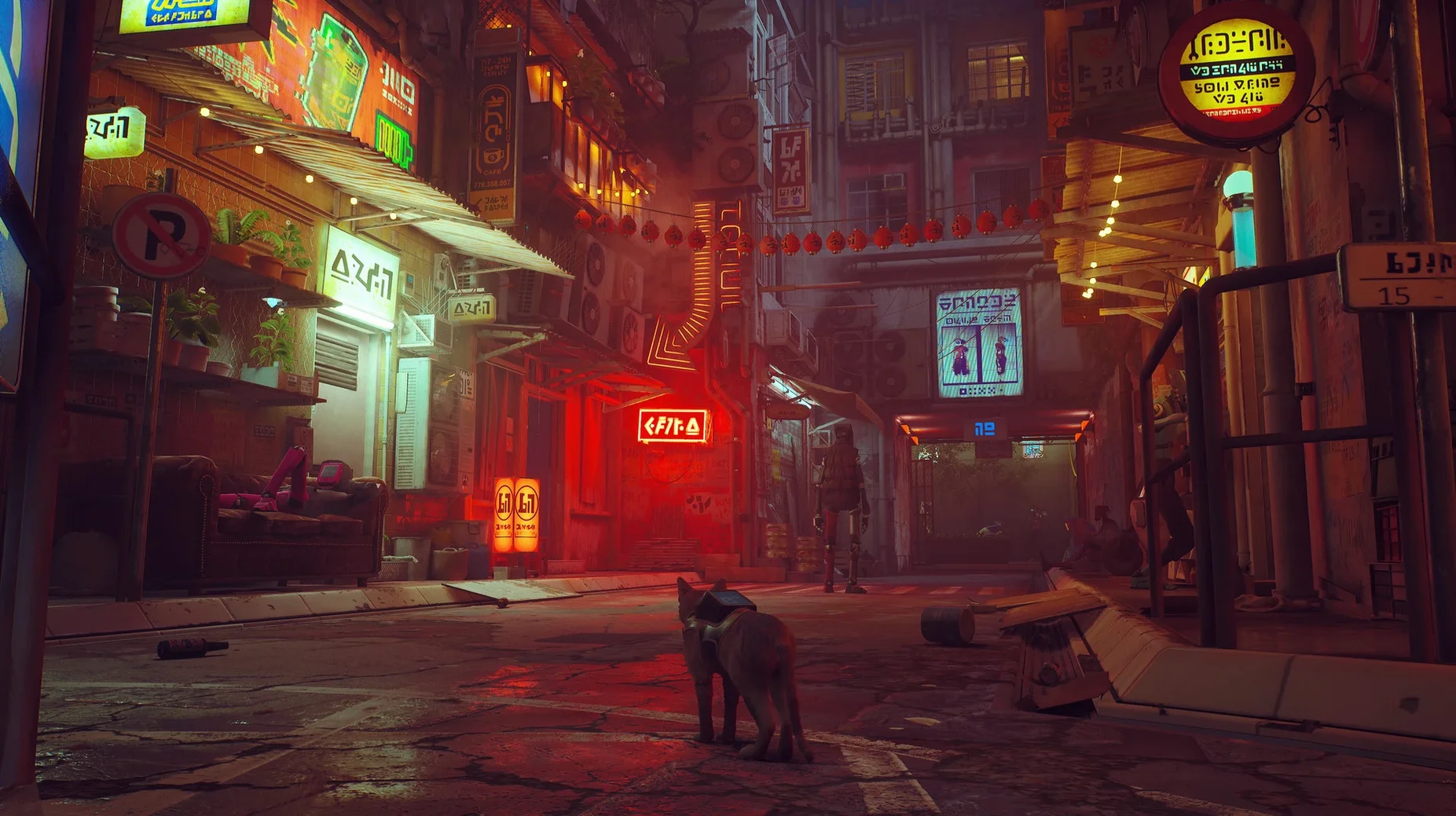
Some games drop you into a world and let you move at your own pace, while others demand quick reflexes and constant combat. Stray falls clearly in the first camp. That is good news if you enjoy exploring a detailed world and solving puzzles from a cat’s perspective, but it means action-focused players may feel let down.
- You like third-person exploration with a focus on atmosphere and story, not combat.
- You enjoy puzzles that ask you to observe your surroundings and figure out paths.
- The idea of playing as a cat navigating neon-lit streets and dirty alleys appeals to you.
- You are okay with a slower pace where the main threats come from environmental dangers, not enemies you fight directly.
- You appreciate a game that lets you interact with the world in small, cat-like ways — knocking things over, napping, meowing at droids.
- You might not enjoy Stray if you want fast action, boss fights, or a narrative driven by constant conflict.
Why adventure game fans will feel at home
A few types of Mac users will find Stray especially rewarding.
Adventure game fans who grew up with point-and-click games or walking simulators will feel at home. The core loop is the same: enter a new area, look for interactive objects, figure out how to proceed, and watch the story unfold. The difference is that you do it from four paws instead of two feet, and the world feels alive in a way that static backgrounds cannot match.
Cat owners and cat lovers will appreciate the small details. The way the cat curls up to sleep, the way it bats at dangling cables, the way it squeezes through narrow gaps — these gestures feel authentic rather than animated. BlueTwelve Studio clearly spent time observing real cats, and that attention shows in every movement.
Players who want a manageable play session also benefit. A single playthrough runs about six to eight hours, which makes it easy to finish over a weekend or a few evenings. There are no grinding sections, no skill trees to manage, and no side quests that stretch the game longer than its story warrants.
A real-world scenario
A teacher friend of mine, who also runs a lunchtime game club at her school, brought Stray to the classroom last term. She teaches English as a second language, and she wanted a game that would let students practice descriptive vocabulary and narrative prediction. The class played in shifts of two students per session, one controlling the cat and the other directing with English instructions. The player who controlled the cat had to describe what they saw, and the other student had to guess what might happen next based on the environment clues.
She told me the game worked well for this partly because there is no voice acting, so students had to read the dialogue from the droids and the notes scattered around the city. The slower pace meant they could pause and discuss without losing momentum. By the end of the term, several students who rarely volunteered in regular class were eager to take their turn as the cat.
Why rushing like a platformer causes stuck moments
Most new players try to treat Stray like a platformer. They rush through the streets, jump at every ledge, and then get stuck because they missed a clue or an interactable object. The game rewards patience. If you reach a dead end, stop and look around. There is almost always a pipe, a window, or a stack of boxes you can climb — but only if you are standing in the right spot to see it.
Another mistake is ignoring the drone, B-12. Early on, B-12 can translate droid speech, read old documents, and store items you pick up. If you forget to use B-12 in a new area, you might miss key information about where to go next. A good habit: whenever you encounter a droid, let B-12 translate the conversation before you move on.
Some players also assume combat is possible. The cat has no weapons and no attack moves. When you encounter the creatures that roam the darker parts of the city, your only option is to run, hide, or find a way to distract them. Trying to fight will only end your run.
Fixing sluggish stutter on M1 Macs with display settings
The game feels sluggish or stutters on an M1 Mac. Stray is a demanding game visually, especially in areas with many light sources and reflective surfaces. Lowering the display settings in the options menu usually resolves this. Start with shadow quality and volumetric lighting, as those two settings have the biggest impact on performance. If the game still feels unresponsive, close other applications before launching it.
You cannot figure out where to go next. This happens most often in the slums area, which has multiple vertical paths. The trick is to watch for the cat's natural pathfinding cues. Look for pipes, awnings, and ledges that are slightly brighter than the surrounding surfaces. These are the interactable climb points. If you still feel lost, B-12 often gives hints if you use the interaction button near objects of interest.
The game crashed or closed unexpectedly. Save files are created automatically at certain checkpoints, so you rarely lose more than a few minutes of progress. If crashes happen repeatedly, restart your Mac and try again. If the problem persists, check that your macOS is fully updated — Stray requires macOS 12.0 or later, and some early versions of Monterey had compatibility quirks that later updates fixed.
You cannot open the game after installing. If macOS shows a warning that the app cannot be opened because it is from an unidentified developer, open Terminal and run xattr -cr /Applications/Stray.app && codesign --force --deep --sign - /Applications/Stray.app. This removes extended attributes that macOS uses to block unsigned apps, and it re-signs the application so the system treats it as trusted. After that, the game should launch normally.
Stray runs only on Apple Silicon Macs with macOS 12.0 or later. If you have an Intel Mac, this one will not start.
- macOS 12.0 or later
- Apple M1 chip or later (Apple Silicon only)
Questions I keep getting
Does Stray on Mac support Intel processors?
No, Stray 1.6 requires a Mac with an Apple M1 chip or later and macOS 12.0 or newer.
How to install
- Mount the downloaded disk image to see its contents.
- Drag the Stray application into the Applications folder alias inside the image.
- Wait for the copy to finish, then open the app from Launchpad.
- If you see a "cannot open" error, open Terminal and run
xattr -cr /Applications/Stray.app && codesign --force --deep --sign - /Applications/Stray.appto clear extended attributes and re-sign the app.
Similar games






Sign in or join the club to leave a comment.
Nobody has commented yet.