- Version
- 5.9.8 [MAS]
- Studio or maker
- Time Base Technology Limited
- Languages
- Russian, English, German, Spanish, Italian, Chinese (Traditional), Chinese (Simplified), Korean, Dutch, Portuguese, Thai, Turkish, French, Japanese
- Activation
- K'ed by TEAM HCiSO
- Runs on macOS
- macOS 10.15 or later
- Chip type
- Apple Silicon, Intel 64-bit
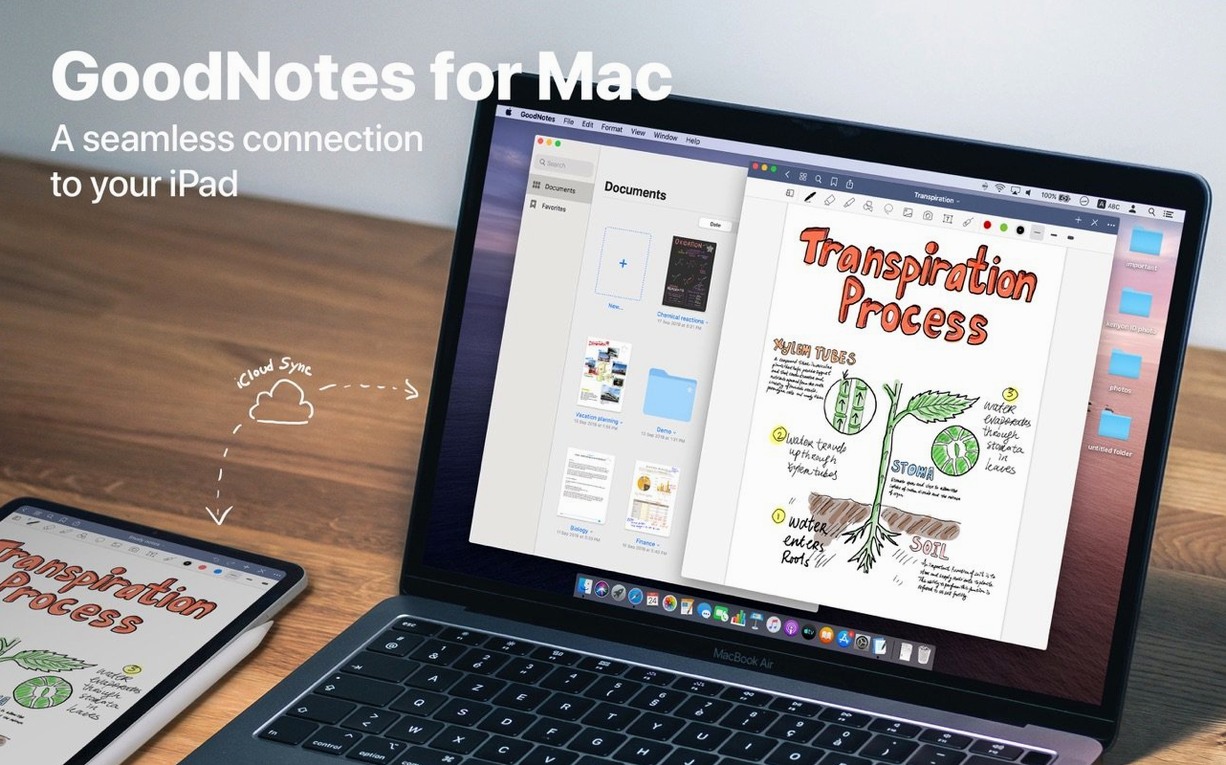
GoodNotes is a Mac app for creating, editing, and organizing handwritten and typed documents.
Create a new notebook for each class
Open GoodNotes and click the plus button to create a digital notebook. You can choose paper style and name it right away. This becomes your home for all notes on that subject.
How do I keep the notebook tidy as it grows?
Drag pages into folders and subfolders to group topics or weeks. You can also mark important pages as Favorites for quick access later. A custom table of contents helps you jump to key sections without scrolling.
Clean up messy handwriting with the lasso tool
Yes. Select the handwriting with the lasso tool, then move, rotate, resize, or recolor it. If you used a marker, the eraser can remove only the marker ink, leaving your pen notes intact.
Sync notebooks across iPad, iPhone, and Mac via iCloud
Turn on iCloud sync in GoodNotes settings. Changes you make on your Mac will appear on your other devices, so you can start a note in class and finish it on the go.
GoodNotes 5 has been designed so that nothing crucial is hidden, but a few conveniences only reveal themselves after a day or two of regular use.
What to try in the first days
After you drag the app into the Applications folder and launch it, spend a few minutes setting up your folder structure before you start writing. Create a top-level folder for each broad subject or project, then add subfolders for terms or topics. This upfront work makes it much easier to find things later.
Import a test PDF by dragging it from your Downloads folder straight into the notebook window. GoodNotes opens it as a new document, and any live hyperlinks inside the PDF remain clickable. This is useful for interactive worksheets or reference sheets that link to other sections.
Try the shapes tool early. Draw a rough circle or line, and the app snaps it into a clean version. It saves time on diagrams and tables without forcing you to switch to a different app.
Export a single page as a PDF by dragging it out of the notebook and onto your desktop. This is faster than going through a menu, and it is the same motion whether you export one page or a whole document.
GoodNotes 5 syncs only through iCloud
Does GoodNotes sync through anything other than iCloud?
iCloud is the only sync method for GoodNotes 5. If you use an iPhone, iPad, and Mac, the same iCloud account keeps your notebooks in sync across all three. There is no separate cloud service to sign up for.
Can I open a goodnotes dmg on a Windows computer?
GoodNotes 5 for Mac is built for macOS only. The files themselves are not designed to open on Windows. If someone needs to share notes with a Windows user, exporting pages as PDFs is the straightforward workaround.
Will the app work on an Apple Silicon Mac?
Yes. The architecture supports both ARM and x86 (64-bit) systems, so it runs natively on Intel Macs and on Apple Silicon models like the M1, M2, and later without emulation.
Does the eraser remove everything or only part of a stroke?
You can switch between two behaviors. The eraser can remove an entire stroke with one tap, or you can scrub over part of a line and only that section disappears. There is also a dedicated option that erases only marker ink, which is helpful when you want to clean up highlights without touching the handwriting underneath.
Drag documents in from your hard drive
You can add a document by dragging it from the Mac hard drive into the GoodNotes window — no import dialog needed. The same drag-and-drop gesture works for exporting documents and individual pages as PDF files.
The app lets you recolor handwriting after you have written it. If you used a dark pen and later decide it should be blue, select the text and change the color. The same selection tool also lets you resize, rotate, and move handwritten content.
Favorites are not limited to entire documents. You can mark individual pages as Favorites, which is useful when a single page inside a large notebook contains the information you need most often.
Version 5.9.8 focuses on macOS compatibility
The current version, 5.9.8, is a mature release. Recent updates have focused on maintaining compatibility with newer macOS versions rather than introducing large new features. For everyday use, this means the app behaves reliably on macOS 10.15 and later, including the latest macOS releases that require Apple Silicon compatibility.
If you have been using an older build, version 5.9.8 keeps the same workflow and interface. The installation process remains unchanged: open the downloaded disk image, drag the app to the Applications folder alias, and launch from Launchpad after copying finishes.
- macOS 10.15 or later
- Works on both Intel and Apple Silicon Macs
Questions I keep getting
Can I use GoodNotes for typed text as well as handwriting?
Yes. GoodNotes supports text, handwritten notes, and drawings, so you can mix typing and writing in the same document.
How to install
- Open the downloaded disk image to see the app and the Applications folder alias.
- Drag the GoodNotes app onto the Applications alias to copy it into place.
- Once copying finishes, launch GoodNotes from Launchpad and start your first notebook.
Similar apps


Sign in or join the club to leave a comment.
Nobody has commented yet.