- Version
- 13.3.1
- Studio or maker
- Nitro Software
- Languages
- English
- Activation
- K'ed by TNT team
- Runs on macOS
- macOS 10.14 or later
- Chip type
- Apple Silicon, Intel 64-bit
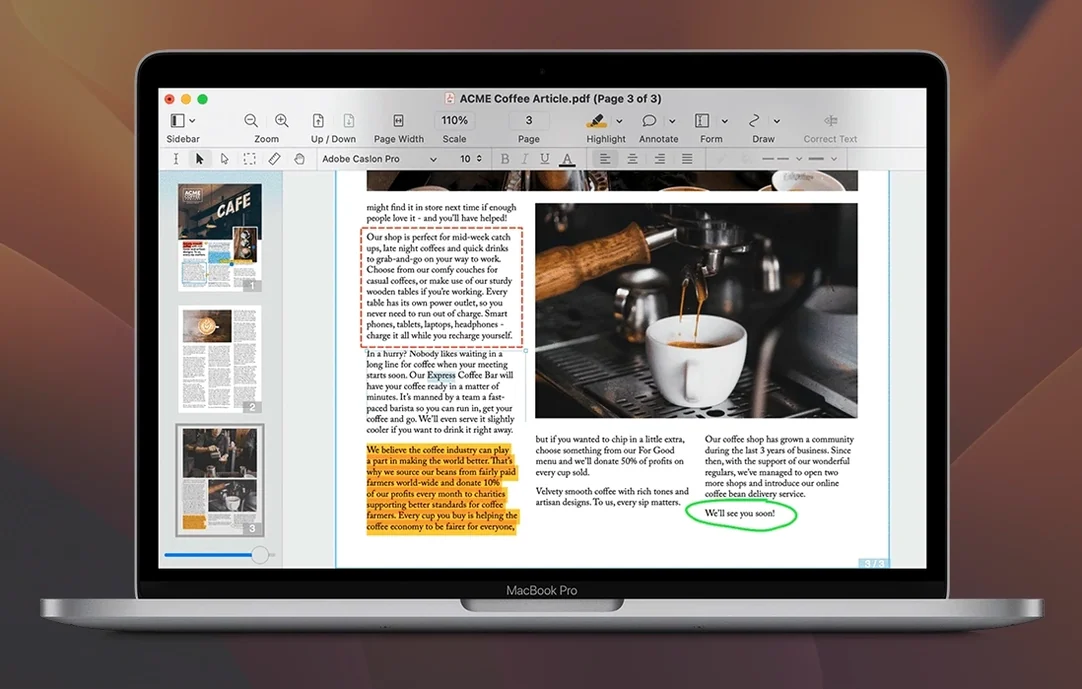
A teacher receives a scanned worksheet from a colleague, needs to fix a typo, add a signature block, and save it as a Word file for the department. That is the kind of task Nitro PDF Pro handles on a Mac. It is a PDF editor that runs on both Intel and Apple Silicon machines, starting from macOS 10.14 Mojave.
What can you do with Nitro PDF Pro?
You can edit text and images directly inside a PDF, add signatures, fill forms, or create forms from scratch. The OCR feature turns scanned documents into searchable and editable files. You can also highlight, underline, or strikethrough passages, which is useful when commenting on student work or reviewing contracts.
Exports PDFs to Word, Excel, and PowerPoint
Nitro lets you export PDFs to Microsoft Word, Excel, and PowerPoint, so you can reuse content without retyping. It can also turn websites into multi-page PDFs that keep hyperlinks intact. If you need to assemble several files, you can create document portfolios or an editable table of contents.
Is it suitable for sensitive documents?
Yes. The Mac version includes a redaction tool for permanently removing confidential text or images. Batch processing and automation are supported, which helps when handling many files at once. The interface is in English.
OCR engine now handles multi-page scans more reliably
Version 13.3.1 is a refinement release, so the basic workflow stays the same, but the small improvements add up. The OCR engine now handles multi-page scans more reliably, which means less time re-scanning a document when a table gets misaligned. The form tools also feel a bit more responsive when you are toggling between field creation and preview mode.
One change that matters in a classroom or office setting: the export filter now preserves more of the original layout when you send a PDF to Excel. A grade table with merged cells or a budget spreadsheet with conditional formatting comes through without the extra cleanup step. For users who work with both scanned and native PDFs, the app now distinguishes between them more clearly during OCR, so you do not accidentally trigger a scan conversion on a file that is already searchable.
The redaction tool also got a visual tweak. You now see a live preview of the redacted area before you apply it, which helps avoid missing a single character in a long document. None of these changes rewrite how you use the program, but they remove a few small frustrations.
Teachers and administrators use it for scanned worksheets and forms
A few groups find themselves using Nitro PDF Pro daily. Teachers and administrators who handle scanned worksheets, signed permission slips, or fillable forms appreciate that OCR and form creation live in the same app. You prepare a form, email it, and later collect and edit the responses without switching to another tool.
Small business owners or freelancers who send contracts and receive signed PDFs back also benefit. The signature tool and the ability to export to Word for minor wording changes cover most of what a standard document workflow needs. If you are part of a team that uses batch processing to rename, stamp, or convert dozens of files at once, the automation features save consistent time.
People who work with scanned historical documents, legal archives, or academic papers will use the OCR regularly. The fact that you can then edit text blocks inside the same document, rather than going through a separate OCR application, keeps the process contained. Casual users who only open a PDF once a month may not need this depth, but anyone who edits PDFs more than a few times a week will notice the difference.
Opens PDFs from Finder with drag-and-drop or right-click
Nitro PDF Pro integrates well with the standard macOS workflow. You can drag a PDF from Finder into the app, or right-click a file and open it directly if you set Nitro as your default PDF handler. The export function uses the same file format names you see in Office apps, so saving as .docx or .xlsx feels familiar.
MacOS virtual desktops and split-screen multitasking work fine here. I often have a scanned PDF on one side of the screen and a Word document on the other, copying formatted text between them. The app preserves columns and font styling during copy-paste, which is rare enough to mention.
The software also respects macOS security permissions. When you need to edit a protected PDF, it prompts you for the password through the standard system dialog rather than a custom popup. And the batch processing tool can be triggered from the command line for users who prefer automation scripts, though most people will use the graphical interface.
No section text provided
Compared to Adobe Acrobat Pro
Adobe Acrobat Pro includes a broader set of cloud collaboration features and a larger library of third-party plugins. The interface is cleaner and less crowded, which helps if you only need PDF editing a few times a week. For users who rely on Acrobat's custom stamps or advanced prepress tools, Nitro is probably not a replacement. For most other everyday work, the feature overlap is large.
Compared to Foxit PDF Editor
Foxit PDF Editor is another solid alternative with a fast rendering engine and good annotation tools. Nitro's advantage lies in the OCR quality and the form creation workflow. Foxit tends to be lighter on system resources during the first launch, but Nitro handles scanned documents with fewer artifacts after conversion. Both support batch processing and redaction. The choice often comes down to which interface you prefer and whether you need Foxit's connected cloud features for team review.
Compared to PDFelement
PDFelement from Wondershare offers a similar set of tools at a similar skill level. It includes OCR and form creation, and it can export to Office formats. Where Nitro stands out is in the depth of the annotation options—recordable audio notes, bookmarks, and headers and footers are all built in without needing separate add-ons. PDFelement's interface is slightly more guided for new users, while Nitro assumes you already know what you want to do.
If you are searching for a Mac PDF editor that runs on both Intel and Apple Silicon, and you want the OCR and form tools without the extra cloud services, Nitro PDF Pro fits that space well. Searches like nitro pdf for mac download or nitro pdf pro torrent will bring you to the right files. The version here, 13.3.1, works on macOS 10.14 and newer and has been prepared for straightforward installation.
- macOS 10.14 Mojave or later
- Intel or Apple Silicon processor
- 1 GB RAM
- Up to 2 GB disk space
- Display resolution at least 1280x800
How to install
- Mount the disk image and run the installer — this makes the app Gatekeeper friendly.
- Press Enter in Terminal to bypass Gatekeeper and allow the app to run.
- Drag the app into the Applications folder.
- Open the app once the copy finishes.
Similar apps



Sign in or join the club to leave a comment.
Nobody has commented yet.