

- Version
- 1.7.1
- Studio or maker
- Native Instruments
- Languages
- English
- Activation
- K'ed by TEAM HCiSO
- Runs on macOS
- macOS 13 or later
- Chip type
- Apple Silicon, Intel 64-bit
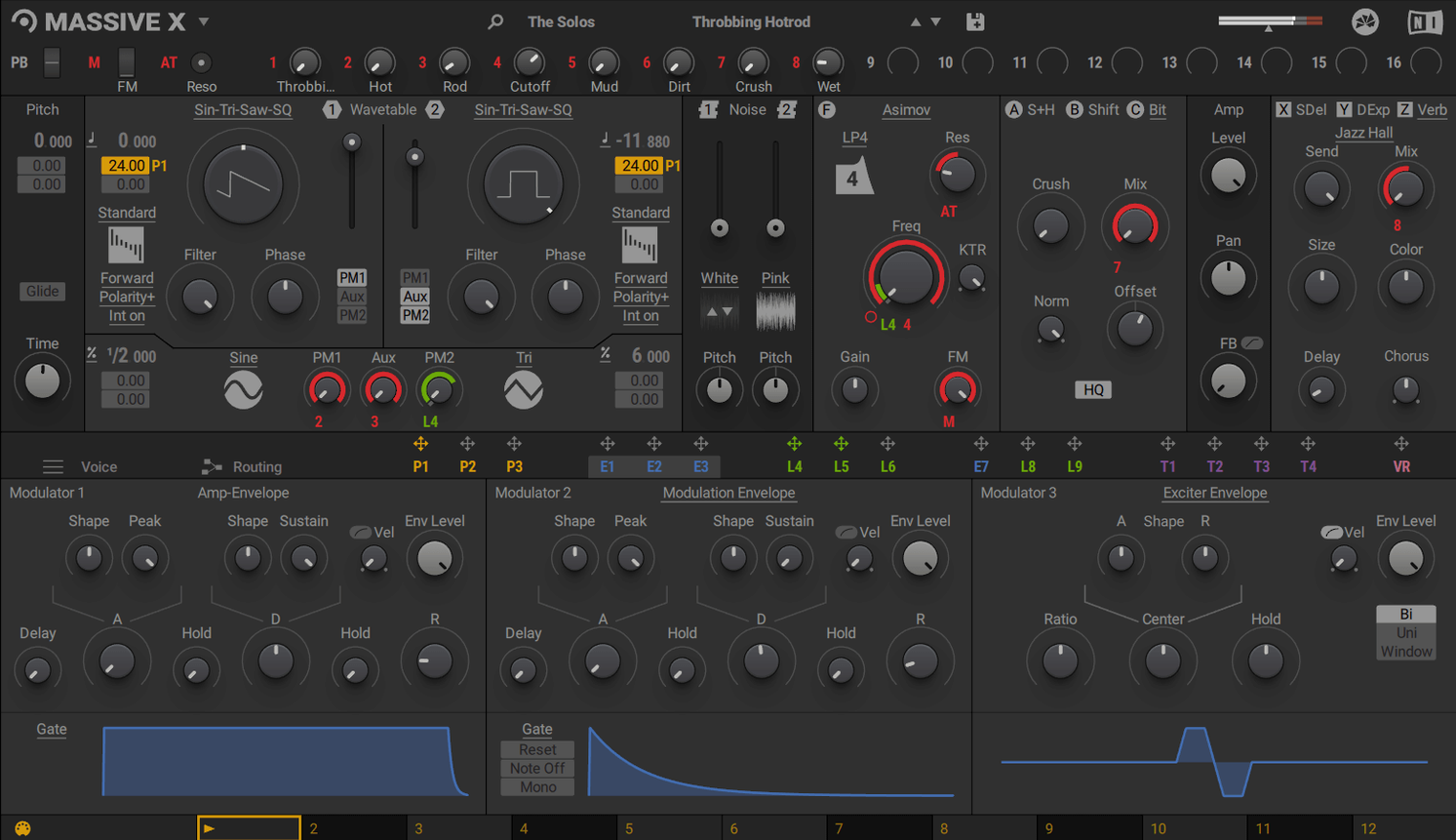
Sound designers and electronic music producers who want a deep, hands-on synth will feel at home with Massive X. It builds on the original Massive with a reworked oscillator section and a Performer that lets you draw modulation patterns, then trigger them from the keyboard using the Remote Octave control. The result is a synth that changes character as you play, not just note to note but phrase to phrase. The factory library offers 780 presets to start from, and the polyphonic wavetable engine gives you room to shape your own. It runs as a VST, VST3, AU, or AAX instrument on both Apple Silicon and Intel Macs.
First days with Massive X: what to try first
After installing, the 780 presets in the factory library give you a good sense of what this synth can do. Browse the categories — bass, lead, pad, FX — and play a few notes from each. The presets are grouped by character, so you can find the ones that respond well to the Remote Octave control and the Performer section. I would start with a preset that uses modulation, then open the Performer panel to see how the drawn pattern moves the sound.
Try assigning a modulation lane to a filter cutoff and another to the wavetable position. Play a simple chord and hold it; then trigger the Remote Octave from a higher or lower key. The pattern shifts pitch along with your playing, so you hear the modulation change with the melody. It is not a random effect — it is tied to what your hands do.
Spend some time with the 10 wavetable playback modes. Pick one preset, then switch through the modes one by one. Some modes add harmonic movement, others change the oscillator's character completely. The 170 wavetable options mean you can go from a simple saw to something noisy and metallic without leaving the same oscillator. Keep a few presets you like as starting points and save your own variations as you go.
A polyphonic wavetable synth with deep modulation
Massive X sits in a particular corner of the synth plugin world. It is not a simple subtractive synth, nor is it a modular environment. It is a polyphonic wavetable synth designed for routing and modulation depth. A few other Mac-compatible plugins share some ground with it, but each takes a different approach.
Xfer Records Serum is the most common comparison. Serum is also a wavetable synth with a large preset library and flexible modulation. The difference is in the routing. Massive X lets you connect any output to any input, which opens up feedback paths and complex modulation chains that Serum's more linear signal flow does not easily allow. Serum has a built-in wavetable editor; Massive X does not — you import wavetables from your own collection. For a sound designer who wants to patch everything together, Massive X's routing feels more like a modular system inside a single plugin.
u-he Hive is another wavetable synth for macOS that emphasizes a clean interface and straightforward workflow. Hive has fewer wavetable playback modes than Massive X and no direct equivalent to the Performer section with drawn modulation patterns. It is quicker to dial in a sound, but Massive X rewards the time you put into its routing and modulation matrix. Hive runs on both Apple Silicon and Intel, same as Massive X, but Hive works on macOS 10.7 or later, whereas Massive X requires macOS 13 or later.
Arturia Pigments is a polyphonic synth that combines multiple synthesis methods, including wavetable, analog, and granular. Pigments covers more ground in a single plugin, but its wavetable section is not as deep as Massive X's 10 playback modes and 170 wavetables. Massive X's Performer and Remote Octave control give it a live performance angle that Pigments does not offer in the same way. If you already own Pigments, Massive X adds a dedicated wavetable synth with a different modulation mindset.
Works in any Mac DAW that supports VST or AU
Massive X does not run standalone, so you need a DAW that supports VST, VST3, AU, or AAX plugins. On macOS, that covers almost every current DAW: Logic Pro, Ableton Live, Cubase, Studio One, Reaper, Bitwig Studio, and Pro Tools all load it without issue. The AU format is the native format for Logic, so Logic users get a clean integration — no wrapper needed. VST3 users get the benefit of improved plugin state saving and multi-channel support if your DAW supports it.
You can use Massive X alongside the original Massive in the same project. Native Instruments includes both in the KOMPLETE line, so they share the same activation system. If you have older projects that use Massive, they keep working, and you can layer the two synths on the same track for a thicker sound or route one into the other through your DAW's sidechain.
On macOS, the plugin shows up in your DAW's instrument list after the standard installer runs. The system requirements mention an Intel processor with AVX for Intel Macs and a graphics card supporting OpenGL 2.1 or higher. That means older Intel Macs without AVX support will not work with Massive X, but most Macs from around 2013 onward include it. Apple Silicon Macs (M1, M2, M3, M4) are fully supported, and the plugin runs natively — no Rosetta translation needed.
780 presets run on 4 GB RAM minimum
Massive X lists 4 GB of RAM as the minimum and 6 GB as recommended. Most modern Macs come with 8 GB or more, so you will likely be in the recommended range. The 780 presets are stored as patches, not as large audio files.
The OpenGL 2.1 requirement for the graphics card means the plugin's interface needs GPU support for its visual elements. On Apple Silicon Macs, the integrated GPU handles this fine. On Intel Macs with older integrated graphics, you may want to check that your system meets that standard. Most Macs from 2012 onward do. The internet connection is only needed for download and activation — after that, the plugin works offline inside your DAW.
The architecture support covers both ARM (Apple Silicon) and x86 64-bit (Intel Macs), so you can use the same installer on either platform. The disk image you download runs the standard installer, and the plugin registers itself in your DAW's plugin folder without extra steps. It is a straightforward install for a synth with this much routing depth.
- macOS 13 or later
- Apple Silicon or Intel processor (Intel Macs require an Intel processor with AVX support)
- 4 GB RAM (6 GB recommended)
- A graphics card supporting OpenGL 2.1 or higher, or DirectX 9 or 11
- An internet connection to download and activate the product
How to install
- Open the downloaded disk image to mount it.
- Run the standard installer that appears.
Similar apps
Sign in or join the club to leave a comment.
Nobody has commented yet.