- Version
- 1.3.1
- Studio or maker
- uJAM Instruments
- Languages
- English
- Activation
- K'ed by MORiA
- Runs on macOS
- macOS 10.14 or later
- Chip type
- Apple Silicon, Intel 64-bit
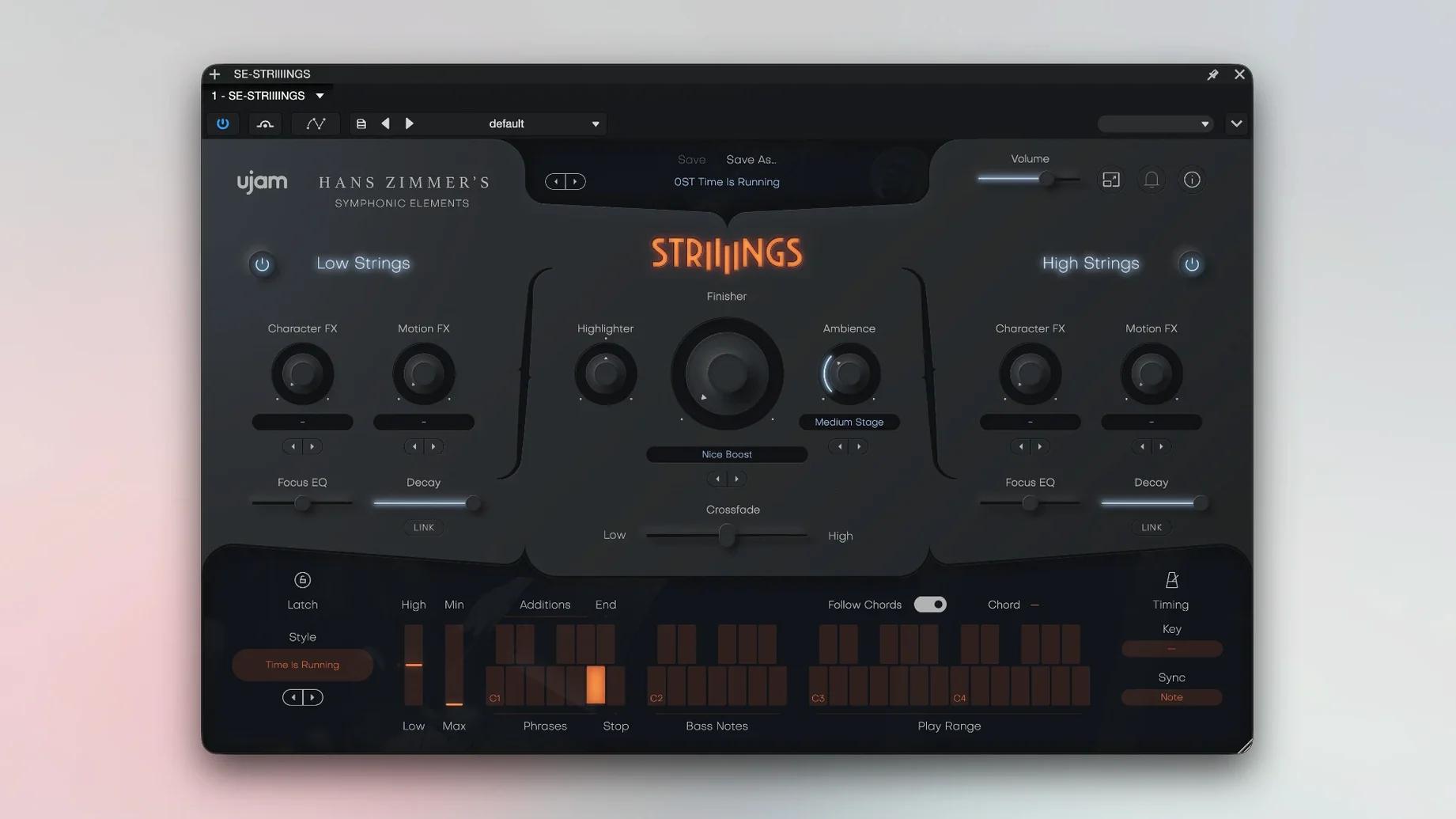
The Crossfade control on UJAM Symphonic Elements STRIIIINGS is the first thing I reach for. It blends low strings (basses and celli) with the upper section, letting you slide between a deep, rumbling foundation and a brighter, more articulate texture. That single slider changes the character of a part without any complex routing.
String textures and sound design for fills and leads
- String-section textures that sit behind a lead or fill a gap in a mix. The 60 included styles cover everything from soft pads to aggressive staccato hits.
- Sound design elements. The plug-in has a built-in twist that lets you shape the raw string recordings into something less traditional, useful for trailer cues or experimental cues.
- Quick sketching on a track or bus in major DAWs such as Ableton Live, Logic, Cubase, or Bitwig. The interface is English, 64-bit only, and runs on macOS 10.14 through 26.
Uses 4 GB of RAM and requires a double launch for activation
- It uses 4 GB of RAM, so plan accordingly on a session with many instances.
- The first time you open it, launch the plug-in twice to complete activation. The package includes its own install and activation instructions.
- It is a 64-bit plug-in only, so your DAW and macOS need to be 64-bit as well.
How STRIIIINGS sits beside similar Mac plug-ins
Most string libraries for Mac fall into two camps. One camp focuses on deeply sampled, note-by-note articulations where you can switch between pizzicato, spiccato, legato and so on. The other camp gives you a phrase-based engine, where you choose a preset and the instrument plays a recorded pattern. STRIIIINGS leans toward the phrase-based side, but with a narrower focus on the string section as a textural layer rather than a solo instrument.
Compared to a library like Spitfire Audio's BBC Symphony Orchestra Discover, STRIIIINGS gives you fewer articulations but more immediate, cinematic textures. The Discover library is a general orchestral tool; STRIIIINGS is a specialty instrument for the kind of wide, processed string sound you hear in modern film trailers. You do not need to build a multi-mic setup or learn a deep mapping system.
Next to Output's Arcade, STRIIIINGS feels more grounded. Arcade blends many acoustic and electronic sources into hybrid instruments, while STRIIIINGS sticks to real string recordings from Hans Zimmer's library and adds its own sound design layer. If you want pure, unprocessed strings, Arcade is not the right tool. STRIIIINGS keeps the string identity intact while giving you the crossfade and the presets to reshape it.
Finally, compared to Orchestral Tools' Metropolis Ark series, STRIIIINGS is smaller in scope. Metropolis Ark covers a full orchestra with many playing techniques. STRIIIINGS does not try to be a general orchestral library. It handles one job — cinematic string textures with a sound design option — and does it without the gigabytes of samples that a full orchestral library needs.
Double-click to activate and start exploring the 60 styles
Here are a few things I have found useful when getting started with STRIIIINGS.
- Open the plug-in twice the first time. The install process requires this extra launch to complete activation. If the instrument does not load the first time, close it and reopen it in your DAW.
- Start with the Crossfade slider at center. This gives you equal amounts of low and high strings. From there, move the slider slowly to hear how the texture shifts. Many presets sound very different with even a small adjustment.
- Browse the 60 styles by mood, not by name. The style names sometimes describe the playing technique rather than the emotional feel. Play through the first ten or fifteen in a row and note which ones fit your project. The 200 sound designer presets are worth a separate pass later.
- Use it on a bus, not on every track. Since STRIIIINGS uses 4 GB of RAM, I keep one instance on a bus and route MIDI from several tracks into it. That keeps the session lighter and lets me layer other string sounds underneath.
- Try it on a pad or drone first. The string textures work well as a foundation for a track. Set a slow attack, hold a chord, and let the Crossfade control move gradually over a few bars. That can give you a bed to build the rest of the arrangement on.
Dark fantasy overworld map on a low budget without live strings
A composer working on a low-budget adventure game needed a string sound for the overworld map. The game had a dark fantasy style, but the budget did not allow for a live string recording or a full orchestral library. The composer had a few days to deliver the first pass of the music.
She loaded STRIIIINGS into a track in Reaper. She chose a style labeled "dark sustain" and set the Crossfade slider about two-thirds toward the low strings. That gave a deep, cello-heavy drone that felt ominous but not aggressive. She recorded a simple two-note pattern on a MIDI controller and let the plug-in handle the articulation. For the second part of the map, she moved the Crossfade toward the high strings and added a brighter, viola-led line. The transition between the two sounded like a natural shift in the game world rather than a hard edit.
The presets helped her finish the track in an evening. She did not have to learn a complex sampler interface or map articulations across multiple channels. The instrument sat on one track, used less than 4 GB of RAM, and gave the map a consistent, moody string texture that fit the game's art style.
- macOS 10.14 or later
- 64-bit software only
- 4 GB RAM
- Intel or Apple Silicon
How to install
- Install and activate the plug-in using the instructions included in the package.
- Open the plug-in twice the first time you launch it. The second opening completes the setup.
Similar apps





Sign in or join the club to leave a comment.
Nobody has commented yet.