
- Version
- 9.5.2.32853
- Studio or maker
- Abvent
- Languages
- Russian, English, German, Spanish, Italian, Chinese (Simplified), Korean, Polish, Portuguese, French, Japanese
- Activation
- K'ed by TEAM HCiSO
- Runs on macOS
- macOS 10.13 or later
- Chip type
- Intel 64-bit
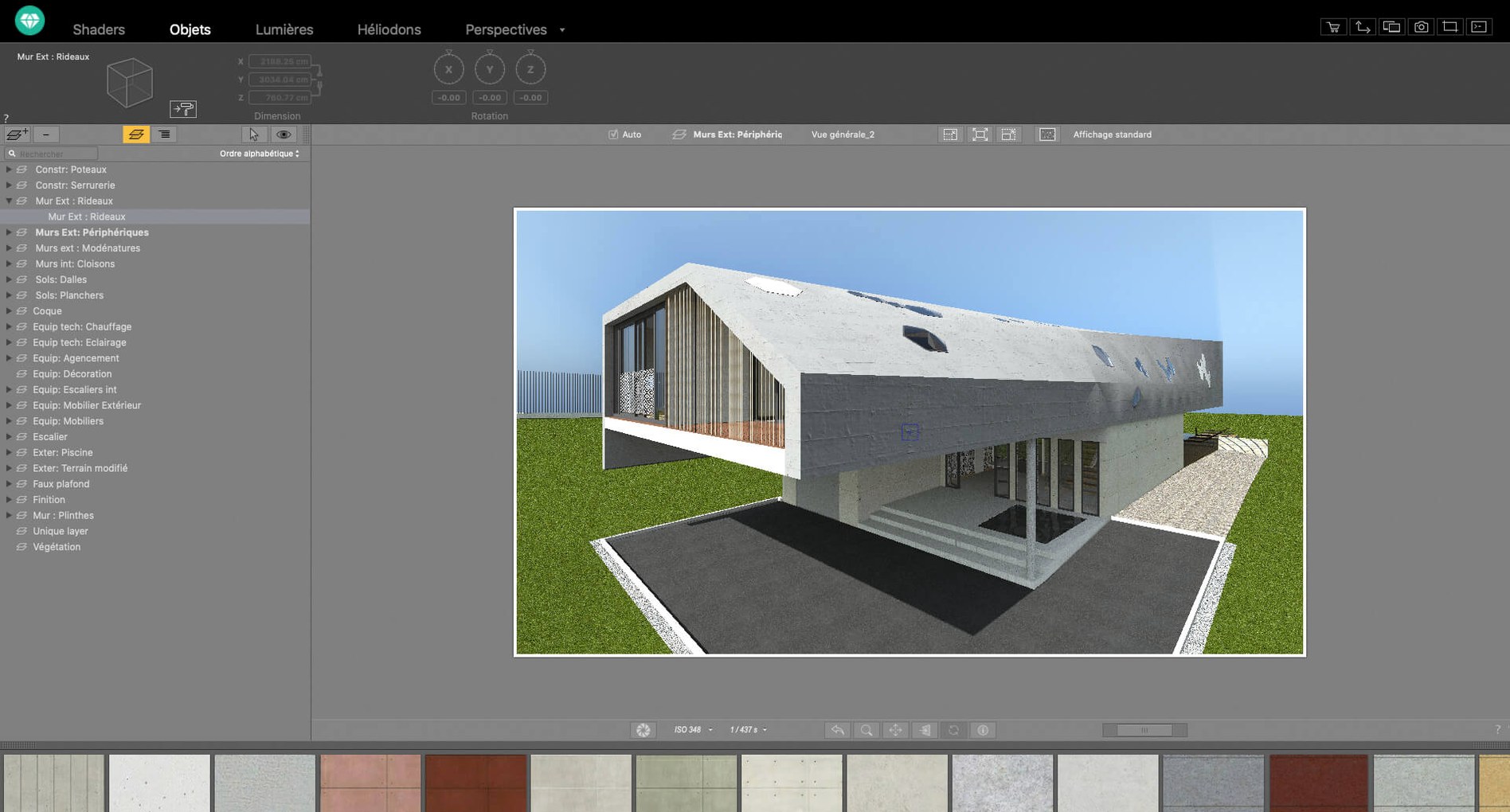
If you work in architecture or interior design, you know the gap between a 3D model and a presentation-ready image. Artlantis fills that gap. It is a rendering application that turns DXF, DWG, or 3DS files into realistic stills, walk-through animations, and VR panoramas. The official distribution has stopped, but perpetual licences still work — and the Artlantis torrent remains a practical way to get it on a Mac.
How does Artlantis handle materials and textures?
You drag materials onto surfaces from a built-in catalog. The shader tools let you tweak textures until they look like real wood, stone, or fabric. No need to build every surface from scratch.
Can I set lighting and camera paths?
Yes. You place natural and artificial light sources, adjust perspective, and edit motion paths for animation videos. The result is a controlled, repeatable lighting setup for any scene.
Which file formats and CAD programs does it work with?
It imports DXF, DWG, and 3DS files. Direct data exchange works with ArchiCAD, VectorWorks, SketchUp, AutoCAD, and Arc+. That covers most common workflows without file conversion headaches.
For architects and interior designers with CAD models
The people who benefit most are architects and interior designers who already have a model in a CAD program and need presentation visuals without learning a full production renderer. If your work involves client meetings where you show material options, lighting studies, or animated walkthroughs, Artlantis does that in a single app.
Mac users running Intel machines with macOS 10.13 or later can install it without compatibility worries. If you use SketchUp or VectorWorks regularly, the direct data exchange saves time. The application is not aimed at game artists or visual effects work — it is made for architectural visualization, and it stays in that lane.
A typical rendering session from start to finish
A colleague of mine, who teaches architecture at a university in Hamburg, uses Artlantis to prepare images for student exhibitions. Here is how a session goes for him.
He starts by exporting a model from SketchUp as a DXF file. In Artlantis, he opens the file and sees the raw geometry — no textures, no lights, just the shape. He opens the material catalog and drags a brick texture onto the exterior walls. For the windows, he picks a glass shader from the library and adjusts the transparency slider until it looks right.
Next he places a sun light source to match the real orientation of the building. He adds an artificial light inside the entrance hall so the interior shows clearly through the glass. He adjusts the perspective to frame the building from a street-level view.
For the final image, he opens the post-processing tools and raises the contrast slightly, then applies a warm color table to match a late-afternoon look. The render takes a while — Artlantis is not real-time — but the result is a single image he can drop into a presentation board. If he needs a walkthrough, he sets keyframes along a motion path and lets Artlantis render an animation video.
Skipping the shader editor is the top mistake
The most common one is skipping the shader tools. Beginners drop a material from the catalog and expect it to look perfect. In reality, you need to open the shader editor and adjust the scale, reflection, and bump settings so the texture matches the real surface size. A brick wall that looks like a Lego block is usually just a scaling problem.
Another mistake is ignoring the light sources. People rely on the default ambient light and wonder why the scene looks flat. Placing a single sun source and turning off the ambient fill gives depth and shadow. It takes seconds to try.
A third issue is exporting models with too many polygons or messy geometry. Artlantis handles clean DXF and DWG files well, but a model with duplicate faces or stray lines slows down the workflow. Cleaning up the model in your CAD application before exporting makes a difference.
Finally, beginners sometimes overlook the object collection that comes with Artlantis. Instead of using the ready-made furniture and vegetation, they import everything from outside. The built-in objects render quickly and match the material system, so it is worth checking the library before adding external files.
Use your own photos as materials instantly
Artlantis can use your own images as materials. If you have a photo of a specific stone or fabric, you can drag it in and apply it directly. No extra steps.
The post-processing tools for brightness, contrast, and color tables are applied after rendering, so you can adjust the mood of an image without re-rendering the whole scene. That saves time when a client asks for a warmer look.
For anyone working with VR, Artlantis can create QuickTime VR files from a scene. It is an older format but still useful for simple interactive panoramas on a laptop screen. The motion path editing for animation videos is straightforward — you set positions along a timeline and the software fills the movement between them.
The application remains fully usable with a perpetual licence, and version 9.5.2.32853 runs on Intel Macs with macOS 10.13 or later. If you look for artlantis 2021 download, you will find the same version. The interface supports eleven languages, including English, German, French, Spanish, Russian, and Japanese, so it works well for international teams.
- macOS 10.13 or later
- Intel processor
How to install
- Mount the downloaded disk image.
- Run the standard installation procedure.
Similar apps



Sign in or join the club to leave a comment.
Nobody has commented yet.