- Version
- 7.3.2
- Studio or maker
- Exposure Software LLC
- Languages
- English, German, French
- Activation
- K'ed by TNT team
- Runs on macOS
- macOS 10.13 or later
- Chip type
- Apple Silicon, Intel 64-bit
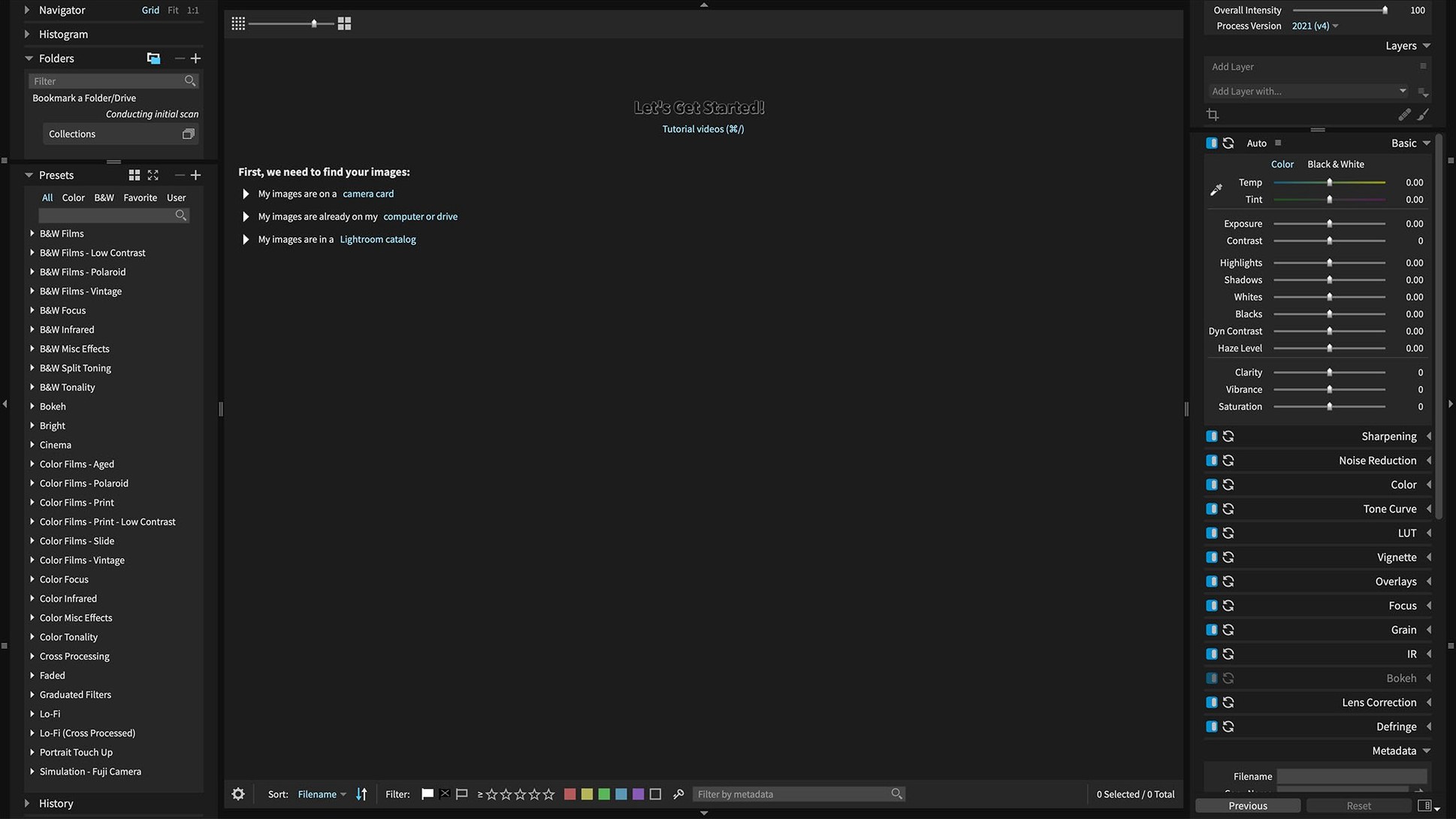
Photographers who want a fast, non-destructive RAW editor with film-style presets often turn to Exposure X7. It works both as a standalone app and as a plugin for Adobe Photoshop and Lightroom, so you can keep your existing workflow or switch to its own organization tools — keywords, collections, and smart collections. Version 7.3.0 fixes a crash when applying black and white film presets and another crash when opening the Quick Export menu after reordering export presets. It also corrects corrupt rendering of Sony A7 IV lossless compressed RAW files.
- Standalone photo editor or plugin for Adobe Photoshop and Lightroom
- Non-destructive layers and automatic adjustments
- GPU optimization for smooth editing
- Full image organization with keywords, collections, smart collections
- Supports HEIC photos from current iPhone models
- Refreshed translations in Chinese, German, French, and Japanese
If you work with Sony A7 IV files or rely on black-and-white film presets, this version addresses those directly. The GPU optimization helps when applying multiple adjustments, and the one-click automatic adjustment is handy for quick edits.
Point it toward your photo library
When you first open Exposure X7, take a few moments to point it toward your photo library. The app can import folders without moving files, so you can browse images where they already live. Start with a small batch of recent photos rather than your entire archive — this gives you room to test presets and masking without waiting on a large import.
Try the one-click automatic adjustment on a few test images. It gives you a baseline edit you can undo or modify, and it helps you see how the app interprets exposure and color. Then apply a black and white film preset to a raw file. Version 7.3.0 fixed a crash that used to happen with those presets, so they should apply cleanly now.
Use the first session to explore the 3D color masking tool on a portrait or a landscape. Make a selection, then adjust only that area — it is a good way to learn how the masking responds to edges and color ranges. The portrait retouching tools work well for skin softening and eye enhancement, but they are easier to judge after you have seen how the app handles sharpening and noise.
Competes with Luminar Neo and ON1 Photo RAW
Exposure X7 competes most directly with Luminar Neo and ON1 Photo RAW. All three offer non-destructive RAW editing and run on both Intel and Apple Silicon Macs.
Luminar Neo leans heavily on AI-driven tools like sky replacement and relighting. It has a clean, modern interface but fewer built-in presets than Exposure X7. The masking tools in Exposure X7 feel more precise for manual selection work, while Luminar Neo aims for one-click results.
ON1 Photo RAW includes a full image browser, layers, and masking similar to Exposure X7. It also offers a plugin mode for Photoshop and Lightroom. The difference is in the preset library: Exposure X7 ships with over 500 presets inspired by film stocks and classic looks, while ON1 focuses more on its own effects and texture overlays. ON1’s catalog management is deeper, but Exposure X7 keeps the browsing experience simpler and faster to navigate.
Adobe Lightroom Classic remains the standard for professional cataloging and cloud syncing. Exposure X7 cannot match Lightroom’s sharing and mobile integration. However, as a plugin it adds the film presets and 3D color masking that Lightroom lacks natively. Many photographers run both together.
Turn on GPU acceleration for faster editing
A few preferences can make the first sessions smoother. Open the Exposure X7 preferences and look for these adjustments:
- GPU acceleration — if your Mac has a discrete GPU or Apple Silicon, make sure GPU optimization is turned on. It makes brush strokes and slider adjustments feel more responsive, especially on high-resolution raw files.
- Default file handling — set the app to open RAW files with your preferred tone curve or leave them flat if you want to build from scratch. The automatic adjustment can be applied later.
- Interface language — version 7.3.0 supports English, German, and French. If you work in a multilingual environment, switch it once rather than guessing menu labels.
- Plugin mode — if you use Exposure X7 as a Lightroom or Photoshop plugin, configure the plugin path early. That way you can send a photo from Adobe’s app into Exposure X7 without hunting for settings later.
Use a new layer for each adjustment, not the original
The most common slip is applying a preset and then layering edits directly on the original layer. Exposure X7 supports non-destructive layers, so use a new layer for each adjustment. That way you can turn effects on and off or change opacity without undoing earlier work.
Another mistake is ignoring the smart collections feature. Beginners often browse folders manually and lose track of edited images. Setting up a few smart collections — for example, “recent imports” or “starred photos” — saves time once the library grows beyond a hundred files.
Some users also forget that Exposure X7 can open HEIC photos from current iPhone models, a feature added in version 7.3.0. If you shoot with an iPhone, you can edit those files directly instead of converting them to JPEG first. That applies to exposure x7 free download with crack users who might have older workflows — the HEIC support is ready to use.
Finally, do not skip the one-click automatic adjustment as a starting point. Some beginners think it is too basic, but it sets a solid exposure and white balance that you can tweak. Starting from a flat raw file and adjusting every slider from zero is slower than necessary.
- macOS 10.13 or later
- 64-bit processor
- Intel or Apple Silicon
Questions I keep getting
Can Exposure X7 be used as a plugin for Adobe programs?
Yes, it includes plugin support for Adobe Photoshop and Adobe Lightroom.
Does Exposure X7 support non-destructive editing?
Yes, it provides non-destructive RAW editing and non-destructive layers.
What was fixed in version 7.3.0?
Version 7.3.0 fixes a crash when applying black and white film presets, a crash when opening the Quick Export menu after reordering export presets, and corrupt rendering of Sony A7 IV lossless compressed raw files.
How to install
- Mount the disk image and run the Gatekeeper-friendly opener.
- Press Enter in Terminal to bypass Gatekeeper.
- Run the installer and complete the standard installation.
- The app is ready to use.
Similar apps


Sign in or join the club to leave a comment.
Nobody has commented yet.