
- Version
- 8.1.5-31
- Studio or maker
- Arobas Music
- Languages
- Russian, English, German, Spanish, Italian, Chinese (Traditional), Korean, Polish, Portuguese, French, Swedish, Japanese
- Activation
- K'ed by Antibiotics
- Runs on macOS
- macOS 10.13 or later
- Chip type
- Apple Silicon, Intel 64-bit
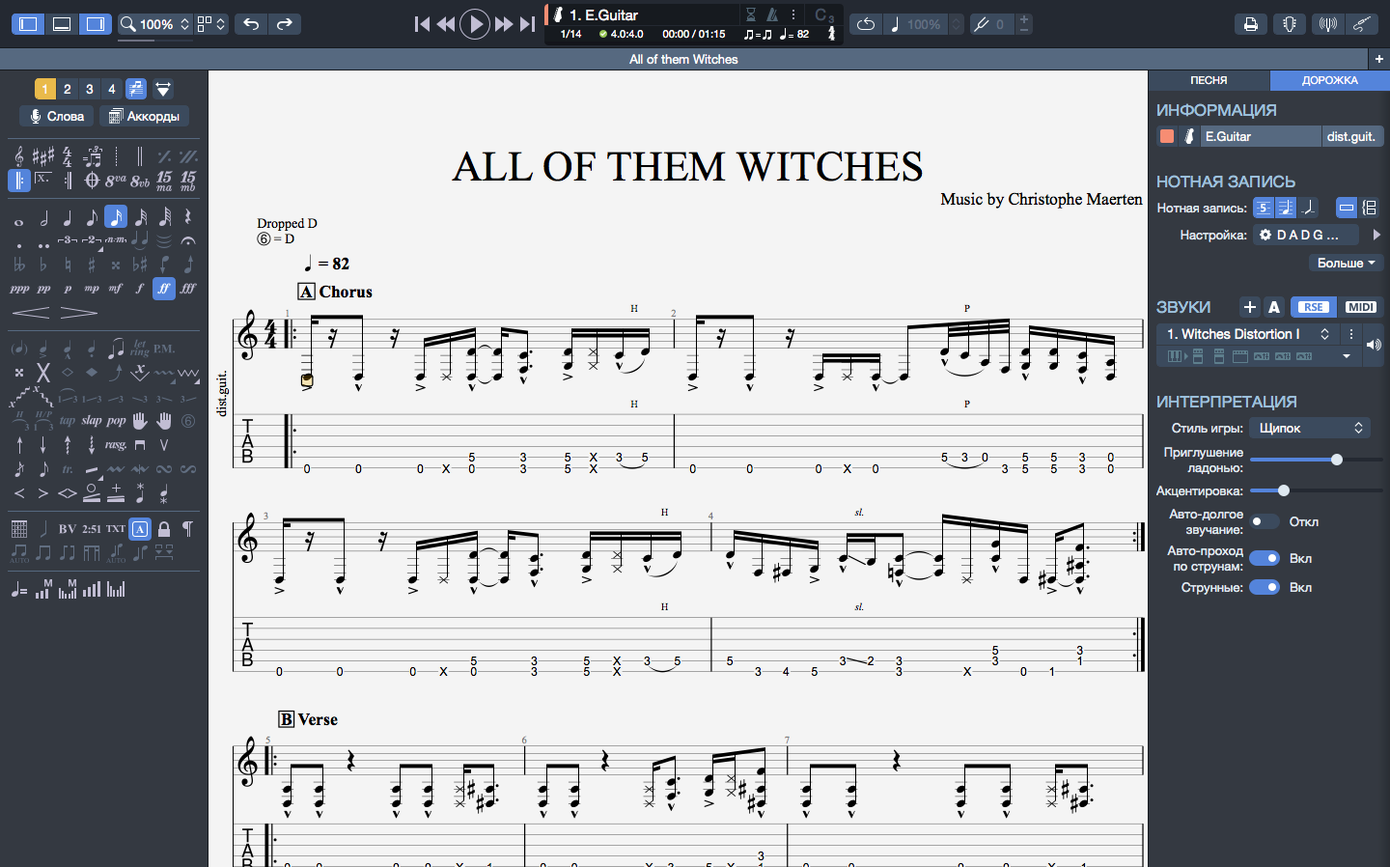
The chord builder opens with a quiet confidence, letting you place fingerings and hear them immediately. But Guitar Pro 8.1.5-31 keeps its real depth just beneath that friendly surface.
Transpose chords and fingerings together
When you shift a song into a new key, chord names and fingerings move as one. No more fixing misplaced barre shapes after a quick transpose. It is a small mercy that saves real time in a rehearsal prep.
Export clean SVGs for handouts
For my students, nothing beats a crisp SVG export. The score scales cleanly, and you can even export PNG with transparent backgrounds for worksheets. The improved contrast and colors make long editing sessions easier on the eyes.
Build backing tracks without a band
The built-in player and metronome are fine, but creating backing tracks for drums or piano turns a solo practice into a full arrangement. Edit bass or Hawaiian guitar parts, then let the track carry the rhythm while you solo over it.
Pin a half-finished folk tune to your recent files
I open Guitar Pro and land on the home page. The recent files section shows last week's chord study and a half-finished arrangement of a folk tune. I pin the arrangement so it stays visible even after I work on other scores.
First, I rough in the chord progression. The chord builder is open on the left. I click a chord shape, hear it, adjust a finger if the voicing sounds muddy. The metronome ticks quietly in the background. I do not worry about rhythm yet — just getting the changes to feel right.
Next, I lay down the bass line on a separate staff. I select the bass track from the instrument list and start entering notes. The MIDI editor lets me tweak the timing of a few lagging notes without redrawing the whole part. I play it back. The bass and chords lock together well enough to keep the song moving.
Then come the fills. I add a few Hawaiian guitar slides for texture on the second pass. The arpeggios at the very beginning of the score had been silent in earlier versions, but 8.1.5 plays them correctly now. That small fix matters when the song starts with a slow, picked intro.
Finally, I create a backing track for drums. I pick a simple rock pattern and adjust the snare hits to match the accents in my chord changes. The playback feels fuller. I save the file, export a clean SVG for the student handout, and close the session. Everything took about forty minutes.
Fixing playback lag and missing MIDI sounds
Stems refuse to flip direction
You select a note, try to change the stem direction, and nothing happens. This was a known bug in earlier builds. Version 8.1.5-31 fixes it for most cases. If it still stalls, select the whole measure and restart the stem change from the toolbar. That usually resets the logic.
Playback cuts out when plugging or unplugging headphones
On macOS, swapping audio devices mid-playback used to cause a hiccup or a full stop. The 8.1.5 update improves playback continuity here. If you still hear a gap, pause the score first, switch devices, then resume. The metronome stays in sync after the change.
Arpeggios at the start of a score sound wrong
Before 8.1.5, an arpeggio on the very first beat could play all notes at once or skip the effect entirely. Now it rolls correctly. If you imported an older score and the arpeggio still behaves oddly, re-select the arpeggio mark from the palette and apply it again to the same chord.
Exported PNG has a background when you wanted it transparent
Check the export dialog. There is a toggle for transparent background — it defaults to white. Switch it before you export. The SVG format handles transparency more reliably for handouts, so I use that for worksheets.
Pinned files disappear from the home page
Pinning keeps a score in the recent section even after you open other files. If a pinned file vanishes, it may have been moved or renamed outside Guitar Pro. Open it once from its new location, then pin it again.
Workflow: transposing a song to a singer-friendly key
This is the task I do most often when a student brings in a song that sits wrong for their voice.
- Open the score and listen through it once with the built-in player to hear the original key.
- Select all measures. Go to the transpose tool. Choose the interval or the target key.
- Guitar Pro transposes the notes, chord names, and fingerings together. No broken barre shapes, no mismatched chord symbols.
- Play through the transposed version. Adjust any chord voicing in the chord builder if the new key makes a particular stretch awkward.
- Export a fresh SVG for the student's binder. The clean scaling means they can read it on a tablet or a printout.
- Save the new version with the key in the filename so I can find it later.
The whole workflow takes about ten minutes, and the chord transposition feature is the reason it is that fast.
Set your MIDI output device for real-rig playback
Before you start a real project, open the preferences and adjust a few defaults.
- MIDI output device — if you use an external synth or amp sim, set it here so playback sounds like your actual rig, not the default piano sound.
- Metronome count-in — turn it on with two beats of count-in. It helps you stay in time during recording or looped practice sections.
- Display contrast — the interface was adjusted for better reading comfort in version 8, but you can push the contrast a little higher in settings if you work in a bright room.
- Auto-save interval — set it to five minutes. Scores vanish fast when you forget to save during a long arranging session.
- Language — Guitar Pro ships in twelve languages including Russian, Polish, Korean, and Swedish. Switch it if English is not your first or preferred language. The menu labels stay readable in all of them.
Once these are set, the software stays out of your way and you can focus on the part. Guitar Pro lets you compose and learn tablature, even if you found it via a guitar pro download torrent.
- Arpeggios at the beginning of a score now play correctly.
- Fixed some cases where stem directions could not be changed.
- Improved playback continuity on macOS when plugging or unplugging devices.
- macOS 10.13 or later
- 64-bit dual-core Intel, AMD, or Apple Silicon processor
- 4 GB RAM
- 2 GB free disk space
- Administrator rights required
Questions I keep getting
Does Guitar Pro 8 work well on Apple Silicon Macs?
Yes, Guitar Pro 8 has improved efficiency on Mac with Apple Silicon, and the current version runs on both Intel and Apple Silicon processors.
How to install
- Mount the downloaded disk image by double-clicking it. This makes the installer available.
- Run the standard installation procedure. Follow the prompts to place Guitar Pro in your Applications folder.
Similar apps






Sign in or join the club to leave a comment.
Nobody has commented yet.