
- Version
- 6.9.0
- Studio or maker
- MAMP GmbH
- Languages
- English
- Activation
- K'ed by TNT team
- Runs on macOS
- macOS 10.12 or later
- Chip type
- Intel 64-bit
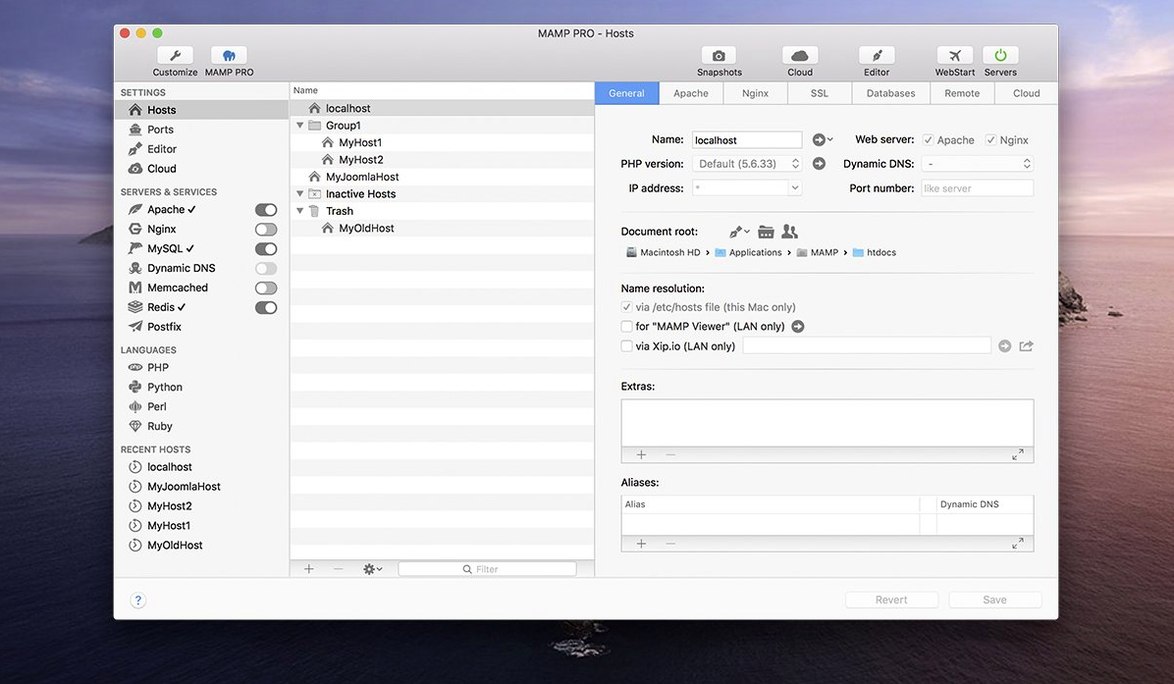
Host ordering lets you decide which local site answers first when multiple projects share the same port. That small feature saves me from typing long URLs during a lunch-break test run.
Workflow for a multi-site setup
- Create a new host — each web project gets its own host entry with separate document root and server type (Apache or Nginx).
- Pick the PHP version per host — MAMP PRO manages several PHP and Python versions side by side, so an older Drupal site can keep PHP 7.4 while a Laravel app runs on 8.0.
- Choose the database — MySQL 5.7 or 8.0, Redis or Memcached. The stack starts and stops per host, not globally.
- Import a WordPress site from a live server — the remote editing and migration tool pulls files and database straight into the local host you just created.
- Arrange the host order — drag hosts in the list so the one you use most appears first.
The built-in stack runs on ARM Macs with macOS 11.0 or later. Version 6.9.0 fixes a crash when editing host-specific server configs and improves PHP installation. If you manage more than a handful of local sites, the per-host control and WordPress import tool make it worth keeping next to your text editor and terminal.
What the 6.9 update changed in daily use
Version 6.9.0 does not rewrite the interface, but it removes a few irritations that could stop your work mid-session. The most noticeable fix is the crash when you edit host-specific server configurations — that screen where you tweak Apache directives or Nginx settings for one project alone. Earlier versions could drop you back to the desktop without warning. That crash is gone now.
The MAMP Cloud feature, which syncs hosts and files to a remote server, had network-related problems in previous builds. Those connections are more stable in 6.9. If you use Cloud to move a site from your Mac to a staging server, you should see fewer timeouts or failed transfers.
PHP version installation received a quiet improvement. When the app needs to download and set up a new PHP version for a host, the process completes more reliably. And phpMyAdmin 5, which many of us open to inspect a database quickly, now loads properly via its alias — no more blank pages when you click the phpMyAdmin button.
Start a new WordPress site from a blank host
Here is how a real project looks from start to publish, using the tools in the app.
- Open MAMP PRO and create a host. I click the plus button in the redesigned toolbar and give the host a name — say, "client-redesign-2025." The create dialog is optimized now, so fewer clicks to set the document root and server type. I choose Apache because the client's live server uses it.
- Set the PHP version and database. Under the host settings, I pick PHP 8.0 (the client's requirement) and MySQL 5.7. The app starts the stack for this host only, leaving my other projects untouched.
- Install WordPress with one click. MAMP PRO offers a one-click WordPress installer. I fill in the site title, admin credentials, and the database name. The app creates the database, downloads WordPress, runs the installation script, and opens the new site in my browser. Total time: about two minutes.
- Import content from the live server. The client already has a WordPress site running online. I use the import tool to pull files and the database from the live server directly into the local host I just created. The migration handles the URL replacement automatically — no manual search-and-replace in the database.
- Work locally. I edit theme files in my code editor, and every change appears immediately on my local site. The stack runs quietly in the menu bar. I can take a screenshot of the current page from within MAMP PRO to share with the client for approval.
- Publish the finished site. When the work is done, I use the publish feature to push the local host to the live server. MAMP PRO transfers files and the database, and the site goes live without me touching an FTP client or a command line.
Drag host entries into any order in the list
The interface has a few details that do not appear in release notes but make a difference after weeks of use.
- Host ordering. The host list lets you drag entries into any order. The host at the top answers first when multiple projects share the same port. I keep my current project at the top so I can reach it with a shorter URL.
- Remote editing. If you edit files on a live server directly, MAMP PRO can open those files in your local editor and sync changes back. No need to download and re-upload each time.
- Screenshot capture. A single button takes a screenshot of the current local page and saves it to a folder you choose. Useful for quick visual notes during development.
How MAMP PRO compares with similar Mac apps
MAMP PRO is not the only local server tool on macOS. Here is how it stands next to a few alternatives.
Laravel Valet is a lightweight option for developers who work primarily with PHP projects. It runs in the background with minimal configuration and uses a single domain for all projects. Valet is faster to set up for a single framework, but it does not offer per-host PHP versions, a graphical interface, or the one-click WordPress installation that MAMP PRO provides. It also lacks the built-in database management and migration tools.
Local by Flywheel is aimed squarely at WordPress developers. It creates isolated WordPress sites quickly and offers a clean interface. Local handles SSL certificates and site cloning well. MAMP PRO, on the other hand, supports a wider range of back-end technologies (multiple PHP versions, Python, Nginx, Apache, Redis, Memcached) and is not limited to WordPress — you can run legacy PHP apps, Laravel, or plain HTML sites in the same environment.
Docker gives you full control over containers and can replicate a production server exactly. It is the most flexible approach, but it requires comfort with Dockerfiles and terminal commands. MAMP PRO wraps the same stack (Apache, Nginx, MySQL, PHP) in a point-and-click interface. For developers who want a working server environment without writing configuration files, MAMP PRO is the simpler choice.
Each tool has its place. MAMP PRO fits best for developers who manage many different projects with varying PHP and server requirements and who prefer a visual interface over the command line.
- macOS 10.12 or later
- Intel or Apple Silicon processor
Questions I keep getting
Can I run MAMP PRO on an Apple Silicon Mac?
Yes, version 6.9.0 is listed for ARM Macs with macOS 11.0 or later.
Does it support multiple PHP and Python versions at the same time?
Yes, the documentation says it manages multiple PHP and Python versions, and each host can use a different version.
How to install
- Mount the disk image and run Open Gatekeeper friendly.
- Press Enter in Terminal to bypass Gatekeeper.
- Drag the application to the Applications folder.
- Launch the app when installation is complete.
Similar apps






Sign in or join the club to leave a comment.
Nobody has commented yet.