- Version
- 3.6.0
- Studio or maker
- Native Instruments
- Languages
- English
- Activation
- K'ed by TEAM HCiSO
- Runs on macOS
- macOS 13 or later
- Chip type
- Apple Silicon, Intel 64-bit
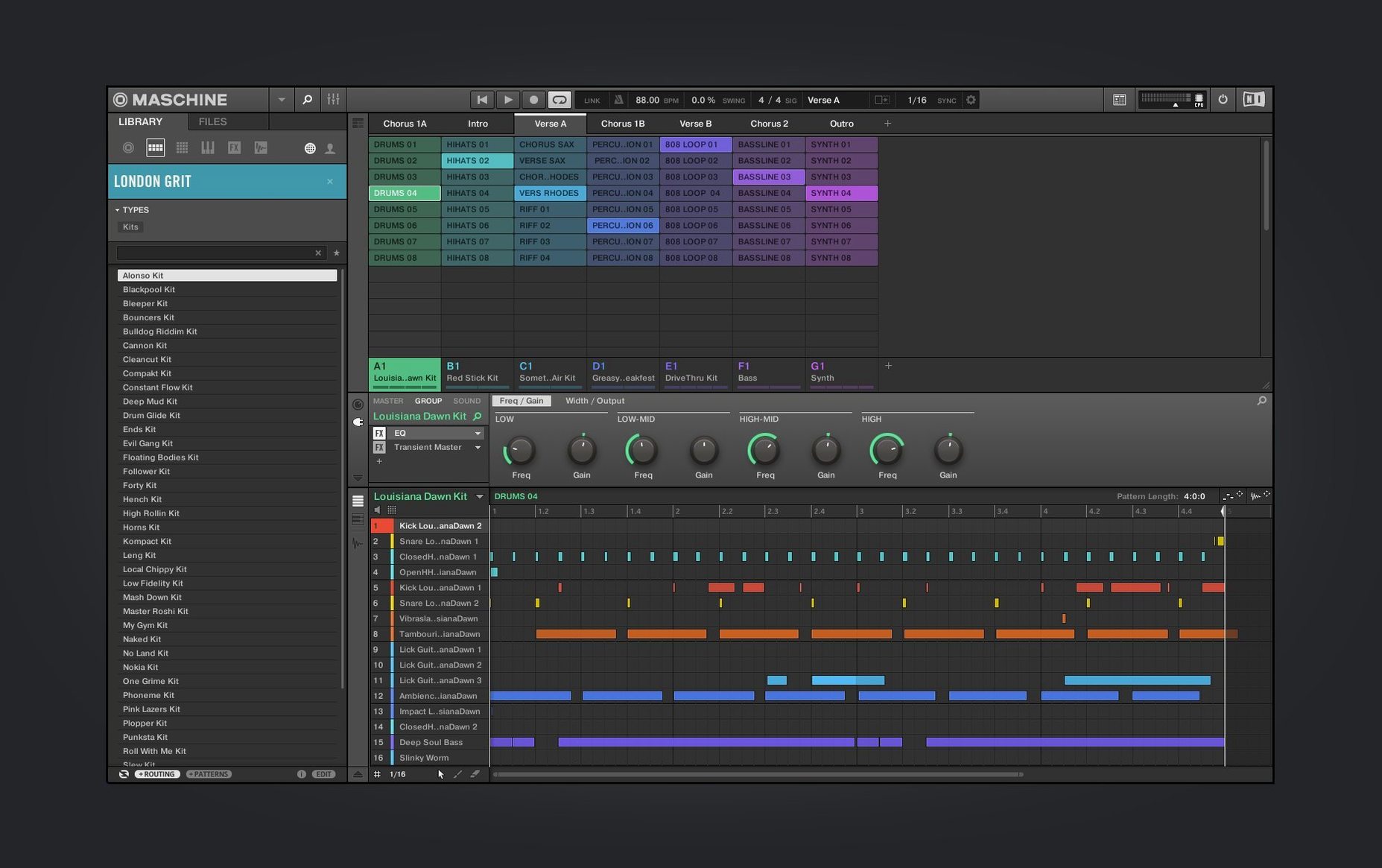
Maschine is the kind of tool that rewards people who like to dig past the presets. If you spend evenings layering samples, nudging drum patterns by a few ticks, or tweaking a synth patch until it sits right in the mix, this is for you.
Slice, pitch, and map samples across the pads
High-performance sampler — slice, pitch, and map samples across the pads. The engine handles large libraries without slowing down, so you can stack layers and keep working.
Integrated drum sequencer — the classic 16-step grid, but with per-step controls for velocity, swing, and note repeat. It is the backbone of most Maschine sessions.
Mixer — a full channel strip with EQ and effects per sound, plus a master section. The redesigned Mixer view in 3.6.0 keeps the layout clean on a single screen.
Standalone or plug-in — run it as its own app for sketching, or load it inside your DAW as a VST, AU, or AAX plug-in. The same projects open in both modes.
New in 3.6.0 — the Audio, Poly Synth, and Drum Synth modules have a refreshed UI, and NKS Connect lets you map compatible controllers like the AKAI MPK mini IV straight to the software.
For a maschine 2 download, this version builds on everything the earlier releases taught the developers. The tools are deeper, but the workflow still feels like Maschine.
How the 3.6.0 changes show up in a real session
The redesigned Audio, Poly Synth, and Drum Synth modules are the kind of update you notice once you start tweaking. The Audio module now places its waveform and slicing markers in a more readable arrangement, so when you drop a loop in and want to cut it into hits, you spend less time hunting for the controls. The Poly Synth module's new layout groups its oscillator and filter sections more clearly — useful when you are building a pad from scratch and adjusting the envelope. And the Drum Synth module, which I often use for kick and snare design, puts the pitch and decay knobs where you expect them.
The continued Mixer view redesign is smaller but practical. If you have a project with eight or more sounds running, the updated channel strips show the EQ curve and effect sends without needing to scroll sideways. That matters when you are mixing on a laptop screen and want to see the whole chain at once.
The new welcome screen is straightforward: it lists demo projects and tutorial video links. For someone who is new to Maschine — or returning after a break — it saves the step of digging through the file browser to find a starting point.
Beatmakers with sample libraries and live performers who trigger patterns
Beatmakers who work with sample libraries benefit from the high-performance sampler and loop slicing. You can load a folder of one-shot drum samples, map them across the pads, and start sequencing without waiting for pre-processing.
Live performers who trigger patterns and scenes on stage find the pattern-based sequencer useful. The ability to mute, solo, and switch patterns in real time, combined with NKS Connect for a controller like the AKAI MPK mini IV, gives you hands-on control without needing the full Maschine hardware.
Producers who work inside a DAW but want a dedicated beat-making environment can run Maschine as a plug-in. The standalone mode is good for sketching, and when you load the same project inside Logic or Ableton, everything — patterns, effects, mixer settings — transfers over.
Sample-based composers who slice vinyl loops or field recordings into new arrangements will appreciate the loop slicing and mapping features. The sampler handles timestretching and pitch-shifting cleanly, so you can match the tempo of an old loop to your current project.
A scenario: building a beat from a single sample
Imagine you have a short soul record sample, about four bars long, that you want to turn into a hip-hop beat. Open Maschine in standalone mode, load the Audio module, and drop the sample onto a pad. The loop slicing tool cuts the audio at transient points — snare hits, kick drums, vocal stabs — and maps each slice to a separate pad. Now your sample is a kit.
From there, you sequence the slices in a new pattern: some pads play the original hits, others get pitched up or reversed. The drum sequencer lets you adjust the swing on each step, so the rhythm feels loose. Add a Poly Synth pad underneath for warmth, and route everything through the Mixer to shape the low end with the EQ.
This kind of workflow — one source, many results — is where Maschine fits naturally. The pattern-based arrangement means you can build a verse section, copy it to a new pattern, and change a few slices for the chorus without rebuilding everything.
Audio routing fix when Maschine runs alongside your DAW
One snag people hit with the stand-alone version is audio routing when they run it alongside their DAW. If you open Maschine after your DAW has claimed the audio interface, Maschine may not find an output. The fix is to quit both, open Maschine first, and then launch the DAW on the same interface, or use the built-in audio interface that Maschine includes.
Another issue is sample browsing when the library is large. Maschine's browser searches by folder, but if you have samples scattered across several drives, it helps to consolidate them into one main sample folder and point the browser there. The high-performance sampler loads files quickly, but a clean folder structure saves time.
For NKS Connect with the AKAI MPK mini IV, the connection is plug-and-play if the controller's firmware is up to date. If the pads do not respond in Maschine, check that the controller is set to the correct USB mode — usually a button combination on the unit itself — and restart the software. The NKS Connect support in 3.6.0 handles the mapping automatically once the connection is established.
Maschine 3.6.0 provides a complete standalone and plug-in package for music producers and beat-makers. The installation mounts a disk image and runs a standard installer — no extra steps beyond what you would expect.
- Redesigned UI for the Audio, Poly Synth, and Drum Synth modules.
- Continued work on the Mixer view design.
- Added NKS Connect support, starting with the AKAI MPK mini IV.
- NKS Mode integration for compatible NKS Connect controllers.
- macOS 13 or later
- Supports both Apple Silicon and Intel Macs
- Interface language: English
How to install
- Mount the downloaded disk image.
- Run the standard installation process.
Similar apps




Sign in or join the club to leave a comment.
Nobody has commented yet.