- Version
- 3.4.15 [MAS]
- Studio or maker
- Pixelmator Team
- Languages
- Russian, English, German, Spanish, Italian, Chinese (Traditional), Chinese (Simplified), Korean, Portuguese, French, Japanese
- Activation
- Included
- Runs on macOS
- macOS 13 or later
- Chip type
- Apple Silicon, Intel 64-bit
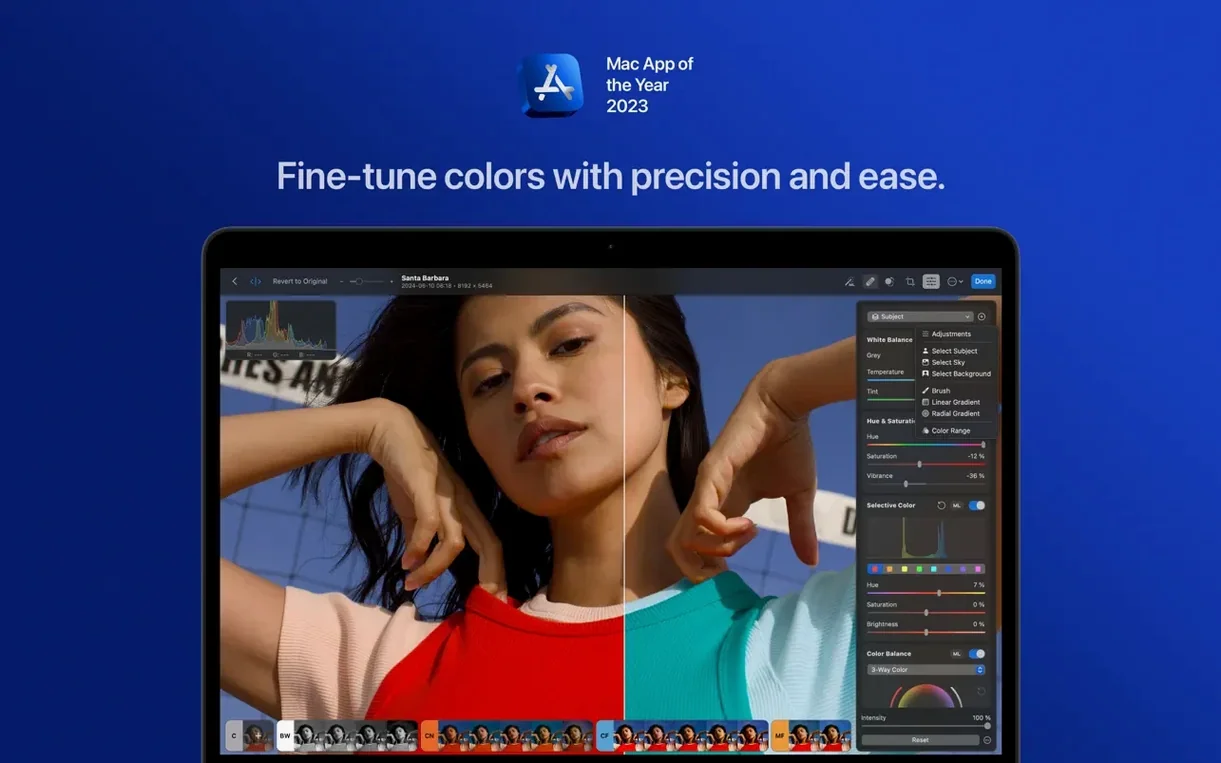
Photomator is a Mac photo editor that pairs a clean interface with serious depth for those who want more than quick filters.
Tools that reward the patient editor
- Match the look — transfer color and tone from one photo to another, useful for keeping a series consistent.
- Copy and paste edits — apply the same correction stack across many shots without redoing each one.
- Batch processing — edit RAW files together with JPEGs or other formats in one pass.
- Smart Deband — removes color banding that often appears in skies and gradients.
- Perspective control — crop, straighten, and adjust perspective to fix architectural lines.
Built for the way you work
Photomator taps into Apple technologies like Metal, Core ML, and Core Image, which means adjustments feel responsive even on large files. It handles over 650 RAW formats, including Apple ProRAW and compressed Fujifilm files, and syncs edits with the Photos app and iCloud Drive. Version 3.4.15 adds support for newer Sony, Fujifilm, Nikon, and Panasonic cameras. For an experienced user, this is a tool that respects your workflow.
A walk through one session with Photomator
I brought in a batch of thirty photos from a Saturday afternoon walk, mostly RAW files from a recent camera. The first task was picking the keepers. Photomator loads thumbnails fast enough that I could scan the grid, then I used the star rating in the file browser to mark the dozen I wanted to work on. I opened one image that had a harsh shadow across a face. The clone and repair tools handled that in a couple of strokes. No need to switch windows or hunt for a layer palette. Then I moved on to the sky, which had subtle color banding. Smart Deband cleaned it up in one pass. I applied the same correction to two other shots with similar sky conditions by copying and pasting the edit stack. After that I selected a landscape preset for the remaining eight images and ran the batch edit. The whole session, from import to export, took about twenty minutes. No menus buried three levels deep. No waiting around.
Edits one image, then pastes the corrections to hundreds
Adobe Lightroom
Photomator does not require an account or ongoing payments. For basic RAW development, color correction, and batch work, the two overlap a lot. Lightroom has a more extensive catalog system and cloud sync across devices, while Photomator leans into macOS-native tools like iCloud Drive and the Photos app for syncing. If you work mostly on one Mac and want a straightforward editor without the full Adobe ecosystem, Photomator covers the same ground for daily edits.
Affinity Photo
Affinity Photo is a full pixel editor with layer masking, advanced compositing, and a design-oriented toolset. Photomator does not try to replace that. It is more focused on the photographic workflow: importing, adjusting, retouching, and exporting. Affinity is stronger for graphic design work like combining images or creating composites. Photomator is stronger for photographers who want quick, consistent results across a set of photos and who prefer AI-assisted selection and matching over manual masking.
Apple Photos
The built-in Photos app is fine for cropping, basic exposure, and applying a filter or two. Photomator takes that same integration with macOS and stretches it much further. You get RAW support, batch editing, AI subject selection, and tools like Deband and Denoise that Apple does not include. For someone who already uses Photos to organize their library, Photomator fits neatly alongside it.
Start by copying and pasting edits to see instant consistency
A photographer who shoots club events or small weddings often comes home with two hundred or more images. Many need the same corrections: lift shadows, adjust white balance, add a bit of contrast. With Photomator, you can edit one image until it looks right, then copy the edit stack and apply it to the rest of the set in one batch. If a group shot includes an unwanted object in the background, the repair tool fixes it in seconds. The AI subject selection helps when you need to brighten a face without affecting the background. The photographer ends up with a consistent look across the whole album in a fraction of the time it would take to edit each one separately.
Lift shadows and adjust white balance across two hundred images
- Start with the copy and paste feature. Edit one photo fully, then select several others and paste the edit stack. It is the fastest way to understand how consistent your adjustments can be.
- Use the auto-select tools on a few test photos. The subject, sky, and background selections usually save time, but it helps to know their limits before you rely on them for a full set.
- Try Smart Deband on any photo with a flat sky or a gradient. It is one of those corrections you might not think to run, but you will notice the difference once you see it.
- Open a RAW file and a JPEG side by side. Apply the same edits to both. You will see how Photomator handles different formats without needing separate workflows.
- If you have a recent Sony, Fujifilm, Nikon, or Panasonic camera, check that the RAW files open correctly in version 3.4.15. The update added support for several newer models, so there is a good chance your camera is covered.
- Bug fixes and performance improvements.
- Support for compressed RAW from Sony Alpha ILCE-7M5, FUJIFILM GFX 100S II, and FUJIFILM GFX 100RF.
- Support for High Efficiency and High Efficiency Star RAW from Nikon Z5II and Z50II.
- Support for Panasonic LUMIX DC-S1RM2 RAW in High Resolution mode.
- macOS 13 or later
- Intel or Apple Silicon
How to install
- Mount the downloaded disk image.
- Drag the app to the Applications folder shortcut.
- After copying finishes, open the app from Launchpad.
Similar apps





Sign in or join the club to leave a comment.
Nobody has commented yet.