
- Version
- 1.0.0
- Studio or maker
- Plugin Alliance, Brainworx, Native Instruments
- Languages
- English
- Activation
- K'ed by TEAM HCiSO
- Runs on macOS
- macOS 12 or later
- Chip type
- Apple Silicon, Intel 64-bit
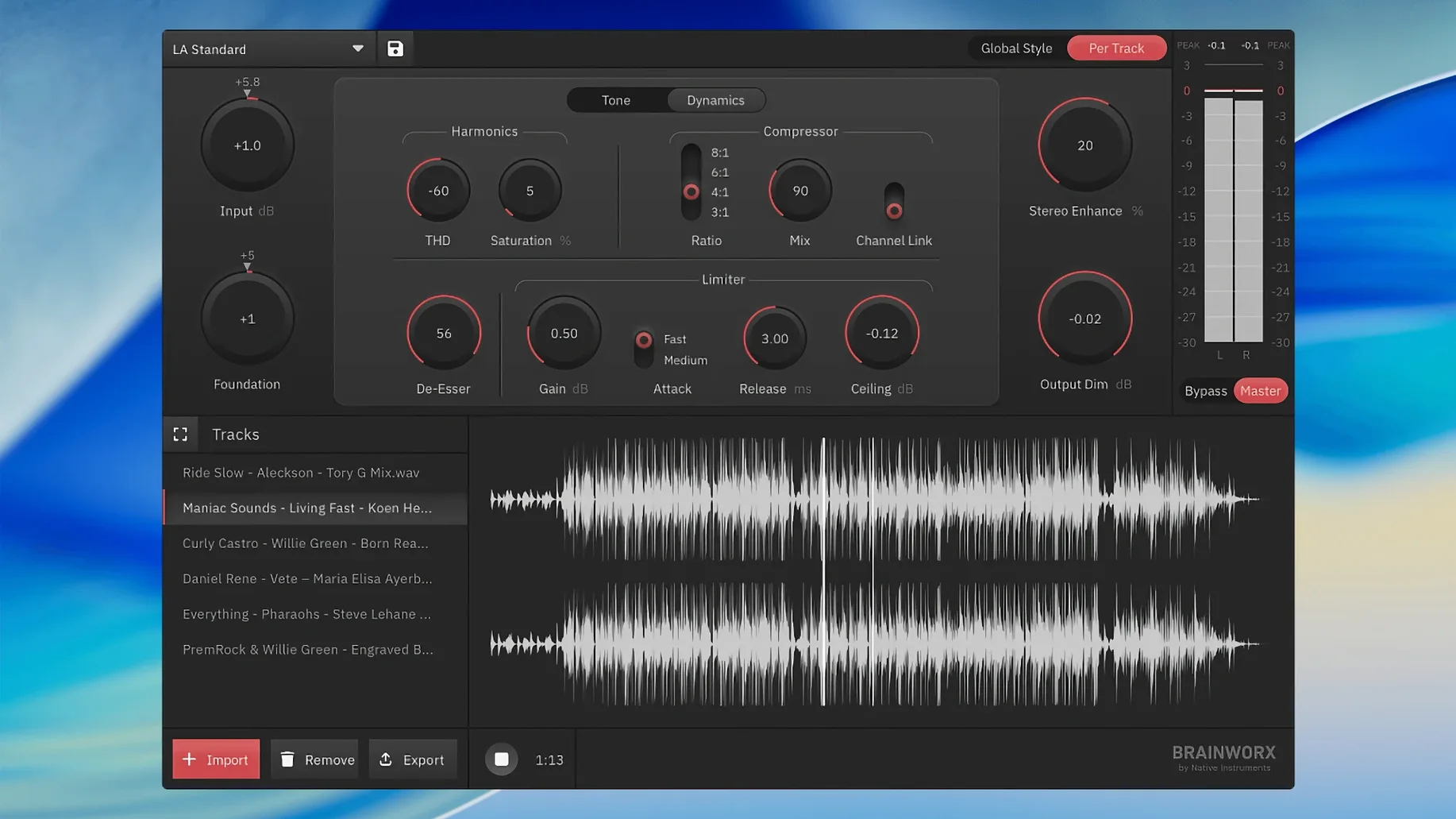
Version 1.0.0 of the Brainworx bx_mastering studio is a standalone mastering application, meaning it does its job without a digital audio workstation.
Standalone mastering
Term — the app runs on its own, so you can finalize tracks even if your DAW is basic, like GarageBand.
Algorithm-based processing
Term — the built-in processes come from analysis of notable masters, aiming for a polished, consistent sound.
Streaming-ready output
Term — it prepares your mixes for streaming platforms, so they translate well across services.
GarageBand musicians get a complete mastering chain
Musicians working in GarageBand or other entry-level DAWs are the clearest fit here. If your recording software lacks a built-in mastering chain, or if you prefer not to install extra plugins and figure out signal flow, bx_mastering studio gives you a dedicated environment that handles the final polish. Podcast producers also find it useful — spoken word benefits from the same loudness and clarity adjustments that music masters use, and having a standalone app means you can bypass your DAW entirely when all that is left to do is deliver a finished file to a client or platform.
Content creators who regularly upload audio to streaming services — YouTube, Spotify, Apple Music — will appreciate the streaming-ready output. You do not need to study loudness standards or reference tracks. The app applies what it has learned from analyzing professional masters, so your mix should land at a competitive level without guesswork. Teachers and students in music production courses can also use it as a learning tool: hear how automated mastering changes a track, then experiment with the built-in styles to hear the difference.
Power users with advanced DAWs and a collection of mastering plugins may find the app less essential — they already have the tools. But for anyone who wants a quick, reliable result without opening a complex session, bx_mastering studio saves time.
What to know before you install
Does it replace a professional mastering engineer?
Not exactly. The app uses algorithms derived from analyzing many mastered recordings, so it can get you to a solid, polished sound quickly. But it cannot make creative decisions that respond to the unique problems of a specific mix. Think of it as a reliable starting point — or a finishing touch if your track is already well mixed — rather than a substitute for human judgment on complex material.
Works offline once installed
No. Once installed, bx_mastering studio runs offline. The analysis and processing happen on your Mac. That makes it a good choice if you work in a studio without steady internet or while traveling.
Export from your DAW, master in bx_mastering studio
It is a standalone application, not a plugin. You export a mix from your DAW as an audio file, open that file in bx_mastering studio, apply the mastering, and export the result. Then you bring the mastered file back into your session if needed. This workflow works with any DAW that can export audio.
Runs natively on M1, M2, and Intel Macs
Yes. The app supports both ARM (Apple Silicon) and x86 (Intel) architectures, so it runs natively on the latest Macs and on older Intel models running macOS 12 or later.
Try the built-in mastering styles first
When you open bx_mastering studio for the first time, take a moment to check the mastering style style creator. It includes several built-in styles — try a couple of them on your track to hear how the app interprets different sonic goals. Each style adjusts EQ, compression, and limiting in a different way, and you can often find one that suits your material better than the default.
Also look at the output level target. Streaming platforms have different loudness expectations, and the app is designed to match them. If your track sounds too quiet or too dense after mastering, adjusting the target loudness is the first place to start.
Finally, explore any trim or gain controls before processing. If your raw mix is very quiet or already hitting near zero, setting a sensible input level helps the algorithm make better decisions.
Over-processing can ruin dynamics
A common first error is over-processing. Because bx_mastering studio makes your track sound louder and fuller, it is tempting to apply the heaviest style and call it done. But too much processing can introduce distortion or squash the dynamics. Start with a moderate style and listen carefully before dialing it up.
Another mistake is ignoring the mix. Mastering works best when the mix is already balanced. If your track has a muddy low end or harsh highs, the app cannot fix those problems — it will only amplify them. Spend time getting the mix right before opening the app.
Beginners also forget to compare the processed and unprocessed versions. Always A/B the result against your original mix. If the mastered version sounds worse in any way, back off the processing or try a different style.
Finally, some users skip checking the output on different playback systems. What sounds good through studio monitors might not translate well to earbuds or a car stereo. After you export the mastered file, test it in a few places before calling it finished.
Term — musicians, podcast producers, and content creators can all use it to finish audio without extra gear.
- macOS 12 or later
- Intel or Apple Silicon
Questions I keep getting
Can I use bx_mastering studio without a DAW?
Yes, it is a standalone application, designed specifically for mastering outside of a digital audio workstation.
How to install
- Run the standard installer. This places the app in your Applications folder.
Similar apps



Sign in or join the club to leave a comment.
Nobody has commented yet.