
- Version
- 9.35.4
- Studio or maker
- Termius Corporation
- Languages
- English
- Activation
- K'ed by Antibiotics
- Runs on macOS
- macOS 10.13 or later
- Chip type
- Apple Silicon, Intel 64-bit
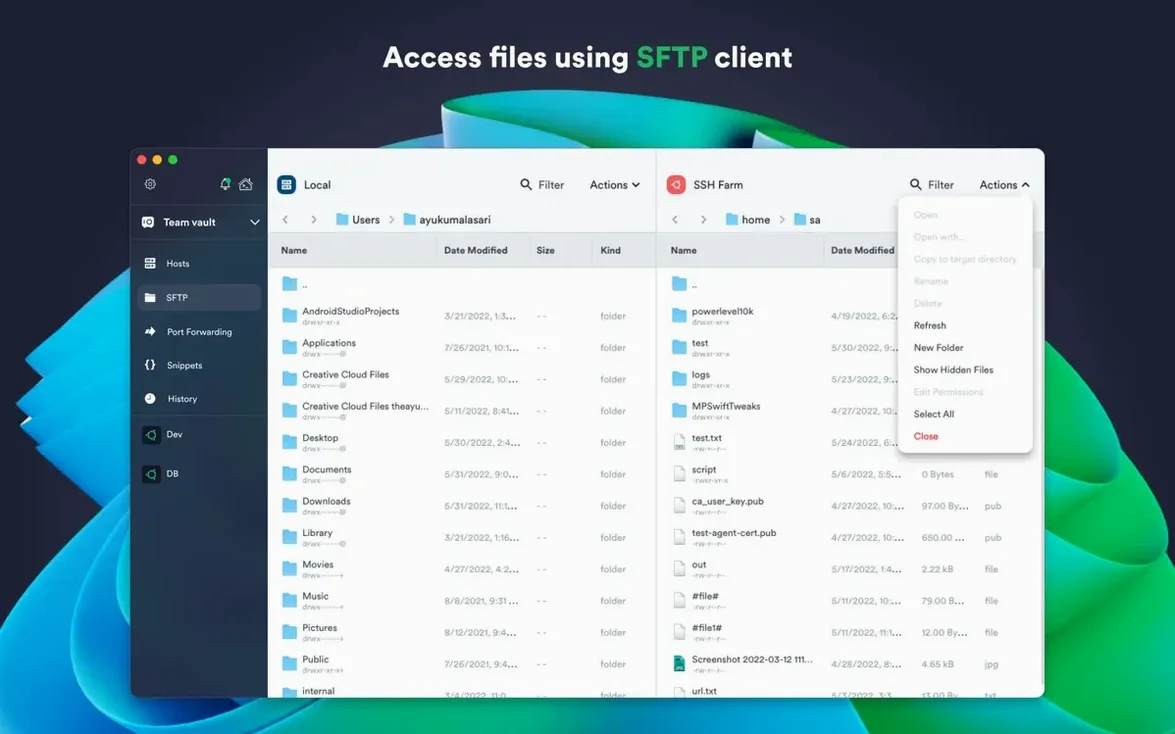
If you manage remote servers or work with command-line tools over SSH, you have probably run into the usual friction: keeping keys straight, juggling multiple sessions, and remembering credentials across machines. Termius is a desktop SSH client for macOS that tries to take that friction out. It handles the basics — remote shell access and SFTP — and adds the sort of polish that makes daily use feel less like a chore.
- Full SSH client with tabbed sessions and split view, so you can work on several servers at once without stacking windows.
- Supports ECDSA and ed25519 keys, chacha20-poly1305 cipher, FIDO2 hardware-key authentication, and SSH agent forwarding to keep private keys on your local machine.
- Syncs connection settings and credentials through encrypted cloud storage, which saves time when you move between your iMac and a laptop.
- Works with proxy servers and jump servers for environments where direct connections are not possible.
- Lets you set custom environment variables per session and lock the app with Touch ID or Face ID.
- Runs on both Apple Silicon and Intel Macs with macOS 10.13 or later, and the interface is in English.
There is not much more to say. If you need a clean, reliable SSH client that stays out of your way, it is worth a look.
How Termius compares to PuTTY and other Mac clients
I do not think Termius is the only solid choice, so it helps to see where it sits next to a couple of familiar alternatives. I have spent time with all of them in the game club’s setup days, and each has its own trade-offs.
Terminal (iTerm2 + built-in SSH). Many Mac users stick with iTerm2 because it is free, open source, and deeply configurable. You can set up profiles, manage keys through the command line, and save sessions with a bit of scripting. The difference is that iTerm2 is a terminal emulator first and an SSH client second — you are doing more manual work. Termius gives you a visual list of hosts, one-click reconnect, and encrypted sync out of the box. If you manage more than a handful of servers, that convenience saves time.
PuTTY (via Wine or a Mac fork). PuTTY is older software designed for Windows, and running it on macOS feels like a workaround. The interface never quite matches the system font scaling, and key management is clumsy. Termius is native to macOS — it installs cleanly, supports Apple Silicon without emulation, and integrates with platform features like Touch ID. It is simply less friction.
Royal TS. This is another multi-platform remote access tool, and it is very capable — it handles RDP and VNC alongside SSH, which Termius does not. But Royal TS has a more complex interface and a licensing model that can feel heavy for a single user. Termius is simpler to start using, especially if your main need is SSH and SFTP. I would choose Royal TS only if you need the broader protocol support.
I see the same few slip-ups when someone at school’s IT club sets up Termius for the first time. They are easy to avoid once you know they exist.
- If you need those, get the desktop version from your website download. The difference is not obvious until you try to run a local command and nothing happens.
- Not enabling SSH agent forwarding. Beginners often copy private keys onto every server they connect to. Termius can forward your local agent instead, so the key never leaves your Mac. It is safer and cleaner once you turn it on in the connection settings.
- Ignoring the shared command history. Typing the same long command over and over is a waste. Termius saves your recent commands, and you can tap one to reuse it. I show new users this early, and it changes their workflow.
- Forgetting to sync before switching machines. If you set up your hosts and credentials on an iMac but do not enable cloud sync, you type everything again on your laptop. One toggle in the account settings prevents that.
Why version 9.35.4 stays stable during long sessions
Version 9.35.4 is a stability release — the changelog says just that. In practice, that means the app does not misbehave during long sessions or when you switch networks. Earlier in the 9.x cycle, Termius added support for serial cable connections and FIDO2 hardware-key authentication. For daily use, the hardware-key support is the bigger change: if you use a YubiKey or similar device, you can authenticate without typing passwords or managing software tokens. The serial cable support matters for network engineers working directly on switches and routers.
Termius for Mac securely manages remote servers, but a termius crack mac would disable its cloud sync. The k'ed release you see on this site works as intended, but treat it like any tool: test your connections, keep your key material separate, and do not sync it across untrusted machines.
- Stability improvements.
- macOS 10.13 or later
- Apple Silicon or Intel 64-bit processor
- English language interface
Questions I keep getting
Does Termius support hardware security keys?
Yes, it supports FIDO2 hardware-key authentication for an extra layer of security.
Can I use Termius on both Intel and Apple Silicon Macs?
Yes, it runs natively on both architectures and requires macOS 10.13 or later.
How does Termius handle credentials across devices?
It uses encrypted cloud storage to sync connection settings and credentials, so you can access them from multiple machines.
How to install
- Open the downloaded disk image.
- Drag the app into the Applications folder shortcut.
- After copying finishes, open the app from Launchpad.
Similar apps






Sign in or join the club to leave a comment.
Nobody has commented yet.