- Version
- 4.5.1.21
- Studio or maker
- Native Instruments
- Languages
- English
- Activation
- K'ed by TEAM HCiSO
- Runs on macOS
- macOS 12 or later
- Chip type
- Apple Silicon, Intel 64-bit
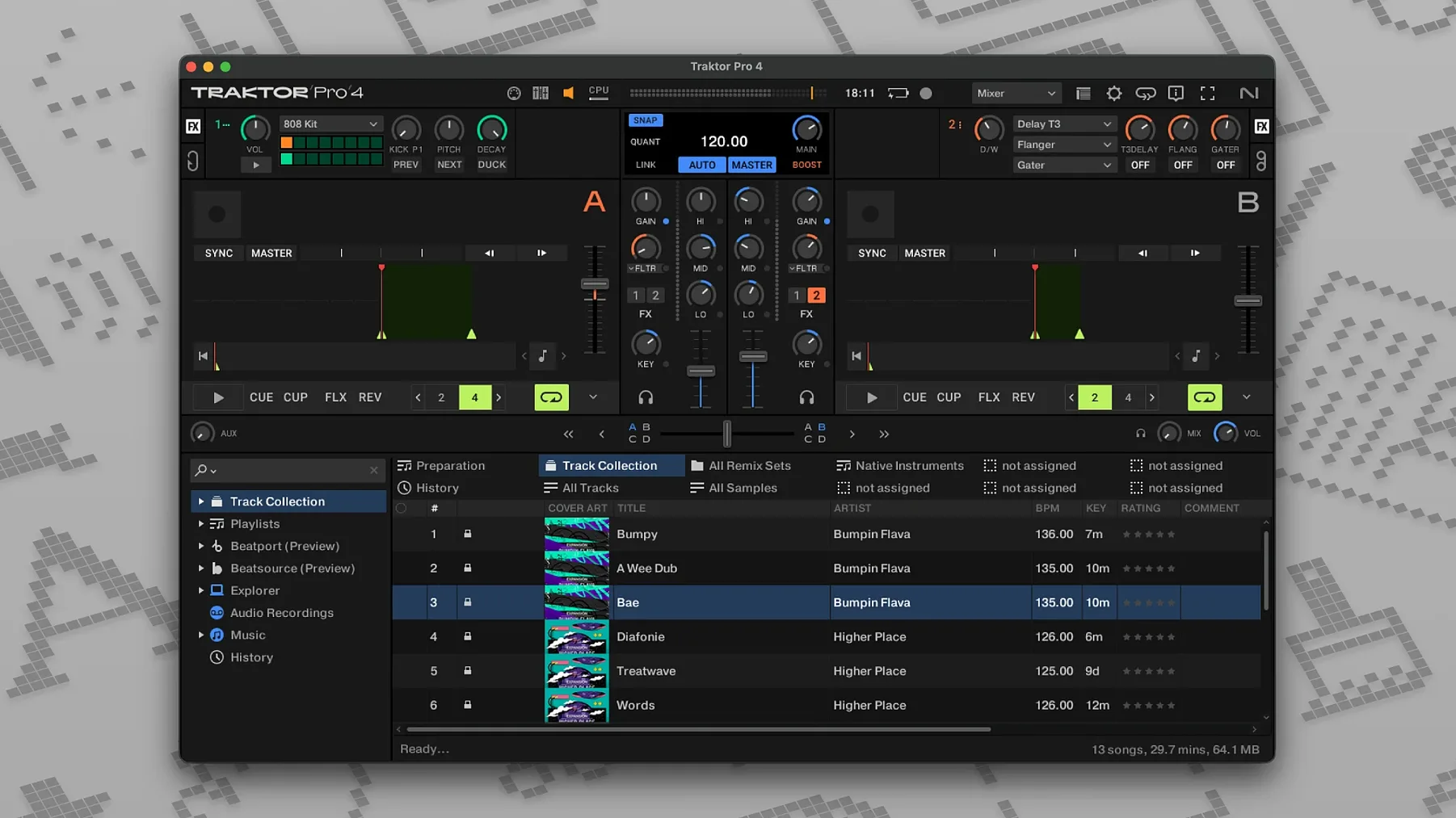
You have a handful of tracks you want to blend into a live set, but the software you used before keeps running into CPU spikes or lacks the deck count you need. Traktor Pro 4 for Mac solves that by giving you four virtual decks, each with independent controls, plus real-time stem separation so you can isolate vocals, drums, or melody on the fly.
Setting up a four-deck mix with external hardware
- Connect a Traktor Kontrol hardware controller or any MIDI device. Traktor Pro 4 supports MIDI mapping and custom layouts, so you can assign faders and knobs however you like.
- Load tracks onto decks A through D. Use stem separation on a track to pull out its drum stem, then route that stem to a separate deck for live remixing.
- Sync all four decks using the master clock. The program also sends MIDI Clock and OSC signals, so external drum machines or lighting software stay in time.
- Record the mix as a WAV or AIFF file. ID3 tags can be saved directly to exported files for easy library management later.
Exporting and tagging your set
Once the mix is recorded, Traktor Pro 4 writes ID3 metadata into the file. That means artist, title, and BPM data stay attached whether you share the file or archive it. The software runs natively on both Apple Silicon and Intel Macs under macOS 12 or newer, and the interface stays in English throughout. For anyone running an older setup, Traktor Pro 3 remains available as a previous-generation alternative.
Saves time with remembered keyboard shortcuts
Traktor Pro 4 has a few details that do not shout for attention but save time once you notice them. The program remembers user-defined keyboard shortcuts, so if you map a key to toggle the view or cue a track, it stays set between sessions. You do not have to reassign it each time you launch. The custom layouts and elements work the same way — you can hide panels you rarely use and keep the ones you reach for often, and Traktor remembers that arrangement.
Reverse playback is another quiet feature. It works on any deck, so you can spin a track backwards as an effect or to find a cue point by ear without stopping the mix. When you import tracks that already have tags from iTunes, Traktor reads those tags and keeps them. Combined with the ability to save ID3 tags on exported mixes, your library stays consistent without manual re-tagging.
Recording actions are straightforward: you hit record, play your set, and export as WAV or AIFF. No extra compression steps or conversion dialogs. The program also lets you switch between the four deck types — Track Deck, Stem Deck, Remix Deck, and Live Input — per deck. That means you could have a Remix Deck loaded with one-shot samples on deck C while decks A and B play full tracks, all without restarting or changing a global mode.
Installs via .dmg on macOS 12 or later, runs on Apple Silicon and Intel
Traktor Pro 4 installs through a standard disk image procedure. Open the downloaded .dmg, run the installer, and the application is ready. It requires macOS 12 or later and runs on both Apple Silicon and Intel-based Macs with its dual ARM and x86 64-bit architecture. The interface is entirely in English, so there are no language switching menus to navigate.
You can connect it to an external audio interface for higher-quality sound output, or use it with an external DJ mixer if you prefer hardware mixing. The software also supports synchronization with other programs via OSC and MIDI Clock, which is useful if you run Ableton Live or a visual show alongside your DJ set. None of this requires an internet connection once the program is installed — your library and stem separation happen locally.
Flexible deck layout beats Serato's freeform approach
Other DJ applications for macOS offer overlapping features, but each approaches the workflow differently. Serato DJ Pro, for example, is widely used by club DJs and has strong hardware partnerships, but its freeform deck layout is less flexible than Traktor's four independently configurable deck types. Serato also supports stem separation, though the implementation came later and works differently in real time.
Ableton Live is not a DJ app in the traditional sense, but many performers use it for live remixing because of its session view and clip launching. Traktor Pro 4 differs by focusing on continuous mixing across decks — you bring in the next track while the current one plays, rather than building arrangements from clips. Ableton also lacks native Beatport streaming integration, which Traktor includes for browsing and loading tracks directly from the service.
Virtual DJ is another popular option that supports four decks and streaming services. Its strength is broad file format support and a simple interface for beginners. Traktor Pro 4 leans more toward professional DJs who want deeper control over deck types, custom MIDI mappings, and stem routing to separate outputs. The choice often comes down to whether you need the specific deck flexibility Traktor offers or prefer the broader hardware compatibility of Virtual DJ.
Custom mapping and OSC sync for live sets with external mixers
Professional DJs who play live sets with external mixers and controllers will find the custom mapping and OSC sync most useful. You can map a controller exactly the way you want, save the layout, and bring it to a gig without reconfiguring. The four deck types also help when you want to layer stems from one track over the beat of another.
Mixing beginners who want to learn on a capable program benefit from the straightforward recording and tagging workflow. You can record practice sessions, tag them with BPM and artist info, and review your progress without third-party software. The stem separation also lets you practice mixing isolated parts of a song before combining them with other tracks.
Remix users who work with samples and loops get the most out of the Remix Deck type. Load a set of one-shots or loops into a single deck and trigger them in sequence while the main tracks play. Live Input mode is also useful if you want to route a microphone or external instrument through Traktor's effects and recording engine. The combination of four independent deck types and external sync means Traktor Pro 4 fits into larger performance setups, not just standard DJ gigs.
- macOS 12 or later
- Intel or Apple Silicon processor
- Interface language: English
Questions I keep getting
Can Traktor Pro 4 work with non-Native Instruments hardware?
Yes, Traktor Pro 4 supports MIDI control and OSC, so you can map almost any MIDI controller or external software to its decks and parameters.
What audio formats can I export my mix in?
You can export mixes as WAV or AIFF files, and the software can save ID3 tags to those files for organization.
How to install
- Open the downloaded disk image.
- Run the standard installation procedure.
Similar apps


Sign in or join the club to leave a comment.
Nobody has commented yet.