- Version
- 10210 Rev 1 [Wineskin]
- Studio or maker
- Valve
- Languages
- Russian, English
- Activation
- Not required
- Chip type
- Apple Silicon, Intel 64-bit
- Tried out on
- macOS Tahoe, MacBook Pro (M3 Pro 2023)
- First released
- 1.11.2000
- Voice languages
- English
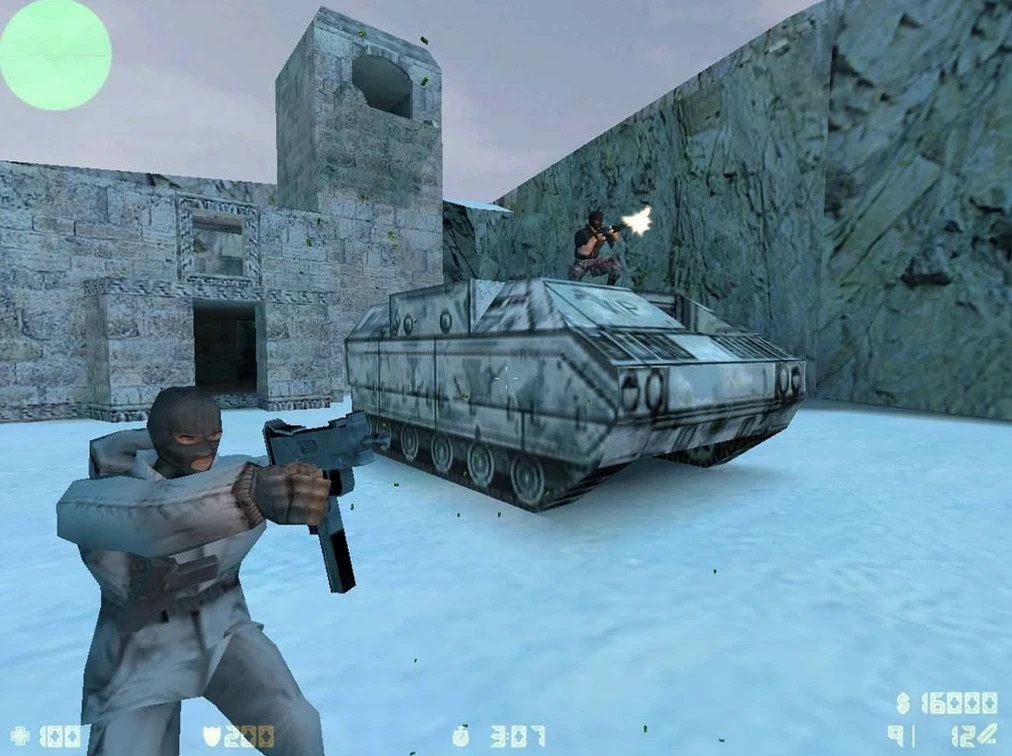
Counter Strike is still a favorite for teachers and students who want a quick, tactical team-based shooter during game club. The classic terrorist-versus-counter-terrorist format keeps rounds short and focused on objectives. On a Mac, the Wineskin package (version 10210 Rev 1) means you can play without Steam. Here is what to expect.
- The game runs on both Apple Silicon and Intel Macs, tested on macOS Tahoe with an M3 Pro.
- Controls use standard keyboard and mouse mapping; you can rebind keys in the options menu.
- Online matches work fine, though you may need to tweak network settings if you run into lag.
- Performance is smooth on modern hardware, but older Intel Macs might need lower resolution and detail settings.
- The package includes English and Russian interface languages.
- If the game fails to launch, run the Fix file from the disk image before starting.
For Mac mini users, switch your audio output to a non-external device before launching to avoid sound issues. It is a straightforward way to revisit or discover this landmark shooter on macOS.
Wineskin build wraps Windows Counter-Strike on macOS
Version 10210 Rev 1 is a Wineskin build, which means it wraps the Windows version of Counter Strike so it runs on macOS without needing Steam or a separate compatibility layer. The main change in this revision is improved support for Apple Silicon Macs. Earlier Wineskin builds sometimes required Rosetta 2 or manual configuration to run on M-series chips; this one detects ARM and x86-64 automatically and picks the right translation path. For day-to-day play, that means you can launch the game from Counter Strike mac torrent downloads or from the disk image and it just works, with no extra setup. The Fix file that comes in the package is still there for users who hit a black screen at startup, and the audio workaround for Mac mini remains necessary.
Game fails to launch or shows a blank screen
A few recurring issues show up when people set up this version on their Macs. Here are the ones I see most often in my game club, along with fixes that work.
- Game fails to launch or shows a blank screen. Run the file called Fix inside the disk image after you copy the app to Applications, not before. Some users try it from the mounted image; that only works if you run it from the same location where Counter Strike will launch.
- No sound or distorted audio. This happens most on Mac mini models. Switch your system audio output to the internal speakers or to a non-USB device before starting the game. You can switch back after the game loads.
- Mouse feels laggy or unresponsive. Open the game's options menu and disable mouse smoothing if it is on. Also check that your mouse polling rate is set to 125 Hz in your mouse's own software; higher rates can cause jitter in older games wrapped through Wineskin.
- Online matches disconnect or have high ping. The game uses older netcode. In the multiplayer menu, lower the rate setting to 10000 or 15000 and set cl_cmdrate and cl_updaterate both to 30 in the console (open it with the ~ key). This helps with modern routers and high-speed connections.
Game club leaders run controlled bot matches offline
This version of Counter Strike suits three kinds of Mac owners especially well.
Game club leaders and teachers. The single-player bot matches let you run a fair, controlled session without needing an internet connection. You can set the bot difficulty to easy for newcomers and scale it up as students improve. It also works on an iMac in a classroom where network ports might be restricted.
Fans of the original 2000-era gameplay. Later versions of Counter Strike added weapon skins, loot boxes and matchmaking. This build is the pure tactical shooter with no extras, just round-by-round buying, map objectives and skill-based gunplay. For people who want the game as it was, this is the version to keep installed.
Users with mixed hardware environments. Because the package runs on both Intel and Apple Silicon Macs, you can install it on a 2019 Intel MacBook Pro and on a 2023 M3 Pro MacBook Pro using the same disk image. The app detects the architecture at launch, so you do not need separate downloads or configurations for different machines.
Workflow: setting up a bot match for a classroom round
Here is the sequence I follow when I want to run a quick, offline game with my after-school club. It takes about two minutes from launch to first round.
- Open the app and wait for the menu. After copying Counter Strike to Applications, launch it from Launchpad. The main menu loads in a few seconds. If it does not, run the Fix file from the disk image and try again.
- Select Create Server from the menu. This opens the server settings screen. Change the game type to Deathmatch or Hostage Rescue, depending on how much time you have. Deathmatch keeps everyone respawning, good for beginners. Hostage Rescue works better for a focused 20-minute session.
- Add bots to fill both teams. Set the bot difficulty to Normal for a mixed-skill group. Leave the number of bots at 10 for a standard 5v5 setup. You can also check the box for Bot Quota Mode Fill, which keeps teams even if a player disconnects.
- Pick a small map. Choose de_dust2 or cs_assault — these maps have clear choke points and spawn areas, so students do not spend the whole round wandering. Avoid huge maps like de_aztec for a first session.
- Start the match. Click Done, then select Start Game from the lobby screen. Players get dropped into the buy zone with $800. The round timer is two minutes by default, which keeps things moving.
- End the match from the menu. When time is up or you need to switch activities, press Escape and select Disconnect. The game returns to the main menu. No scoreboard to save, no accounts to log out of.
I keep a copy of the Counter Strike anthology torrent on a USB drive for students who want to install it at home. The disk image from that archive works exactly the same way on their MacBooks, as long as they run the Fix file once after copying.
- macOS version not specified; tested on macOS Tahoe
- Architecture: Apple Silicon or Intel (64-bit)
Questions I keep getting
Can I play Counter Strike offline on Mac?
The game is designed for online matches, but you can play against bots offline for practice.
Does this version include the Counter Strike Anthology content?
No, this package is the base Counter Strike game only, not the Anthology bundle.
How to install
- Mount the downloaded disk image and drag the app to the Applications folder alias.
- After copying finishes, launch the app from Launchpad.
- If the game reports an error on launch, run the file named Fix in the disk image.
- For Mac mini use, switch audio output to a non-external device before launching the game.
Similar games




Sign in or join the club to leave a comment.
Nobody has commented yet.