- Version
- 1.3.20 (25350)
- Studio or maker
- Defiant Development
- Languages
- Russian, English, German, Hungarian, Spanish, Italian, Chinese (Simplified), Korean, Portuguese, Ukrainian, French, Japanese
- Activation
- DRM-free
- Chip type
- Intel 64-bit
- Tried out on
- macOS Sonoma, MacBook Air (M1. 2020)
- First released
- 17.02.2015
- Voice languages
- English, Chinese (Simplified)
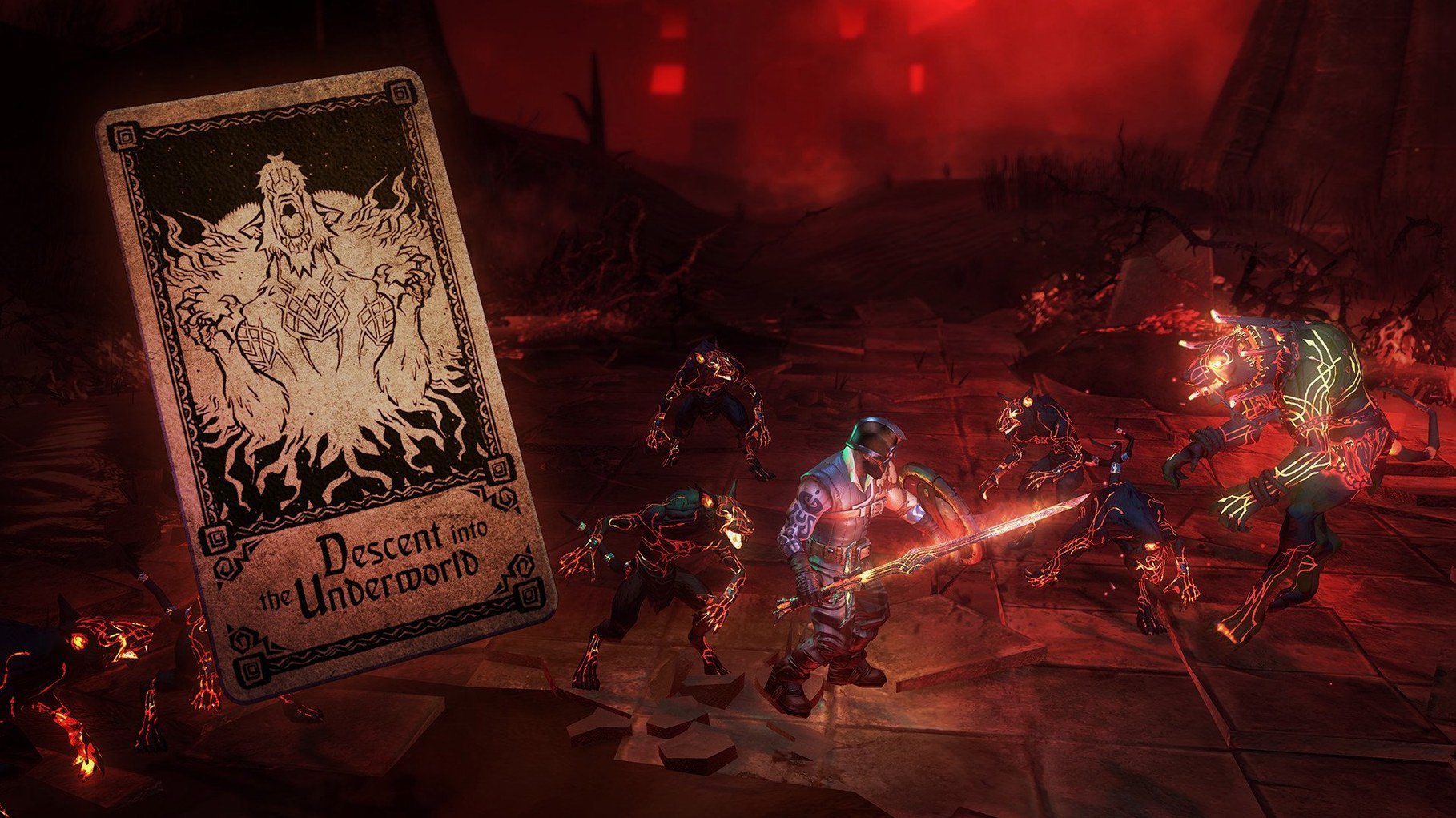
Picking an adventure and seeing your starting deck
I usually start a session by picking one of the adventures from the menu. The dealer greets me, offers a brief description of what lies ahead, and I am shown my starting deck. It is small: a few basic weapon cards, some armor, and a handful of encounter cards that will become the dungeon rooms I travel through.
From there, the game unfolds in layers. On the tabletop, I see a branching path of facedown cards. I click one to flip it. It might be a merchant offering a trade, a trap that tests my reflexes, or a fight. If it is a fight, the view pulls in close and I am in a small arena, fighting with the weapon that corresponds to the card I drew. Block, swing, dodge — the combat is simple but demanding. Once I clear the room, I return to the tabletop and choose the next card.
Between quests, I go back to the deck-building screen. Here I remove weaker cards and add newly earned ones. The trick is balancing offense with survival. Too many weapon cards and my dungeon will be packed with fights; too many food or healing cards and I might lack the damage to finish a boss. I spend a few minutes adjusting the ratios, then start the next adventure.
I play in short bursts, often between classes or after dinner. A single run can take twenty minutes or stretch to an hour, depending on how far I get. The dealer comments on my choices, taunts me when I stumble, and occasionally offers a hint. His presence gives the session a rhythm that keeps me coming back.
A specific task: building a deck for a boss fight
When I know a boss is waiting at the end of an adventure, I change how I build my deck. Here is the workflow I follow, step by step.
- Check the adventure preview. Before starting, the dealer tells me the boss's name and sometimes its weakness. I note whether it is a fast melee enemy or a magic user.
- Remove weak encounter cards. In the deck builder, I take out low-value trap cards and food cards that heal only a little. I want the dungeon to offer tougher fights that drop better loot, not small distractions.
- Add high-damage weapon cards. I slot in two-handed weapons or ranged cards, depending on the boss. Each weapon card in my deck means it can appear as a room reward or as my starting weapon.
- Include at least one artifact card. Artifacts give passive bonuses — extra health, faster attacks, or better block timing. One good artifact can turn a close fight into a clear win.
- Keep two food or healing cards. I do not remove all recovery. The boss fight itself has no healing between phases, so I need enough health to survive its first few attacks.
- Start the quest. Once the deck is set, I let the dealer shuffle and begin. The goal is to reach the boss with the right equipment and full health, which the deck layout controls.
This method is not guaranteed to work every time — the shuffle still introduces randomness — but it gives me a much better chance against the harder encounters.
Deck-building fans who enjoy Slay the Spire or Dominion
Hand of Fate suits different people for different reasons. Here are the groups that tend to enjoy it most.
- Deck-building fans who already play games like Slay the Spire or Dominion. The card management here is less abstract because each card becomes a real object in the combat phase. You see your sword card turn into a sword you swing.
- Roguelike players who appreciate permadeath and procedural content. Each run reshuffles the dungeon, so you cannot memorize a path. You adapt to what the dealer gives you.
- Action RPG players who want a lighter combat system. The fighting is not as deep as a dedicated brawler, but it is satisfying enough to break up the card game. If you enjoy games like Fable or Kingdoms of Amalur, the combat here will feel familiar without demanding hours of practice.
- Teachers and club leaders who run a game club. Hand of Fate works well for short sessions. One student can play a run while others watch and discuss the card choices. The dealer's narration and the visual switch between tabletop and combat keep everyone engaged, even the ones waiting for their turn.
If you own an Intel Mac and like games that reward planning as much as reflexes, this one is worth a spot on your shelf. The version 1.3.20 (25350) runs without issues on the hardware I have, and the language options make it easy to recommend to students whose first language is not English.
- macOS version not specified by developer
- Intel processor
Questions I keep getting
What kind of game is Hand of Fate?
It is a hybrid of roguelike, action RPG, and deck-building card games. You build a deck of cards that determines the dungeon levels you explore.
Does the game change each time I play?
Yes. The cards are shuffled, so each quest can play out differently depending on the deck you have built.
When was Hand of Fate released?
The game was released on February 17, 2015.
How to install
Open the downloaded disk image. Complete the standard installation process. Choose the destination folder for the game. Use the Applications folder if recommended.Similar games




Sign in or join the club to leave a comment.
Nobody has commented yet.