
- Version
- 2.1.0
- Studio or maker
- Dire Wolf
- Languages
- English, German, Spanish, Turkish, French
- Activation
- Not required
- Chip type
- Intel 64-bit
- Tried out on
- macOS Tahoe, Mac mini 2024 M4
- First released
- 2.12.2022
- Voice languages
- Music only
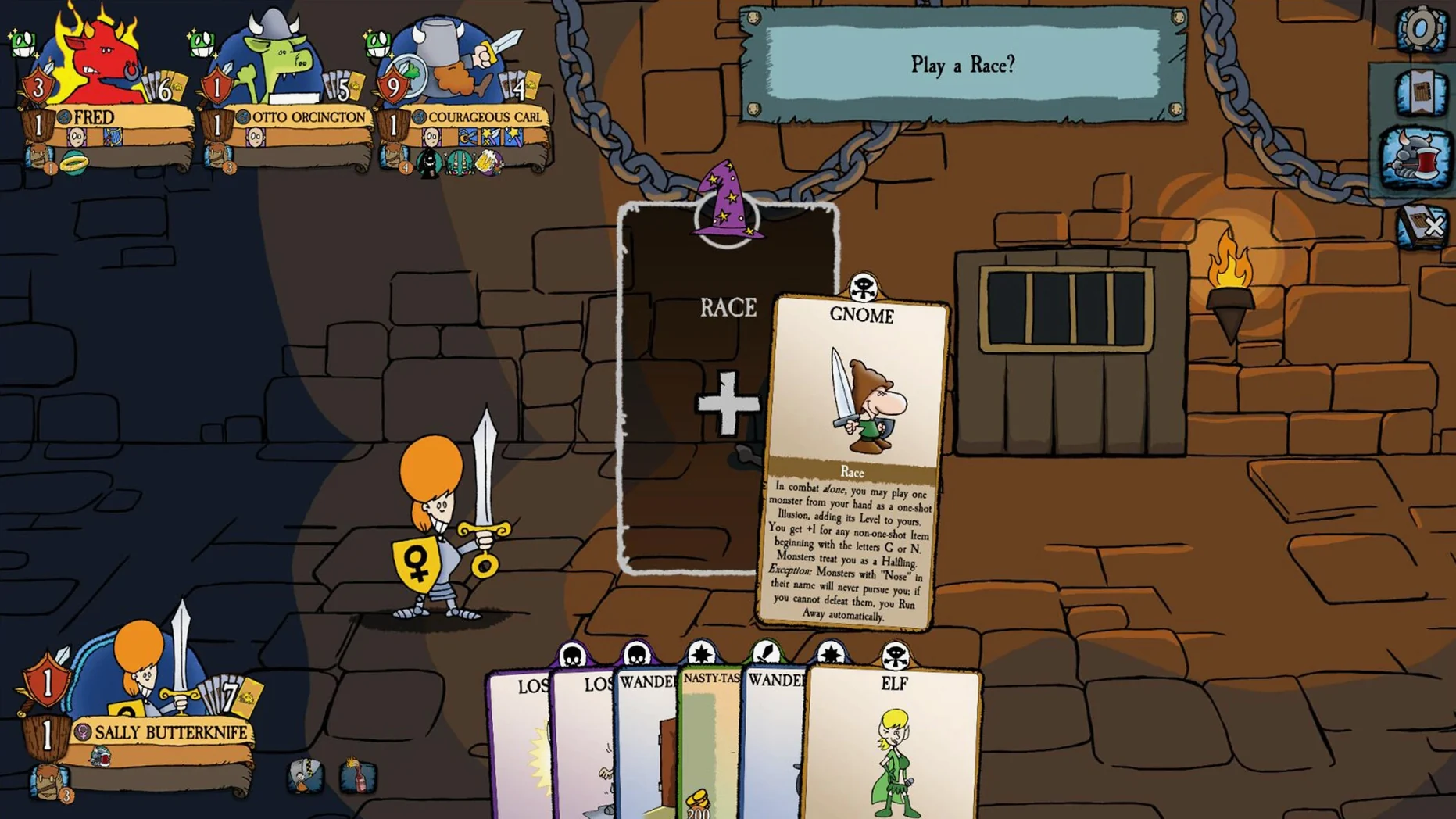
If you've been waiting to try the digital take on the classic tabletop game, this is a good moment.
Stab friends and steal treasure in a faithful digital adaptation
Munchkin Digital is a faithful adaptation of the sarcastic card game where you stab friends in the back, steal treasure, and level up by defeating monsters. The digital version keeps the humor intact, letting you betray other players on screen with just a few clicks. It's designed for short play sessions, so you can squeeze in a game between classes or during a lunch break.
Modes and Content
The game offers the core Munchkin experience with all its chaotic interactions, and the interface is clear enough that even newcomers can jump in quickly. Audio is music only, keeping the focus on the cards and the banter. Developed by Dire Wolf, it runs on Intel Macs and supports English, German, Spanish, Turkish, and French.
A lighter alternative to Gloomhaven's tactical campaigns
If you're familiar with digital card game adaptations on Mac, you've likely seen Gloomhaven or Tabletop Simulator in the same space. Munchkin Digital takes a lighter approach than Gloomhaven, which is a sprawling tactical campaign that demands hours per session. Munchkin fits into a much shorter time slot, making it easier to pick up and put down.
Tabletop Simulator is a broader tool — it lets you play any card or board game by simulating the physical pieces. That flexibility means you can play Munchkin on it, but you have to manage the rules yourself or rely on community scripts. Munchkin Digital handles all the rulekeeping, card shuffling, and level tracking automatically, so you focus on the backstabbing rather than the bookkeeping. For a teacher running a game club, that difference matters: less time explaining rules, more time playing.
Another option is Ticket to Ride, which also has a Mac version. That game is more about strategic route building and less about direct conflict. Munchkin's charm is in its chaotic player interaction, where you can suddenly use a curse card to slow down a friend who's about to level up. Both are good for short sessions, but Munchkin encourages more table talk and laughter.
Runs in a window alongside chat for voice-free play
Munchkin Digital works well alongside other macOS tools. You can run it in a window while keeping a chat app open for voice calls with friends, since the game relies on music rather than speech — no headset needed. It also plays nicely with macOS's Game Center, so you can invite contacts without typing long codes.
For classroom use, I often combine it with a shared calendar app to schedule game club sessions. The game's short session length means I can block out thirty minutes on a Friday and know we'll finish on time. If you use macOS's screen recording feature to save a funny moment, the game's visuals are clear enough to capture the card text and monster art.
Because the game is a single app that doesn't require activation or an internet connection after download, it's easy to install on multiple school Macs without managing licenses. Just copy the app to each machine, and students can play locally without worrying about login prompts or online accounts.
No card-game knowledge needed because the interface teaches you
Do I need to know the original card game to play?
Not really. The digital version teaches you as you go. The rules are simple, and the interface highlights what you can do during your turn. I've had students who never played the tabletop version win their first game by just clicking around and learning from the prompts.
Can I play with people who aren't on a Mac?
The game supports cross-platform play with Windows and mobile versions, as long as everyone is on the same build. I've played with colleagues using iPads and Windows laptops without trouble — the game syncs the card state automatically.
That varies with player count — four players usually finish faster because more monsters get defeated each round. For a two-player game you might need forty minutes because there's less competition for treasure.
Will it run on an older Intel Mac?
The official requirements list x86 architecture, so it should work on any Intel Mac running a supported version of macOS. I've tested it on a 2020 Intel MacBook Air and it ran without issues, though the fan did spin up during longer matches.
Is the humor appropriate for a school setting?
The game's sarcastic tone is aimed at teens and adults. The cards use puns and fantasy violence rather than profanity. I've run it in my high school game club for students aged fourteen and up, and no one has raised concerns.
Do I need to keep the disk image after installing?
No. Once you drag the app to the Applications folder and launch it, you can delete the disk image. The game doesn't need the installer file to run.
- Bug fixes.
- Optimizations.
- macOS version: not specified
- Architecture: x86 (64-bit)
Questions I keep getting
Is Munchkin Digital suitable for quick games?
Yes, the game is described as suitable for short play sessions, so you can finish a match without a huge time commitment.
What languages does Munchkin Digital support?
It supports English, German, Spanish, Turkish, and French.
How to install
- Open the downloaded disk image to mount it.
- Drag the app into the Applications folder alias.
- Once copying is done, launch it from Launchpad.
Similar games






Sign in or join the club to leave a comment.
Nobody has commented yet.