- Version
- v1.0
- Studio or maker
- Buka Development
- Languages
- Russian
- Activation
- Not required
- Chip type
- Intel 64-bit
- Tried out on
- macOS Sequoia, MacBook Air (M1. 2020)
- First released
- 18.02.2016
- Voice languages
- Russian
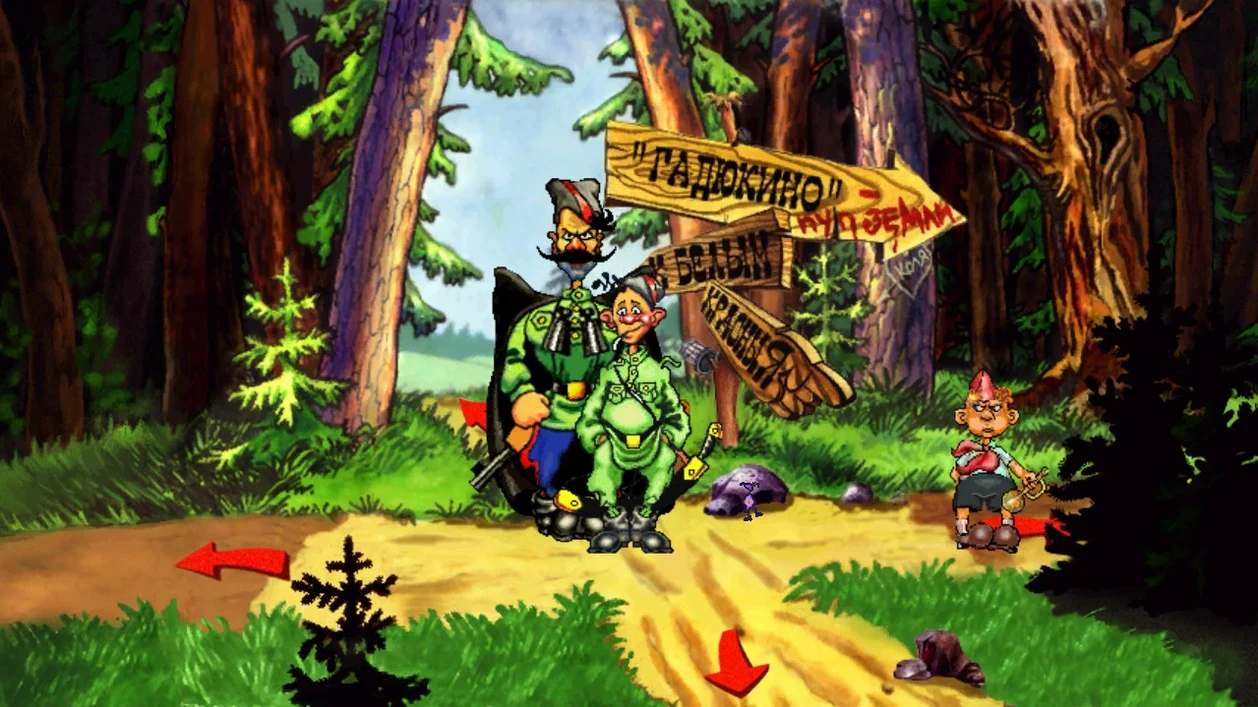
Every so often a student in the game club asks whether there are any games "from where my grandparents grew up". For the Russian-speaking families at our school, Red Comrades Save the Galaxy: Reloaded is one of the first I mention. It is a comedy quest starring Petka and Vasily Ivanovich, two heroes of a whole tradition of Russian jokes, and it is the kind of game parents remember and children find unexpectedly funny.
What kind of game is it?
It is a classic point-and-click adventure. You explore scenes, talk to characters, pick up objects and combine them to solve puzzles, and the story moves forward through dialogue. There is no time pressure and no reflex test, which makes it a good fit for players who like to think a problem through, or for a parent and child playing side by side.
Reloaded is a re-release of the original game adapted for modern computers. The original graphics and the original voice acting are kept, so it looks and sounds the way people remember it. What changed is underneath: the game code was rebuilt from scratch in Unity, and the picture now fits widescreen displays instead of leaving black bars at the sides.
Will I understand it if I do not speak Russian?
Honestly, probably not. The text and the voice acting are in Russian only, and in a dialogue-driven quest the jokes are most of the fun. I recommend it to Russian speakers, to families who want to share a piece of their childhood with their kids, and to students learning Russian who are ready for real spoken language with a lot of humor in it. For everyone else, it is better to pick an adventure with an English translation.
Which Macs can run it?
This build is made for Intel Macs (64-bit). It was checked on a MacBook Air with the M1 chip running macOS Sequoia, so a recent Apple silicon Mac can run it as well, through Apple's translation layer. The developer does not list a minimum macOS version. A quest like this is light on hardware, so even an older Intel MacBook should not struggle with it.
What is new in version 1.0?
Version 1.0 of Reloaded was released on February 18, 2016, by Buka Development. Compared with the original release, it brings the Unity rebuild, widescreen support, achievements and Steam trading cards.
How can a family play it together?
Quests like this one are wonderful to play in pairs. Let one person hold the mouse while the other keeps a short list of objects and ideas on paper; switch roles after each solved puzzle. When you get stuck, stop and talk through what each character said, because in a dialogue-driven game the hint is almost always in a line you heard earlier. If a child does not catch a joke, pausing to explain it is half the value, especially when the joke comes from a story their grandparents grew up with. And there is no rush: you can save, close the laptop, and pick the story up again the next evening.
A tip before the first launch
If the game shows an error the first time you open it, do not give up on it. The disk image includes a small repair file. Run it once, then start the game again from Launchpad. In my experience this solves most "it won't open" questions before they turn into a long conversation.
- The game code was rebuilt in Unity.
- Widescreen displays are supported.
- Achievements were added.
- Steam trading cards were added.
- macOS version not specified by the developer
- Intel Mac, 64-bit (also checked on an M1 MacBook Air with macOS Sequoia)
- Russian text and voice only
Questions I keep getting
Is there an English version of the voice acting?
No. This release has Russian voice acting and Russian text only, so it is best for players who understand Russian.
Does it work on an Apple silicon Mac?
The build is for Intel Macs, but it was checked on an M1 MacBook Air with macOS Sequoia, so Apple silicon Macs can run it too.
How to install
- Mount the downloaded disk image.
- Drag the app onto the Applications folder alias.
- When copying finishes, launch the game from Launchpad.
- If the game shows an error at launch, run the repair file included in the disk image, then try again.
Similar games

Sign in or join the club to leave a comment.
Nobody has commented yet.