- Version
- 1.3.0
- Studio or maker
- Ananki Game Studio
- Languages
- Russian, English, German, Spanish, Italian, Chinese (Simplified), Korean, Norwegian, Portuguese, Ukrainian, French, Japanese
- Activation
- Not required
- Chip type
- Apple Silicon, Intel 64-bit
- Tried out on
- macOS Sonoma, MacBook Pro (M3 Max. 2023)
- First released
- 22.05.2024
- Voice languages
- English
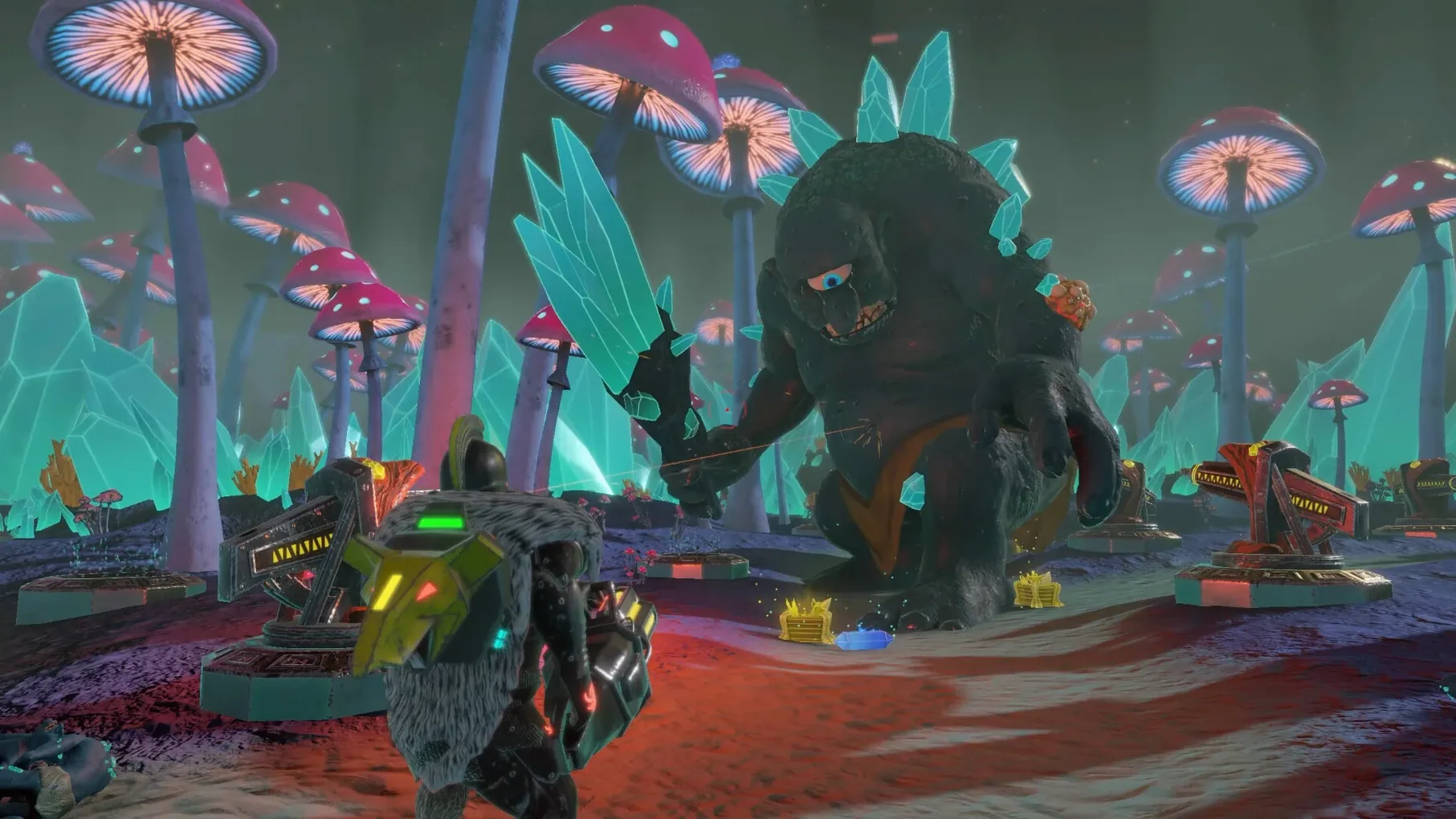
Skill upgrades in The Fate of Baldr aren't just number boosts — each class has its own weapon tree, so a reroll changes how you place towers and defend the ship against waves. That deeper layer is what keeps the third-person tower-defense loop fresh after the first few boss fights.
Can you really play solo, or is co-op required?
You can play through all of it alone. Cooperative play is there if you want it, but the entire campaign and boss battles work just as well with one player.
Which tower placement choices matter most?
Key chokepoints near the ship matter most, because enemy waves come from multiple sides. Placing towers at those points and then upgrading their skills as you earn resources makes the difference between a smooth defense and a scramble.
Does the M3 Max test tell us anything about older Macs?
The build was tested on macOS Sonoma with an M3 Max, but since the game supports both Intel and Apple Silicon, it should run on any Mac that meets the macOS Sonoma requirement. Older hardware may need lower settings.
Third-person perspective sets it apart from other Mac tower-defense games
If you have played tower-defense games on a Mac before, you know that most of them sit firmly in a top-down view. The Fate of Baldr feels different right away because of that third-person perspective. Games like Defense Grid: The Awakening or Kingdom Rush give you a clean overhead map where you place towers and watch. Here, you are down on the ground with the ship, moving a character who fights close-up while you manage towers from that same view. That changes how you read the battlefield — you see enemy height and approach angles in a way a flat map does not show.
Another difference is the class system. Most tower-defense games let you pick towers and upgrade them, but your personal character is just a cursor. In The Fate of Baldr, your Viking class has its own weapons and skills that you upgrade separately from the towers. That dual progression gives you two parallel things to improve between waves: your own combat ability and your defensive layout. Games like Orcs Must Die! do something similar with a hero character, but the Norse setting and the ship-defense objective here create a different rhythm. You are not holding a chokepoint in a corridor — you are protecting a moving vessel, which shifts where enemies come from.
For co-op play, The Fate of Baldr keeps things straightforward. You can invite a friend without needing to manage separate lobby systems or matchmaking queues. Some co-op tower-defense games require both players to unlock towers individually, but here both players share the resource pool during a match, which makes coordination more natural.
A first defense mission from start to finish
When you start a new game, the first thing you see is the ship in its environment. You have one Viking class chosen. Before the first wave, take a moment to look at the approach paths — enemies will come from two or three directions depending on the map. Walk your character to the spot where those paths converge nearest to the ship. That is where your first tower goes.
Place the tower and then spend your starting resources on one upgrade for it. Do not spread resources thin yet. As the first wave begins, stay near the tower so you can fight enemies that slip past while the tower handles the main group. Collect resources that drop from defeated enemies — these let you upgrade the tower during the wave, not just between waves. That real-time upgrade option is important because the first boss often appears midway through the mission.
By the time the boss arrives, you should have that first tower at level two or three and some personal skill points spent on your class weapon. Fight the boss by circling around it, using your ranged attack if your class has one, and letting the tower damage it while you dodge. After the boss falls, you get a resource bonus. Use it to place a second tower at the next chokepoint before the final wave begins. That two-tower setup, with one upgraded more than the other, usually carries you through the first mission cleanly.
Stick with one class for the first three missions
Start by playing through the first three missions with one class before switching. Each class handles differently, and learning one set of weapon upgrades thoroughly teaches you the game's pacing. Trying to learn all four at once makes it harder to recognize which tower placements work best for each class.
Pay attention to resource drops during waves. It is easy to focus on fighting and forget to collect them, but those mid-wave resources are what let you upgrade towers before the next big push. Make a habit of moving toward dropped resources after every few kills.
Experiment with tower placement on the same mission more than once. The first time you play a map, you might put a tower where it feels natural. The second time, try a spot that seems risky — sometimes a tower placed far forward catches enemies before they split up, which makes the rest of the defense easier.
- macOS Sonoma
- Intel or Apple Silicon
- Interface languages: Russian, English, German, Spanish, Italian, Simplified Chinese, Korean, Norwegian, Portuguese, Ukrainian, French, Japanese
Questions I keep getting
What languages does the interface support?
Russian, English, German, Spanish, Italian, Simplified Chinese, Korean, Norwegian, Portuguese, Ukrainian, French, and Japanese.
How many players can play together?
The game supports cooperative play for more than one player, but the exact player count is not specified beyond that.
How to install
- Open the downloaded disk image to mount it.
- Drag the app into the Applications folder so macOS can find it easily.
- Once copying finishes, launch the game from Launchpad.
Similar games





Sign in or join the club to leave a comment.
Nobody has commented yet.