- Version
- 1.4
- Studio or maker
- vesslo
- Languages
- English, German, Korean
- Activation
- Not required
- Runs on macOS
- macOS 12 or later
- Chip type
- Apple Silicon, Intel 64-bit
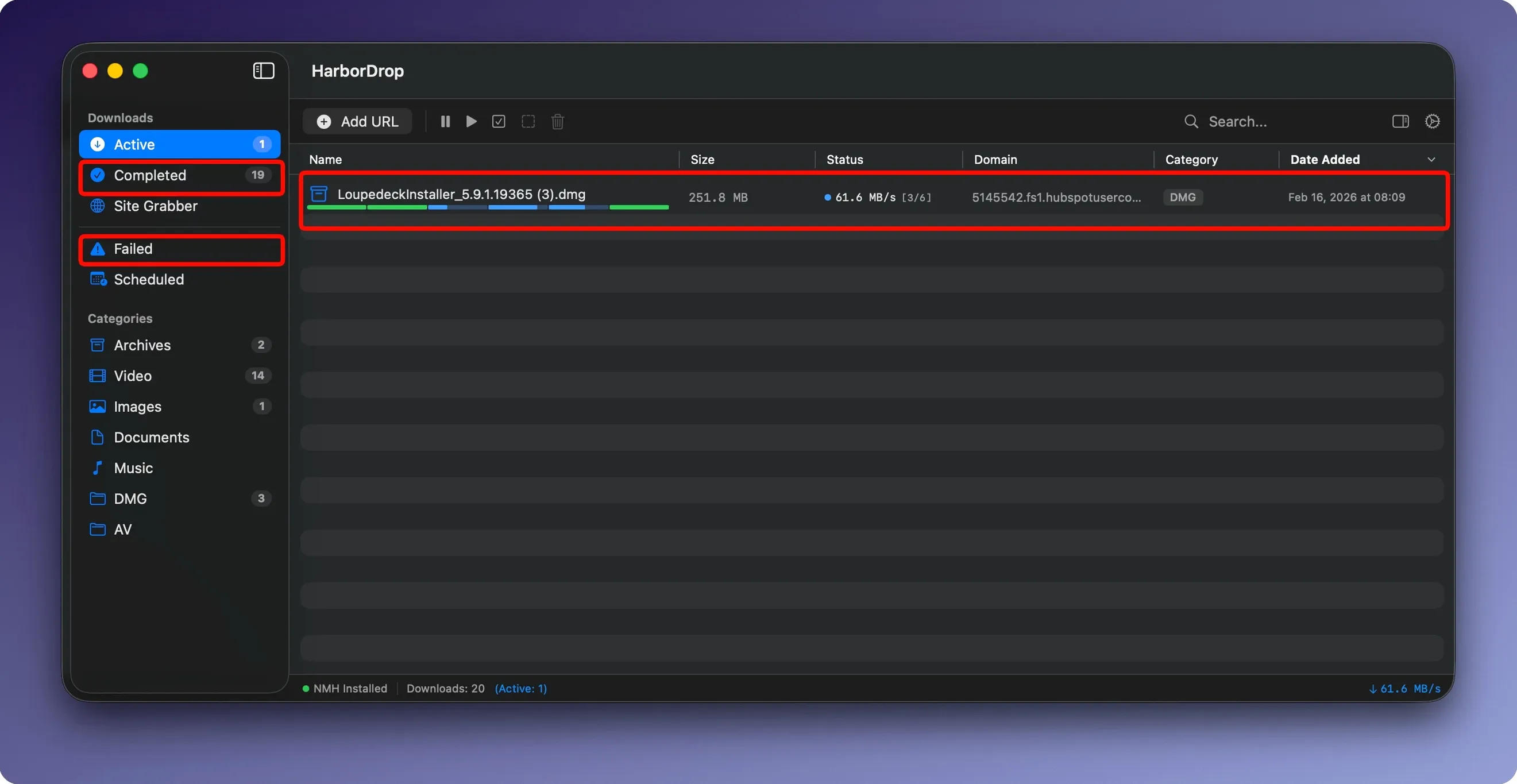
HarborDrop is a macOS download manager for people who want more control than a standard browser offers.
What to ask before installing
- Will it catch big or segmented files? Yes, HarborDrop splits downloads into segments to speed them up, and it handles tricky formats like HLS streams and m3u8 playlists.
- Can I use it with my usual browser? It has extensions for Firefox, Brave, and Edge, so you can send downloads straight from the page.
- What happens after a file finishes? You can set it to run an AppleScript, which is handy for moving files, renaming them, or triggering a backup.
I found HarborDrop easy to explain to students: it is an IDM alternative for Mac, designed for those who want more than a basic download button. The Site Grabber feature lets you set a crawl depth, so you can pull a whole folder of linked resources, not just a single file. For non-DRM videos, it saves them for offline viewing, which makes it useful for teachers preparing materials at home.
Arc browser support for school and home use
HarborDrop’s current version keeps the same core workflow, but a few refinements make a difference during a school week. The extension now supports Arc, which uses Chromium under the hood, so if you manage multiple browsers across school and home machines, you can send downloads to HarborDrop from any of them without switching habits.
The six-segment default still applies for parallel downloading, but you can adjust the number if your connection prefers fewer splits. For classroom scenarios where several people share a network, lowering the segment count can prevent your downloads from competing too aggressively with everyone else’s traffic. I leave mine at four during lesson planning and bump it up when I am alone.
The Site Grabber now works with a specified crawl depth, which saves time when you need a series of linked resources, such as a folder of reference PDFs or a set of tutorial images. You set the depth once, and HarborDrop collects everything within that range. It is not a web scraper, but it is faster than clicking each link by hand.
Manual pasting into HarborDrop from Safari
HarborDrop works alongside Safari indirectly: you use the browser extensions for Chrome, Edge, Brave, Arc, or Firefox, then the download manager takes over. If you prefer Safari, you can still copy a link and paste it into HarborDrop manually. It does not replace your browser’s download manager completely, but it handles large or multiple files more predictably.
After a download finishes, you can have it run an AppleScript, a Shell script, or even JavaScript. This is where the real integration happens. For example, I have an AppleScript that renames downloaded files to match my school’s naming convention and moves them into a shared folder. It triggers automatically, so I do not need to sort through the Downloads folder afterward.
The option to open the file’s folder in Finder after completion is straightforward but saves a few clicks when you are moving quickly between tasks. Combined with automatic sorting by site domain or file type, you can keep your download folder organized without manual effort.
Forgetting to install the browser extension first
The most common slip I see is forgetting to install the browser extension first. HarborDrop works as a standalone app, but without the extension, you have to copy and paste URLs manually, which defeats the purpose. Install the extension for your browser of choice before you start downloading.
Another mistake is leaving the segment count at maximum on a shared or older network. More segments are not always faster; they can overwhelm a connection that has limited bandwidth. Start with four or five, and increase only if your connection handles it well.
New users sometimes expect the Site Grabber to download entire websites, but it is designed for linked files within a set crawl depth, not full site mirrors. Set a depth of one or two for most classroom projects, and you will get what you need without pulling unrelated content.
Finally, people overlook the post-download automation because it sounds technical. An AppleScript can be as simple as “move to a folder named ‘Downloads’,” which takes five minutes to write. Even if you never write code, a short script or a Shell command saves time over time.
No download caps vs. Folx's free restrictions
Folx. Folx has a split-download feature and supports torrents, which HarborDrop does not. Folx also offers a built-in search for media files. HarborDrop does not impose those restrictions, and its post-download scripting is more flexible for users who want automation.
iDown. iDown is simpler, focusing on HLS stream downloading and media capture. It does not include a Site Grabber or multi-browser extension support. HarborDrop covers more ground for users who need sorting, scripting, and bulk link collection alongside stream downloads.
Internet Download Manager (IDM) for Mac. IDM for Mac has a similar feature set, including segmented downloads and browser integration. HarborDrop opens the folder in Finder automatically and lets you run AppleScripts, Shell scripts, or JavaScript, which IDM does not offer natively. If you rely on custom automation, HarborDrop gives you more control without needing third-party helpers.
- macOS 12 or later
- Intel or Apple Silicon
- Activation not required
Questions I keep getting
Which browsers does the HarborDrop extension support?
The extension works with Firefox, Brave, and Edge.
Can HarborDrop download video streams?
Yes, it supports HLS streams and m3u8 playlists, and it can save non-DRM video from supported sites for offline viewing.
Does HarborDrop support automation after a download?
Yes, you can run an AppleScript after a download finishes.
How to install
- Open the downloaded disk image to mount it.
- Drag the app into the Applications folder so it becomes available system-wide.
- Launch it from Launchpad once the copying is done.
Similar apps






Sign in or join the club to leave a comment.
Nobody has commented yet.