- Version
- 2.10.2
- Studio or maker
- MacPaw
- Languages
- Russian, English, German, Spanish, Italian, Chinese (Simplified), Dutch, Polish, Portuguese, Ukrainian, French, Japanese
- Activation
- K'ed by TNT team
- Runs on macOS
- macOS 10.13 or later
- Chip type
- Intel 64-bit
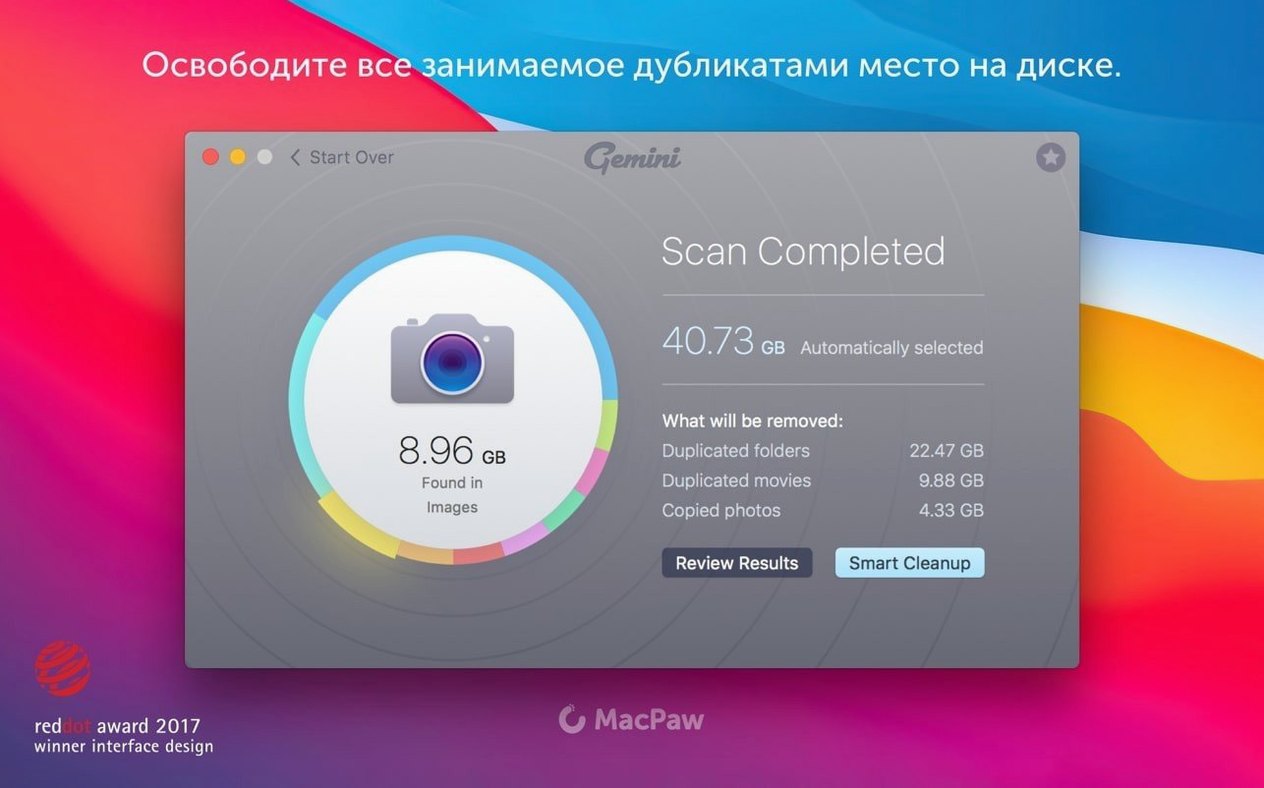
Gemini 2 is a duplicate file finder for macOS that locates and removes duplicate files, even in remote parts of your system.
What versions of macOS does it run on?
Gemini 2 version 2.10.2 requires macOS 10.13 High Sierra or newer. It runs on Intel Macs with 64-bit processors. Earlier versions of Gemini 2 supported macOS 10.10 through 10.12, so the current release drops support for older systems.
How do you scan and review duplicates?
The app scans your drives and shows results in a clear interface where you can review files before taking action. You can select, group, and move duplicates. Smart Select helps automate file selection during cleanup. It supports images, music, video, folders, and libraries.
What happens after you remove files?
A Recently Deleted area lets you restore files you removed, giving you a safety net. The app is installed by dragging it to the Applications folder.
Start a weekly cleanup after your last class
I usually start a session on a Friday afternoon, after my last class. The Mac has been gathering screenshots, downloaded lesson materials, and duplicate photo exports for a week. I open Gemini 2 and click the big scan button. The app begins searching through my home folder, the Downloads pile, and the Desktop. While it works, I can walk away or grade a few papers. The scan finds several groups of identical files: the same PDF of a geometry worksheet saved in three places, duplicate vacation photos from last summer, and multiple copies of a music file I used for a school project.
Once the scan finishes, the interface shows each group of duplicates. I click through the groups one at a time. Gemini 2 has already preselected which copies to remove, marked with a check. In the photo group, it keeps the original and flags the rest. I review each choice. Sometimes I disagree — I keep a second copy of a spreadsheet in a backup folder on purpose. I uncheck that one. For the music files, I let the app decide; it marks the oldest copies. After a quick review, I click the remove button. The files go to the Recently Deleted area, not straight to the Trash, so I have a week to change my mind.
I close the app and move on. The next time I open it, Gemini 2 remembers my previous choices and applies similar logic to new scans. That saves time on repeat sessions.
Open duplicates in Finder or scan Photos and iTunes
Gemini 2 works alongside macOS tools like Finder and Time Machine. When you review duplicates, you can open the file location in Finder to see context before deleting. The app also scans Photos and iTunes libraries, catching duplicates stored inside Apple's media apps. If you use iCloud Drive, Gemini 2 finds copies saved both locally and in the cloud folder. It does not delete iCloud files without asking, but it shows you where each copy lives.
For teachers like me, this is useful. I keep lesson plans in iCloud, but I also save working copies to the Desktop. Gemini 2 catches those pairs and lets me clean up without losing anything important. The Recently Deleted area acts like a second Trash, and you can empty it from within the app or let files expire on their own. If you use multiple user accounts on the same Mac, each account has its own Gemini 2 scan scope. You cannot accidentally remove another user's files unless you run the scan with their permissions.
Don't trust Smart Select without a quick review
- Trusting Smart Select without reviewing. Smart Select is good at guessing, but it is not perfect. I have seen it mark two copies of a document when both were needed in different folders. Always glance through the groups before clicking remove.
- Scanning the entire system drive on the first run. Beginners often select the whole Mac for a first scan. That takes a long time and returns many false positives from system caches. Start with one folder — Downloads or Desktop — to learn how the app works.
- Not checking the Recently Deleted area. Some users empty it immediately, thinking they saved space. Wait a few days. I once restored a file a week after removing it, when I realized I needed it for a lesson revision.
- Ignoring similar files. Gemini 2 finds near-identical files, like photos taken in burst mode or renamed document versions. Beginners sometimes skip this filter. Those similar files are often the biggest space wasters.
- Forgetting to update. Older versions of Gemini 2 may not scan newer macOS file structures properly. The current 2.10.2 release handles High Sierra and later well, but if you use a very old build, the scan might miss duplicates in certain folders.
Skip system folders in Preferences after first scan
Gemini 2 does not have many settings, but the ones it has make a difference. Open Preferences after the first scan. Set the scan scope to skip system folders — you almost never need to scan Library or System. Choose which file types to include. If you only clean up documents and photos, uncheck music and video to speed up scans. The app remembers these choices across sessions.
Another useful setting is the Recently Deleted retention period. The default is seven days, which is fine for most people. If you are cleaning before handing a Mac to someone else, you might shorten it to a day or two. You can also tell Gemini 2 to automatically move duplicates to Trash instead of holding them in its own Recently Deleted area. I do not recommend this for beginners. The built-in safety net is worth keeping.
Gemini 2 Mac torrent aside, this AI assistant helps Mac users draft and refine text. The 2.10.2 release supports macOS 10.13 and later on Intel Macs. Older releases exist for earlier systems, but they lack some improvements. A gemini torrent or gemini 2 crack might lead to outdated builds, so check the version before installing. The process for gemini mac torrent installs is the same: mount the disk image, bypass Gatekeeper if needed, drag the app to Applications, and open it.
- macOS 10.13 High Sierra or later
- Intel 64-bit processor
How to install
- Mount the disk image. Open Gatekeeper friendly.
- Press Enter in the Terminal window to bypass Gatekeeper.
- Drag the app into the Applications folder.
- Open the app after installation.
Similar apps




Sign in or join the club to leave a comment.
Nobody has commented yet.