- Version
- 4.6.0
- Studio or maker
- Macroplant
- Languages
- English
- Activation
- K'ed by TNT team
- Runs on macOS
- OS X 10.10 or later
- Chip type
- Intel 64-bit
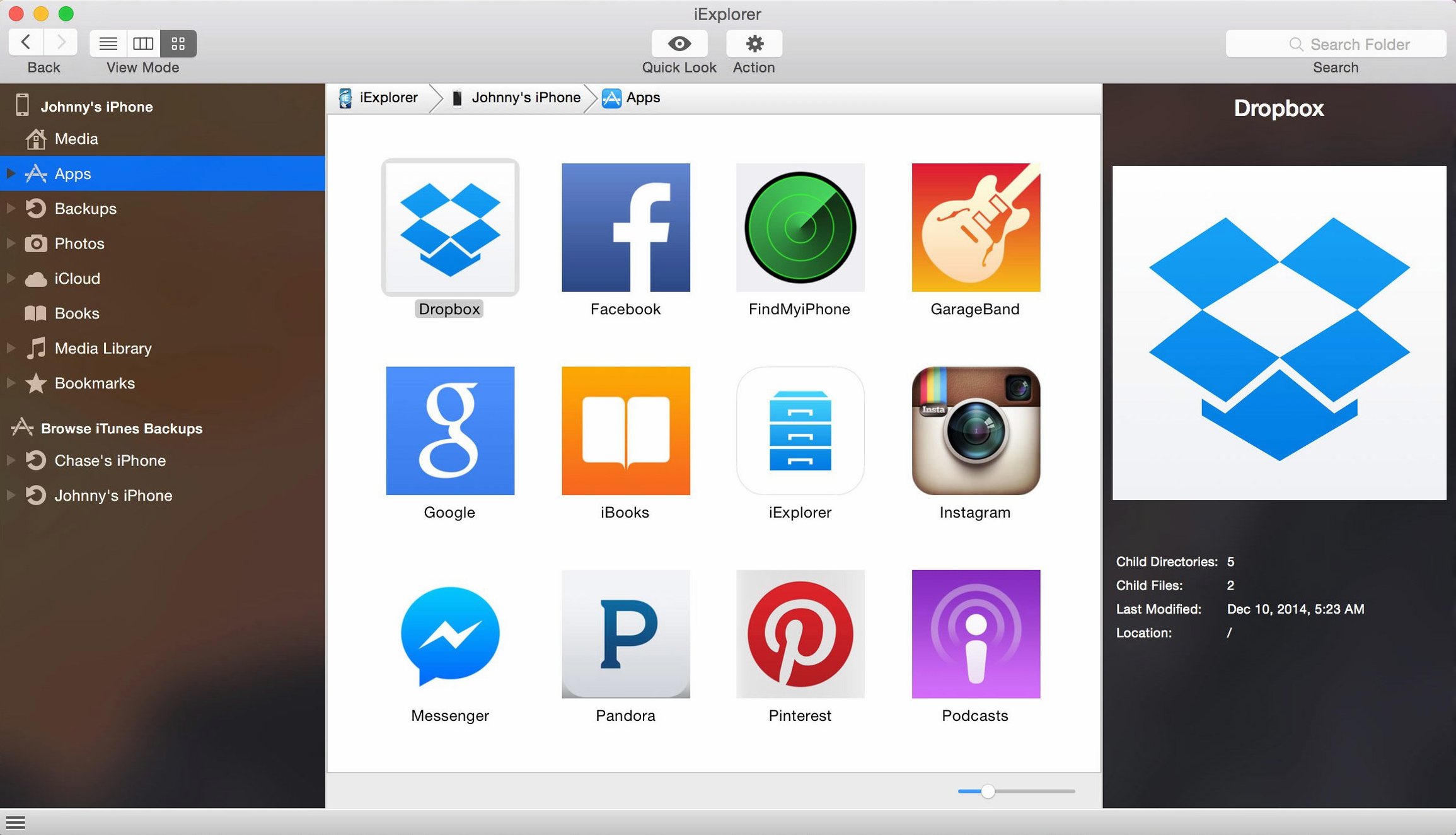
You have an iPhone full of old message threads and a backup you want to pull a single photo from without restoring the whole device. iExplorer version 4.6.0, released October 2022, is a file transfer utility that lets experienced users browse and transfer content from connected iOS devices without needing a jailbreak.
Browse photos, texts, and app data from your device
- Browsing photos, files, text messages, and app data directly from an iPhone, iPad, or iPod.
- Viewing and exporting app documents, icons, and other files stored on the device.
- Checking iCloud storage content, including backups and app data.
- Mounting the device as a disk in Finder for quick file access.
- Transferring music and playlists from an iOS device back into iTunes.
Runs on macOS 10.10+ with iTunes, no jailbreak needed
- Works on macOS 10.10 or later, Intel 64-bit only, with iTunes installed.
- Interface is in English.
- Does not require a jailbreak — it works with standard connected devices.
A sample workflow: pulling a single text message from a backup
Let me walk through one common task. You have an old iPhone backup on your computer, and you need one text from a conversation that was never synced to the cloud. Open iExplorer and click the "Backups" section in the left panel. The app scans your backup folder and lists every archived device. Select the relevant backup, then expand the "Messages" area inside it. iExplorer shows the full thread with timestamps. Find the message you need, select it, and click "Export" — the app saves it as a plain text file on your desktop. No need to restore the entire backup to your phone to get that one detail.
Fix connection and access issues quickly
Device not showing up in iExplorer
If your iPhone or iPad does not appear in the left panel, check that iTunes is installed and running. iExplorer relies on iTunes for device detection. Quit iExplorer, open iTunes, connect your device, confirm it appears in iTunes, then launch iExplorer again. On macOS 10.10 through 10.14, you may need to accept a "Trust this computer" prompt on the phone itself.
Mount as disk option is grayed out
The "Mount as Disk" feature needs a connected device with the screen unlocked. If the phone is locked or the USB cable is loose, the option stays unavailable. Unlock the device, reconnect the cable, and wait ten seconds for iExplorer to refresh. If it still does not work, restart iExplorer with the phone still plugged in.
Transferring music to iTunes fails
Sometimes a playlist or song does not copy back into iTunes. This usually happens when the file format is one iTunes does not read natively, such as certain protected AAC files. iExplorer will still copy the file to your computer, just not into the iTunes library automatically. You can drag the resulting file from the iExplorer export folder into iTunes manually.
Set up your device connection and test a file export first
Take a full backup first
Before you start exploring or moving files, let iExplorer make a complete backup of your device. The backup takes a few minutes but gives you a safety net. Once it is saved, you can browse the live device freely knowing you have a fallback if anything goes wrong during a file transfer.
Use the iCloud tab for forgotten items
If you cannot find a photo or document on the device itself, check the iCloud section in iExplorer. It shows files synced to your iCloud account, including recent backups and app data. This is useful for pulling content from a device you no longer have or from a phone that was wiped before you saved everything.
Keep the export folder organized from day one
iExplorer dumps exported files into a default folder, and after a few sessions it can get messy. Before your first export, set a dedicated folder on your desktop or in Documents. Name it "iExplorer exports" and point each export there. That way, when you search for an iexplorer torrent or iexplorer mac crack later, you will not be digging through stray files to find the one message you saved last week.
Start with one small task, like grabbing a single photo or a contact. Once you see how the interface works, the rest of the features fall into place naturally.
- iOS 16 compatibility improvement.
- macOS 10.10 or later
- Intel 64-bit architecture
- iTunes installed
- Interface language: English
Questions I keep getting
Do I need to jailbreak my iPhone to use iExplorer?
No. iExplorer works with standard connected iPhone, iPad, or iPod devices without any jailbreak.
Can iExplorer transfer music from my iPhone to my Mac?
Yes. It can transfer music and playlists from an iPhone, iPod, or iPad directly to iTunes.
What macOS versions does iExplorer 4.6.0 support?
It supports macOS 10.10 or later, on Intel 64-bit systems with iTunes installed.
How to install
- Mount the disk image and launch the app. If Gatekeeper blocks it, choose the Open Gatekeeper-friendly option.
- Press Enter in Terminal when prompted to bypass Gatekeeper.
- Drag the app to the Applications folder.
- Launch the app when installation is complete.
Similar apps





Sign in or join the club to leave a comment.
Nobody has commented yet.