
- Version
- 9.5.0
- Studio or maker
- Tenorshare
- Languages
- Russian, English, German, Arabic, Spanish, Italian, Chinese (Traditional), Chinese (Simplified), Portuguese, French, Japanese
- Activation
- K'ed by TNT team
- Runs on macOS
- OS X 10.8 or later
- Chip type
- Intel 64-bit
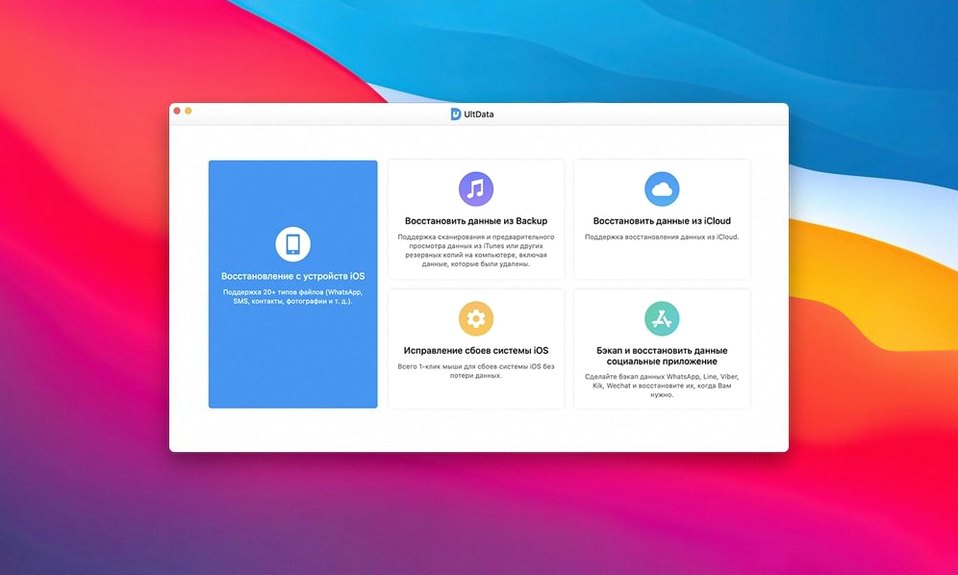
Recovering deleted reminders or voice memos from a backup is one thing, but UltData’s deeper toolkit lets you pull Safari history, iBook content, and notes that most recovery apps skip. For an experienced user, the real value is in the granular control: you choose exactly which data types to scan, from contacts and messages to music and reminders, without wading through a full backup dump. The interface feels deliberate, not cluttered.
- Select recovery mode. Choose between recovering from an iOS device directly or from an iTunes or iCloud backup. Each path reveals different data sets.
- Pick specific data types. Uncheck everything except what you need — reminders, notes, voice memos, Safari history, or photos. This cuts scan time and clutter.
- Scan and preview. After the scan, browse items by category. UltData shows previews for contacts, messages, and photos before you restore.
- Export selectively. Mark only the items you want and export them to your Mac. No need to restore an entire backup.
UltData for Mac runs on OS X 10.8 and later, supports iPhone XS, XR, and older models, and speaks eleven interface languages. It is a 64-bit Intel app, so it works on Intel Macs without a hitch.
Bundles iOS recovery features other apps split apart
If you have used other iOS data recovery tools on Mac, you probably noticed that many of them split their features across separate products. One app handles WhatsApp only, another does photos, and a third tackles notes. UltData bundles all of those into a single scan. That saves you from juggling multiple tools or paying for more than one piece of software.
Compared to apps like iMazing or PhoneRescue, UltData leans harder on the three-recovery-mode approach. iMazing focuses on device management and selective backup browsing, which is useful, but its recovery is limited to what the backup already contains. UltData’s direct-from-device scan can pull data that never made it into a backup in the first place — like recent voicemail or app documents from Viber or LINE. PhoneRescue covers similar ground, but its scan often takes longer because it does less filtering upfront. UltData lets you pick data types before the scan runs, so you can exclude Safari history or iBook content if you only need contacts.
For classroom or family use, the interface language support is a practical difference. With eleven languages built in, including Arabic, Russian, and Japanese, you can hand the app to a colleague or student who does not work in English and they can navigate it without translation help. Most competitors offer fewer languages or require a separate language pack.
Set recovery mode and file types before your first scan
Before you run your first scan, check a few options that change how the app works. These are not buried deep — they appear in the main window before you start a recovery mode.
- Recovery mode selection. Do not default to iTunes backup just because it is the first option. If you have the device connected to your Mac, choose the direct scan. It pulls app-specific data like WhatsApp and Kik conversations that backups might skip.
- Data type checkboxes. Uncheck everything you do not need. If you only want photos and app videos, deselect contacts, messages, Safari history, and voice memos. The scan finishes faster and the preview list is shorter.
- Export format. Some recovery tools export contacts as CSV files, which can be awkward to re-import. Check whether UltData offers a native format for your purpose before you restore.
- Language. If English is not your first language, the interface language selector is straightforward. It is listed in the preferences, not hidden in a submenu.
Works on Macs from 2011 with OS X 10.8 or later
UltData version 9.5.0 runs on any Mac with OS X 10.8 or later and a 64-bit Intel processor. That covers models from about 2011 onward, including the MacBook Pro, MacBook Air, iMac, Mac mini, and Mac Pro from that era. It does not run on PowerPC Macs or early Intel models with 32-bit processors.
The app is distributed as a disk image. After mounting it, you need to bypass Gatekeeper once using a Terminal command, then drag the app into your Applications folder. That is a one-time step. After that, the app opens normally and does not ask for administrator privileges each time you scan a device.
If you search for ultdata torrent or tenorshare ultdata torrent, you will find the same version that works on Intel Macs. For users on older hardware like a 2012 Mac mini running OS X 10.8, this is one of the few current recovery tools that still supports that system. Ultdata mac users on Intel machines can expect the interface to load quickly and scans to proceed at a pace determined by the amount of data selected.
The app requires a USB connection to your iPhone, iPad, or iPod touch. It supports devices from the original iPod touch through the iPhone 11 Pro Max, so almost any iOS device you own will work. The connection does not need a data plan or an active SIM card — just a cable and the device unlocked.
- macOS OS X 10.8 or later
- Intel 64-bit processor
- Interface languages: English, German, French, Spanish, Italian, Portuguese, Russian, Arabic, Traditional Chinese, Simplified Chinese, Japanese
How to install
- Mount the disk image and launch the installer. The app uses a standard drag-to-Applications setup.
- Press Enter in Terminal to bypass the Gatekeeper warning.
- Drag the app into the Applications folder.
- The app is ready to use immediately.
Similar apps



Sign in or join the club to leave a comment.
Nobody has commented yet.