
- Version
- 2.104
- Studio or maker
- Tunabelly Software
- Languages
- English
- Activation
- K'ed by TNT team
- Runs on macOS
- macOS 10.13 or later
- Chip type
- Intel 64-bit
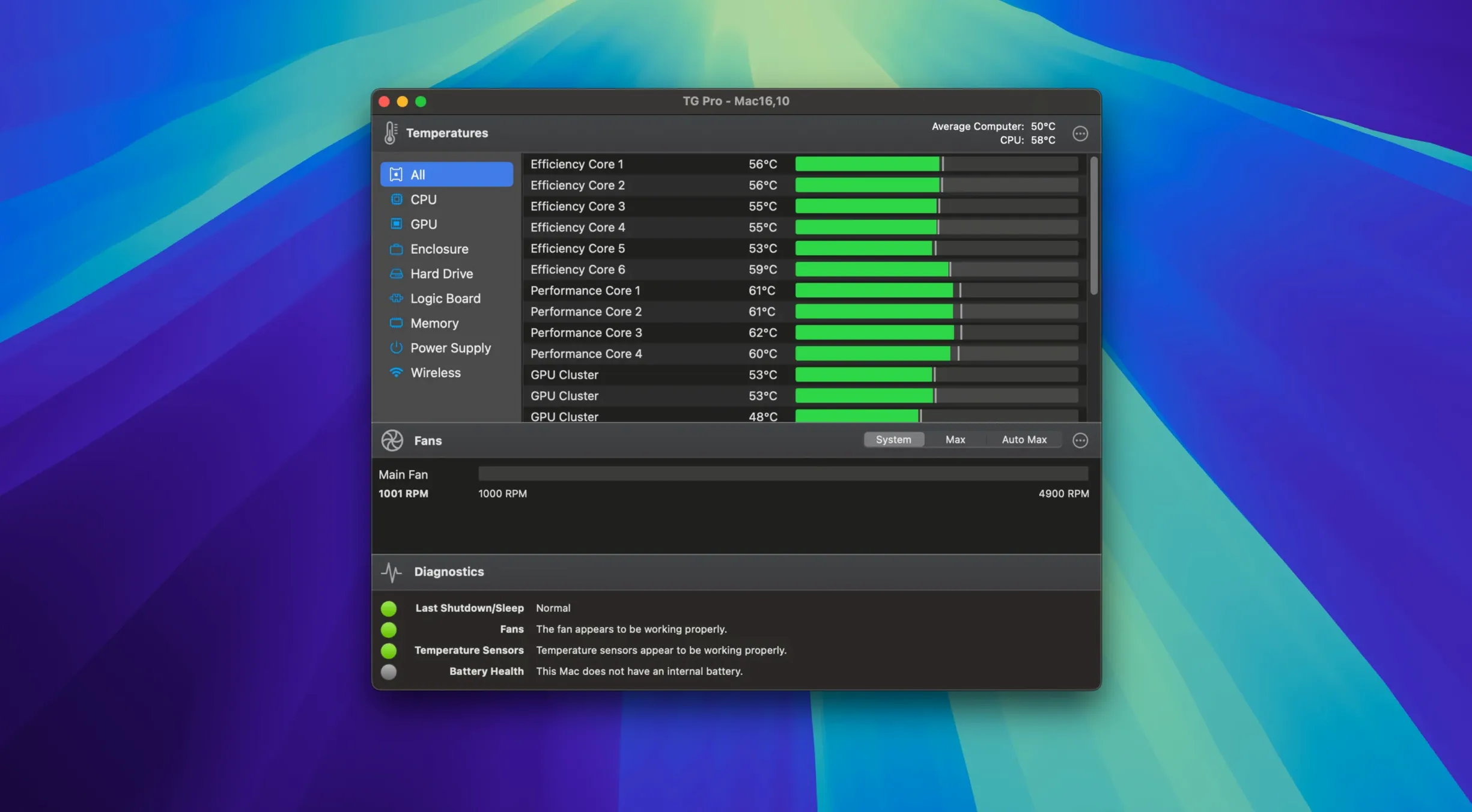
Version 2.103 of TG Pro adds complete fan control for M4, M4 Pro, and M4 Max Macs, and restores fan speeds correctly after Siri or voice dictation finishes. Here are the standout features, each explained by the job it does.
- Manual and automatic fan control. You can adjust fan speeds directly or let TG Pro handle it automatically based on temperature thresholds you set.
- Custom fan rules. Create rules that trigger specific fan speeds when a particular sensor reaches a temperature you define, useful for keeping a quiet system during light work or ramping up cooling for heavy tasks.
- Low background usage. TG Pro runs with minimal CPU impact, so it monitors and controls without slowing down your work.
- Hackintosh support. A preference toggle lets it work on Hackintosh systems, extending its usefulness beyond standard Mac hardware.
- Broad architecture support. It works on both Apple Silicon and Intel 64‑bit Macs running macOS 10.13 High Sierra or later.
Sustained CPU-heavy work calls for TG Pro
TG Pro serves a wider range of Mac users than you might expect. It is not just for power users or people who open their computers for a living. I notice three groups particularly benefit.
Anyone who does sustained, CPU-heavy work. This includes video editors, music producers, 3D modellers, and data scientists who render or process for hours. Their machines push hard and stay warm.
People with older or compact Macs. A MacBook Pro from 2016 or an M1 MacBook Air has limited cooling. TG Pro’s manual fan control can prolong the machine’s comfortable working life by keeping it cooler under load than the system’s default curve would.
Hackintosh builders. If you run macOS on non-Apple hardware, you already accept some tinkering. TG Pro includes a preference toggle that lets it read sensors and control fans on these machines. It gives you the same monitoring tools that standard Macs get, which is especially helpful when you are still dialling in your build’s cooling setup.
Enable auto-start and tweak fan rules first
After installing TG Pro, the default settings work well for most people. But a few adjustments make a real difference depending on your habits.
- Enable automatic start with macOS. You want TG Pro running from the moment your computer boots, not only when you remember to launch it. The preference is in the General tab under “Start with macOS”.
- Set a fan rule for your busiest app. Open TG Pro, run your heaviest application for ten minutes, and note which sensor gets hottest.
- You will know when something is wrong even if you are not watching the menu bar icon.
Manual fan control trips up beginners
A few common missteps can lead to confusion or unnecessary noise. They are easy to avoid once you know about them.
- Manual control is for short, predictable situations. For everyday use, let the automatic rules or the built-in curve manage things.
- Forgetting to save custom rules. You can set a rule and close the window without clicking the save button in the rules panel. The rule will not apply. Always check the rules list after editing to confirm it is active.
- Ignoring the sensor log after a crash. If your Mac restarts unexpectedly, open TG Pro and look at the temperature log. It shows the last readings before the shutdown. That data often points to an overheating component or a failing fan. Beginners clear the log without reviewing it and lose useful clues.
Real-world scenario: a music teacher’s quiet recording session
Julia teaches music at a comprehensive school in Bremen. She records student ensembles on her iMac and uses a DAW for basic editing. The iMac’s fans normally spin up after about twenty minutes of recording, and the noise shows up in the microphone track.
She set TG Pro to start with macOS and created two custom rules. That gives her about thirty minutes of recording time before the fans need to speed up. By that point the class has finished their piece anyway. The recordings come out clean, and the iMac stays well within safe temperatures. Julia does not think about TG Pro after setting it up — it just works in the background.
For teachers or anyone running a Mac for long hours, TG Pro helps keep temperatures in check and fans quiet when they should be quiet.
- Fixed Auto Boost rules that could fail when switching between power sources.
- Improved the startup flow for new installations.
- Added complete fan control for M4, M4 Pro, and M4 Max Macs.
- Restored fan control and speeds after Siri or voice dictation finished.
- macOS 10.13 High Sierra or later
- Intel or Apple Silicon Mac
Questions I keep getting
Does TG Pro support M4 Macs?
Yes, version 2.103 adds complete fan control for M4, M4 Pro, and M4 Max Macs.
How to install
- Open the downloaded disk image.
- Drag the app into the Applications folder alias.
- After copying finishes, launch the app from Launchpad.
Similar apps





Sign in or join the club to leave a comment.
Nobody has commented yet.