- Version
- 1.3.3
- Studio or maker
- Toontrack
- Languages
- English
- Activation
- k'ed by Team V.R
- Runs on macOS
- macOS 10.15 or later
- Chip type
- Apple Silicon, Intel 64-bit
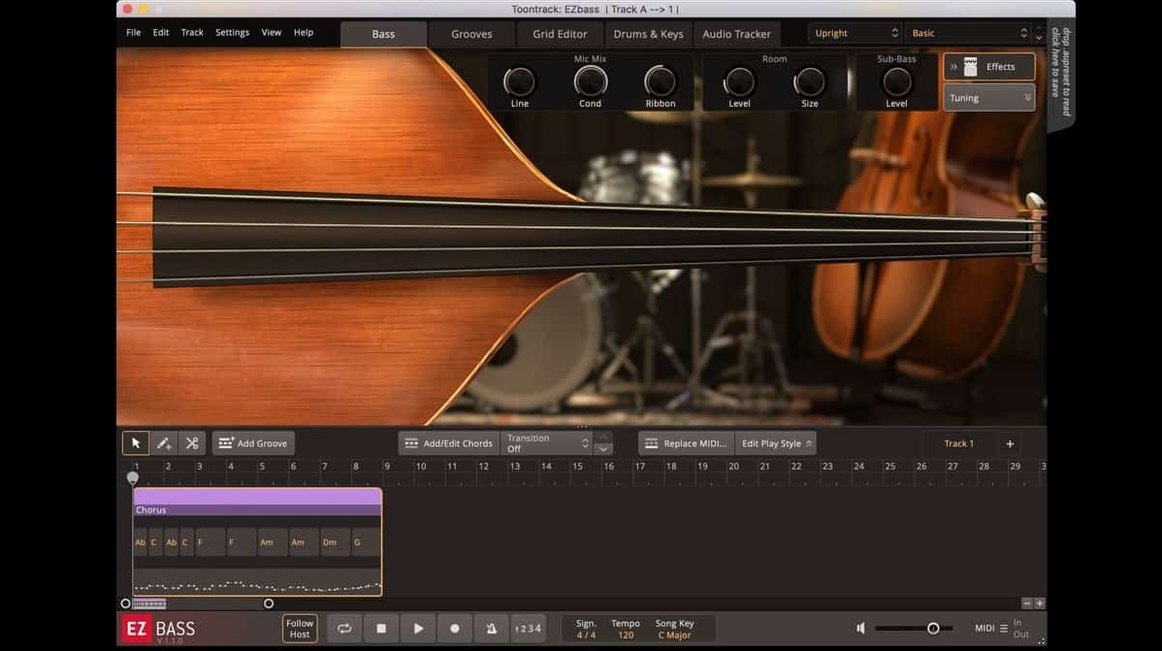
EZbass 1.3.3 works on any Mac from macOS 10.15 onward, Intel or Apple Silicon. That means it runs on the iMac M1 in my classroom game club office and on older Intel machines students bring in. Toontrack’s bass plugin fits into a session in a few natural spots: as an instrument track for direct playback of its two sampled basses, on a bus for processing the DI signal through amp sims or compression, or as a MIDI source feeding a separate bass track. The audio-to-MIDI conversion lets you drag in a recorded bassline and have the plugin play it back with any of its sounds. Version 1.3.3 fixes menu clicks in newer Apple hosts and corrects audio export timing at non-44.1 kHz sample rates, so it behaves predictably whether you track at 48 kHz or mix at 96 kHz.
| Detail | Value |
|---|---|
| Developer | Toontrack |
| Format | Plugin (VST, AU, AAX) |
| Version | 1.3.3 |
| Bass guitars included | 2 (vintage + modern) |
| Audio-to-MIDI | Yes |
Typical jobs: generate a bassline from drum or keyboard MIDI, play the Rock Legend EBX expansion with the new right-hand mute articulation, or layer the vintage bass over a modern one for a thicker low end. The plugin handles direct recording, MIDI composition, and bus processing — all from one interface.
Right-hand mute articulation in the Rock Legend EBX expansion
The two new features in 1.3.3 affect how you play and how you work. The right-hand mute articulation is specific to the Rock Legend EBX expansion — it simulates the short, percussive note stop you get when a bassist mutes the string with their picking hand after striking it. If you write rock or metal lines, that articulation adds a tighter, more controlled sound on fast passages. You select it from the articulation list in the plugin, just like you would a slide or a ghost note.
The change to keyboard shortcuts is the one I notice more often during a long session. Before 1.3.3, the shortcuts were fixed. Now you can remap them in the Settings section. I reassign common actions — switching between the two basses, toggling the MIDI editor, triggering the audio-to-MIDI conversion — to keys that sit closer to my left hand. It saves a bit of mouse travel on every edit. The Settings panel lists every assignable command, so you can see what is available before you change anything.
The updated Mac icons (standalone and project) use the macOS Tahoe style. That is a cosmetic change, but it keeps the plugin looking native on current Mac versions. The two bug fixes are the kind that matter when you are on a deadline: menu clicks now respond correctly in newer Apple hosts like Logic Pro and GarageBand, and audio export no longer drifts at sample rates above 44.1 kHz. If you work at 48 kHz or 96 kHz, that second fix means exported bass tracks stay in time with the rest of your session.
Runs natively on macOS 10.15 and later, no Rosetta needed on M-series Macs
EZbass 1.3.3 runs on macOS 10.15 and later, and it supports both ARM (Apple Silicon) and x86 64-bit Intel Macs. You do not need Rosetta on an M-series Mac if the host DAW or standalone app is running natively — the plugin loads as a native ARM binary. On an Intel machine, it runs in 64-bit mode as expected.
The installer comes as a disk image. You mount it and run the standard installation procedure; the plugin files land in the usual system locations for VST, AU, and AAX formats. The interface language is English. There is no separate download for different architectures — one installer handles both.
Because it works as a plugin in any compatible DAW and as a standalone application, you can audition basslines without opening a full session. The standalone version shows the same interface and includes the same MIDI library and audio-to-MIDI conversion. I use it that way when I am sketching ideas on the sofa with headphones, then switch to the DAW version when I commit the part to a track.
Align keyboard shortcuts with EZdrummer or Superior Drummer muscle memory
After installation, open the Settings section and check two things. First, the keyboard shortcuts panel. The defaults are reasonable, but if you have muscle memory from other Toontrack products — EZdrummer or Superior Drummer — you might want to align the shortcuts. The remapping is straightforward: click a command, press the new key, confirm.
Second, the audio and MIDI routing. If you plan to feed the plugin with drum MIDI to generate a matching bassline, make sure the input MIDI port is set to the correct track or channel. The plugin listens for incoming notes on its MIDI input and responds by generating a bass part that follows the rhythm and accents of the source. It works with keyboard MIDI too, but drum MIDI tends to give more natural-feeling results for rock and pop.
For the audio-to-MIDI conversion, drag in a short recorded bass phrase first — four to eight bars — and let the plugin analyze it. The conversion uses the same technology as Superior Drummer 3, so the timing and pitch detection are reliable enough for most pop and rock parts. You can then edit the resulting MIDI notes or swap the sound between the two included basses or an EBX expansion.
EZbass vs. Modo Bass: sampled notes versus physical modeling
Several Mac bass plugins do similar work, but each has a different focus. Here is how EZbass 1.3.3 relates to three others you might consider.
EZbass and Modo Bass
Modo Bass from IK Multimedia uses physical modeling instead of samples. That means you can shape the tone by adjusting parameters like pickup position, string gauge, and body resonance in real time. EZbass uses sampled instruments (a vintage bass and a modern bass), so the sound is fixed at the recording session. The trade-off: EZbass gives you a finished, mix-ready tone out of the box, while Modo Bass gives you more sculpting control. For songwriters who want to write a bassline quickly and move on, EZbass is faster. For sound designers who want to tweak every detail of the instrument itself, Modo Bass is more flexible.
EZbass and Trilian
Spectrasonics Trilian is a deep sample library covering acoustic, electric, and synth basses. It includes more instruments than EZbass (several electric basses, acoustic upright, synth pads), and its sound design layer lets you layer and process sounds in complex ways. EZbass is narrower — two electric basses and a focus on composition tools like audio-to-MIDI and MIDI generation from drums. If you need a broad palette of bass tones and are comfortable building your own patches, Trilian is the heavier option. If you want a simpler, more directed tool for writing bass parts in a pop or rock context, EZbass gets you there with fewer detours.
EZbass and Bassline by Native Instruments
Bassline is part of Native Instruments’ Komplete line and focuses on synth-style bass sounds with step sequencers and arpeggiators. It is not a sampled instrument — it generates tones through synthesis. EZbass is better suited for realistic, played basslines that sit in a mix next to live drums and guitars. Bassline is better for electronic music, hip-hop, or any genre where a synthetic, programmed sound is the goal. The two complement each other rather than compete directly.
Each tool has its place. For my work — writing parts quickly, layering with drum MIDI, converting audio to MIDI for editing — EZbass 1.3.3 covers the ground I need. The version 1.3.3 additions (shortcut remapping, mute articulation, bug fixes) make it a little more precise to use day to day, and the dual-architecture support means it will work on whatever Mac I switch to next.
- Support for right-hand mute articulation used in Rock Legend EBX.
- Option to change some keyboard shortcuts in Settings.
- Updated Mac icons to macOS Tahoe style.
- macOS 10.15 or later
- Intel or Apple Silicon
How to install
- Mount the downloaded disk image by double-clicking it.
- Run the installer that appears and follow the on-screen steps.
Similar apps
Sign in or join the club to leave a comment.
Nobody has commented yet.