- Version
- 3.1.2
- Studio or maker
- Toontrack
- Languages
- English
- Activation
- k'ed by Team V.R
- Runs on macOS
- macOS 10.15 or later
- Chip type
- Apple Silicon, Intel 64-bit
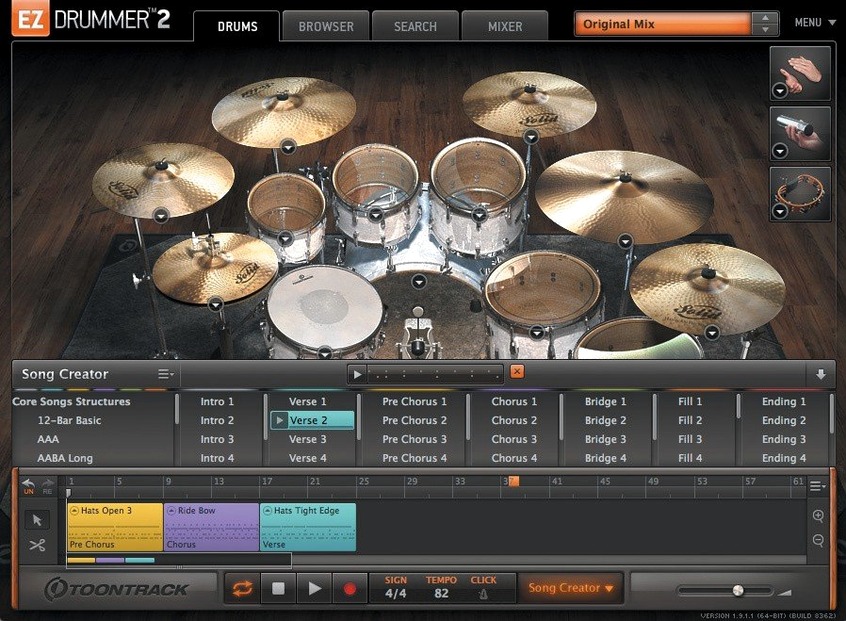
Songwriters and producers use EZ Drummer 3 to build drum tracks without leaving their session. It sits on a dedicated track in your DAW, with individual outputs for kick, snare, toms, hi-hat, and overheads, plus a master bus for the full kit. Typical jobs include:
- Creating a full song arrangement from a simple idea using the Song Creator.
- Dragging audio or MIDI onto Bandmate to suggest complementary drum parts.
- Browsing mix-ready presets and MIDI grooves to find a feel fast.
- Tapping a rhythm into Tap2Find to search the groove library.
- Toggling Solo or Mute in the mixer without clearing the opposite recall state.
- Generating complete drum tracks inside the program, then exporting to your session.
The current version 3.1.2 updates the macOS icons to Tahoe style and improves Infinity Grid EZX support, making it a solid choice for anyone who wants drums that work from the first bar.
Don't open the mixer before you have a groove
New users often open EZdrummer 3 and jump straight to the mixer, expecting to shape a sound before they have a groove. That pulls your focus away from what the software is built for: getting a usable drum part written quickly. The mix-ready presets are there to give you a starting sound that already works in most contexts. Spend your first ten minutes browsing grooves, not EQ curves.
A second common mistake is ignoring the MIDI groove library's preview function. People click through hundreds of patterns without listening to how they sit against their own song. The browser lets you solo the drums against your track in real time. Take advantage of that before you drag anything onto the song track.
Another one I see in the game club translates to this software too: tapping a rhythm into Tap2Find and then expecting an exact copy of what you tapped. Tap2Find searches the library for similar patterns, not a transcription of your finger's timing. It returns grooves in the same feel and tempo range, which is useful for inspiration, not replacement. Beginners get frustrated when the result doesn't match their tap note-for-note. Treat it as a discovery tool, not a notepad.
Lastly, people drag a single groove to the song track and call their drum part finished. That works for a rough demo, but the Song Creator and the cut-and-arrange tools let you build verses, choruses, bridges, and fills from the same library. A one-groove loop gets boring fast. Use the song track's editing functions to vary intensity across sections.
Fixing the snag when your MIDI editor won't sync
Hi-hat pedal and other CC stop recording mid-take
Before version 3.1.2, CC data like hi-hat pedal position could drop out during recording on the song track. If you are on an earlier version and see this, update to 3.1.2 so the fix applies. After updating, check that your MIDI controller sends continuous controller data on the correct channel. Most kits expect CC 4 for hi-hat pedal. If the dropout persists, record the hi-hat part on a separate pass and merge the lanes in your DAW.
Solo or Mute recall state disappears
Old behavior meant toggling Solo and then Mute on the same channel could clear whichever state you had set first. Version 3.1.2 fixes this too. If you rely on soloing individual drums while arranging, make sure you are running 3.1.2. The fix keeps both recall states independent, so you can audition a single drum without losing your mute setup.
Expansion packs not showing up
EZdrummer 3.1.2 is required for EZX packs released from Q4 2025 onward. If you install a new expansion and it does not appear in the software, check your version number. Packs from earlier years still load on older versions of EZdrummer 3, but the newer ones need the icon and infrastructure updates in 3.1.2. Re-run the installer for the pack after updating the host software if needed.
Groove drag and drop feels slow
Dragging a groove from the library to the song track should feel immediate. If it lags, the library might be scanning a large collection of third-party MIDI files. You can star your favorite grooves and filter by starred items to reduce the list. That keeps the browser responsive and lets you focus on a smaller, curated set.
The kit sounds thin on its own
EZdrummer 3 includes three different rooms. If your initial mix sounds dry or small, switch to a different room or try a mix-ready preset. The presets combine room mics, close mics, and processing. If you bypass the mixer section entirely, you lose the spatial depth. Use the presets as a base, then tweak.
Songwriters who work alone get a bandmate that never misses a take
Songwriters who work alone benefit most. If you do not have a drummer or a live room, EZdrummer 3 gives you a bandmate that never misses a take. The Bandmate feature, which suggests drum parts from audio or MIDI you drag in, is especially useful for producers who start with a guitar or keyboard sketch. You hum a riff, record it, drag it in, and get a drum part that follows the feel.
Producers who switch between genres also gain from the seven included kits and three rooms. The range covers rock, pop, metal, and softer styles without loading extra packs. If you produce across several projects in a week, the mix-ready presets save you from dialing in drum sounds from scratch each time.
MIDI users who prefer to program their own patterns can skip the groove library and work in the built-in Grid Editor. That makes it useful for electronic producers who want acoustic drum sounds but need note-by-note control. The Grid Editor runs inside the software, so you do not need to switch to your DAW's piano roll.
Teachers and workshop leaders might find it useful too. I run a game club, not a music production class, but if you teach songwriting, letting students drag audio into Bandmate and hear a drum arrangement form is a quick way to explain arrangement concepts. The Song Creator can turn that into a full song structure in minutes.
The macOS Tahoe icon update that keeps your dock consistent
Version 3.1.2 updates both the standalone icon and the project icon to macOS Tahoe style. That is a minor visual change, but it keeps the software looking consistent with the rest of your dock. If you use multiple Toontrack products, the unified icon style makes them easier to find on a crowded screen.
The Edit Play Style feature lets you change a base groove in real time. If you have a verse pattern that feels too busy, switch the play style without writing a new groove. The adjustment applies to the existing MIDI, so your arrangement structure stays intact. It is one click, easy to overlook in the groove editor.
Percussion is included in the core library, not hidden behind an expansion. Beginners often assume they need a separate pack for shakers, tambourines, or congas. Check the percussion section first. It is part of the seven-kit setup and can be triggered from the same Grid Editor or groove library.
The groove library lets you star patterns for quick access. If you find a fill that fits your style, tag it. Over a few sessions, your starred list becomes a custom palette. That reduces browsing time when you are in the middle of a writing session.
Sketch drum ideas in standalone mode before opening your DAW
EZdrummer 3 runs as a standalone application or as a plug-in inside your DAW. In standalone mode, you can write drum tracks and export them as MIDI or audio. That makes it useful if you want to sketch ideas before opening a full session. The exported MIDI still carries the groove timing and velocity, so your DAW's drum sampler can play it back.
On the macOS side, the software runs on both Intel and Apple Silicon Macs. That means it works on older machines still on macOS 10.15 and on newer Apple Silicon models without translation layers. If you use Logic Pro, you can insert EZdrummer 3 on a software instrument track and route its individual outputs to separate Logic channels for mixing. GarageBand users can load it as a plug-in too, though output routing is more limited in that environment.
Bandmate accepts audio or MIDI from any source. If you record a guitar part into Voice Memos, drag that file onto Bandmate, and it suggests compatible drum parts. That workflow bridges quick phone recordings and full sessions without extra steps. You can also drag MIDI from your DAW's piano roll or from a sequencer app into Bandmate.
The Song Creator works with the groove library and the song track together. You select a few patterns, set a structure length, and it arranges them into verses and choruses. The result stays editable on the song track, so you can cut, copy, and rearrange parts like blocks in a word processor. That fits well with macOS window management: keep EZdrummer 3 in a separate space or split view while you edit your arrangement in the DAW.
If you use ez drummer 3 free download or ezdrummer 3 torrent sources, the software installs through a mounted disk image and a standard installer, same as any native Mac application. No extra frameworks or wrapper tools are required. Once installed, it appears in your DAW's plug-in list and in the Applications folder for standalone use.
- Standalone and project icons updated to macOS Tahoe style.
- Internal improvements for Infinity Grid EZX.
- Fixes for song-track CC recording and mixer Solo/Mute recall states.
- macOS 10.15 or later
- Intel or Apple Silicon
Questions I keep getting
Does EZ Drummer 3 include MIDI grooves?
Yes, it includes MIDI grooves that you can use directly or adapt into your song arrangement.
How to install
- Mount the downloaded disk image.
- Run the standard installation.
Similar apps
Sign in or join the club to leave a comment.
Nobody has commented yet.