
- Version
- 12.3.1 + Not Creator Studio
- Studio or maker
- Apple
- Languages
- English, German, Spanish, Chinese (Simplified), French, Japanese
- Activation
- Not required
- Runs on macOS
- macOS 15.6 or later
- Chip type
- Apple Silicon, Intel 64-bit
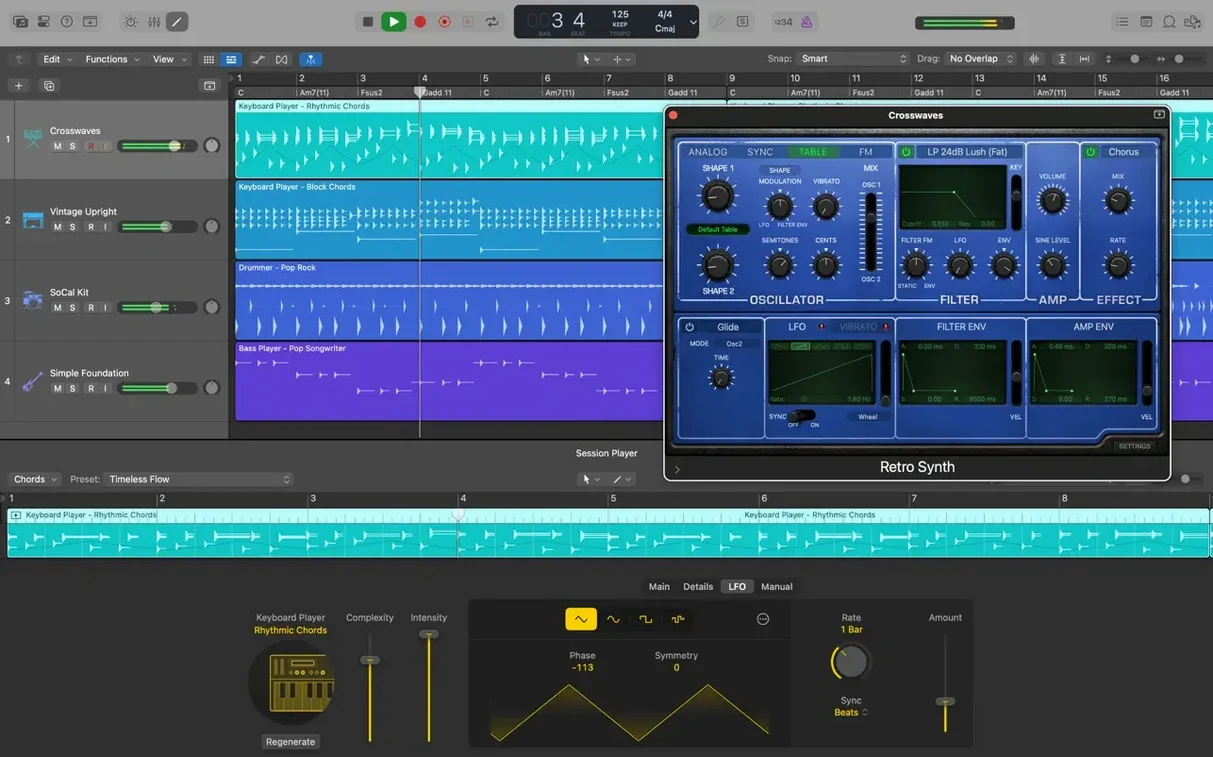
Logic Pro 12.3.1 fixes a few things that matter for everyday work. Beat mapping transients can be relocated again. The Score view now follows Staff Style changes in the Inspector. Crossfades can be dragged and extended from the right side again. It also no longer quits unexpectedly when playing MIDI in a project with video, and performance is better when working with tracks that contain many regions.
What should a newcomer try first in Logic Pro?
Start with the built-in Drummer tracks. There are 28 drummers to choose from, each with different styles and fills. Drag one onto a project and the track plays a pattern you can adjust in real time. It is a quick way to get a song moving without worrying about programming drums.
How can I use Flex Pitch as a beginner?
Select an audio region and open the Flex view. Choose Flex Pitch from the drop-down. You will see each note as a colored block and can drag it to the correct pitch. It works like a visual tuning tool for vocals or monophonic instruments.
What is the simplest way to shape a sound?
Select a track and open Smart Controls. They show a small set of knobs and buttons that control multiple plug-ins at once. Turn a knob to add reverb, adjust the filter, or change the attack. You do not need to open each plug-in separately.
A music teacher records host tracks on a USB mic and imports phone interviews
A music teacher friend of mine, who also runs an after-school podcast club, uses Logic Pro to record and edit the weekly episodes. She records the host track with a USB mic, then imports interviews recorded on students’ phones. The Quick Swipe Comping feature lets her listen through three takes of the same answer and pick the best phrases without cutting anything permanent. She keeps each student’s track in its own Track Alternative, so when someone re-records a line later, she can switch between the old and new versions without losing work. The export to a single MP3 file at the end takes about a minute, and the whole process stays inside one project. She does not use any of the synthesizers or drum machines; she just needs clean dialogue editing and a reliable mix-down.
Start with a single track and try Selection-based Processing
If you have just installed Logic Pro for the first time, start with a simple project. Create a single audio track, record a short voice note or instrument part, and then try the Selection-based Processing. Highlight a small region, choose a preset reverb or EQ, and hear the change right away. It shows you how effects work without committing to a full track edit.
Next, open the Sound Library browser. Browse through the more than 7,000 Apple Loops. Drag a few loops into the project and arrange them in the timeline. This gives you a feel for the grid, snapping, and loop length before you tackle MIDI or automation.
Set up a simple template from the start. Add one audio track, one MIDI track using the Alchemy sampler synthesizer, and one Drummer track. Save this as a template so every new project begins with these three tracks. It saves time later when you want to test ideas quickly.
Learn the undo command. Logic Pro has a deep undo history, so if you move a region by accident or apply a destructive edit, you can step back without fear. It helps to know this before you start comping or pitch correcting.
Beat mapping transient relocation returns for tempo maps
The latest update focuses on fixing annoyances rather than adding new features. The beat mapping transient relocation is back, which matters if you work with tempo maps for live recordings or remixes. The Score view now follows Staff Style changes correctly, so anyone who prints or exports notation for choir or instrumental arrangements sees the correct time signatures and clefs without manual correction.
The crossfade fix is small but practical. You can again drag the right edge of a crossfade to extend it, which is useful when you need to smooth a transition that was too short. The Cursor Tool modes now activate immediately when you select them, without needing to move the pointer first. This saves a click each time you switch between drawing and selecting.
The fix for unexpected quits when playing MIDI with video is important for anyone who scores to picture, even a simple background track for a school film project. Performance improvements for tracks with many regions help when your project grows to dozens of small edited clips, as often happens with podcast or dialogue-heavy work.
Songwriters sketch with Drummer and loops before adding live recordings
Music producers and songwriters benefit from the full instrument library and the Drummer feature. They can sketch a song idea in minutes using loops and built-in sounds before deciding which parts to replace with live recordings.
Audio editors and podcasters get the most from Quick Swipe Comping, Track Alternatives, and the flexible audio editing tools. The ability to compare takes and comp them without destructive edits keeps the project clean. The export formats cover broadcast and web use.
Mix engineers gain from Smart Controls and the surround mixing support. Smart Controls let them adjust multiple plug-ins from one panel, which speeds up the initial mix phase. The Track Stacks help group and route multiple tracks for submixes.
Teachers running a after-class game club or media club can use Logic Pro to introduce students to multitrack recording and editing. The included instruments and loops let students create jingles or short audio pieces without needing to hire session musicians. The GarageBand export from iPhone or iPad through iCloud also lets students work on ideas at home and bring them into the full project.
Songwriters who work alone appreciate the Flex Pitch and Flex Time tools for polishing their own vocal or instrumental performances. They can record a rough take and correct timing or pitch without re-recording.
Anyone who works with video projects, even short ones, benefits from the XML import and export for Final Cut Pro X workflows. You can edit the audio in Logic Pro and send it back to the video timeline with the right placement.
Set project tempo first — Drummer and Alchemy depend on it
One common mistake is to load every track with a heavy virtual instrument before checking the project tempo. Drummer and Alchemy sound best when they follow the project tempo, so set the tempo first. Otherwise the loops and patterns may not line up with your own playing.
Another mistake is to apply Flex Pitch or Flex Time to a whole audio region without listening to the result. The visual blocks are helpful, but if you drag notes too far, the audio becomes warbly or glitchy. Use it on small sections and listen before moving on.
Beginners often add too many plug-ins to a single track, especially reverb and delay, before checking the overall mix. The track can become muddy or too loud. Start with one or two effects per track and use Smart Controls to adjust them together.
Many first-time users forget to name their tracks and regions early. When the project has twenty tracks, it is much harder to find the vocal comp if everything is called “Audio 1.” Naming each track and color-coding it from the start saves time later.
Some new users also try to rearrange the default interface or Mac OS window layout too soon. The default layout works well for most tasks, and customizing it before you know the basic workflow can lead to confusion. Spend a few days working with the defaults before moving panels around.
Finally, beginners sometimes overlook the loop library. They try to record every part from scratch, when a simple Apple Loop could provide a foundation or inspiration.
- Restores the ability to relocate beat mapping transients.
- The Score now responds correctly to Staff Style changes in the Inspector.
- The right side of a crossfade can be dragged and extended again.
- It no longer unexpectedly quits when playing MIDI in a project with video.
- Performance improves when working with tracks that contain many regions.
- macOS 15.6 or later
- Intel or Apple Silicon processor
- 4 GB RAM
- 1280 x 768 display or higher
- 64-bit Audio Unit plug-ins required
- 6 GB free disk space for minimum installation, 63 GB for full Sound Library
Questions I keep getting
Can Logic Pro open old projects?
Yes, it can open projects created in Logic 5 or later, so older work is not lost.
Does Logic Pro work with Final Cut Pro?
It supports XML import and export for Final Cut Pro X workflows, making it easy to move audio between the two apps.
What mixing formats does it support?
It supports mixing in stereo or surround, and you can export final mixes in a variety of formats.
How to install
- Open the downloaded disk image.
- Drag the app to the Applications folder alias.
- After copying finishes, launch the app from Launchpad.
Similar apps





Sign in or join the club to leave a comment.
Nobody has commented yet.