- Version
- 1.2.17 [MAS]
- Studio or maker
- Music Topia
- Languages
- Russian, English, German, Spanish, Italian, Chinese (Traditional), Chinese (Simplified), Korean, Portuguese, French, Japanese
- Activation
- K'ed by TNT team
- Runs on macOS
- macOS 11 or later
- Chip type
- Intel 64-bit
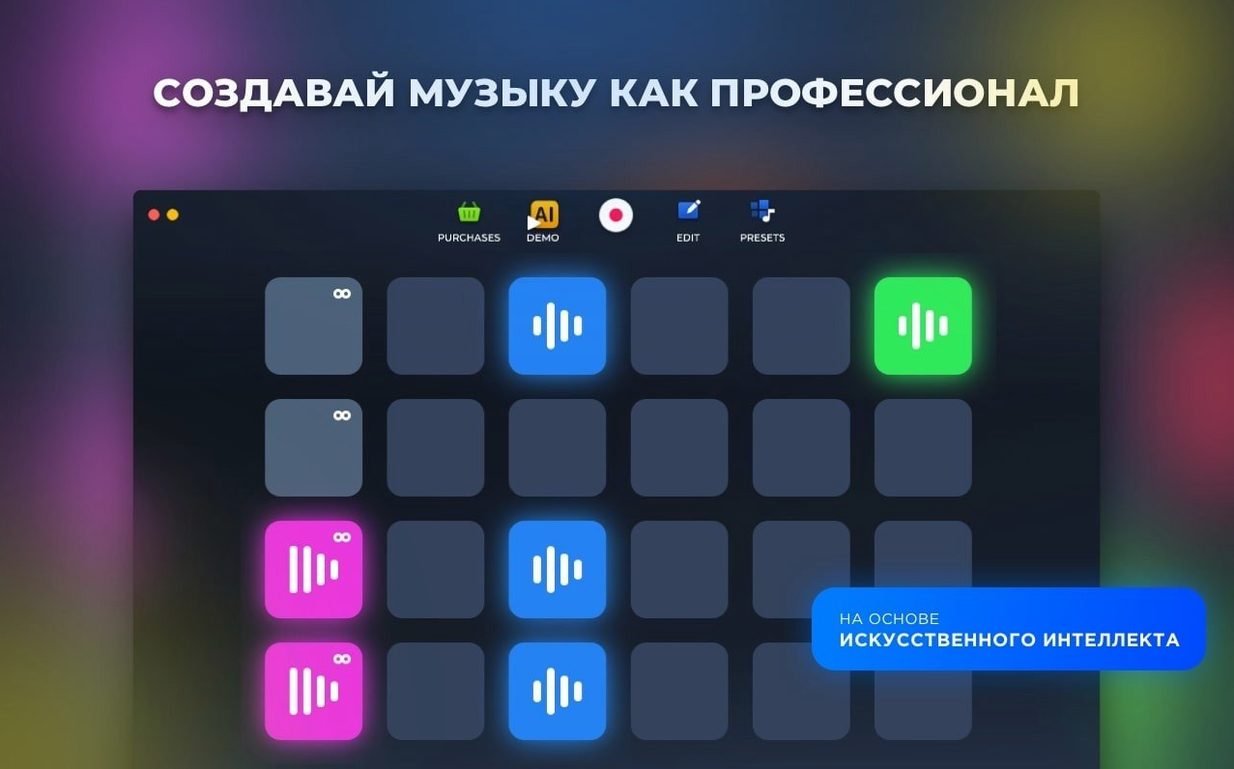
Version 1.2.17 of Loop Mash Up Pro is out, and the main change is a set of bug fixes that make the sampler run a little steadier when you stack multiple tracks.
A four-on-the-floor pattern at a steady tempo, the backbone of most electronic tracks. You can build one from the included presets or by dragging your own samples onto the timeline.
Loop Mash Up Pro — a Mac music app for sampling, looping, and assembling complete tracks. It comes with loops and presets made by professional musicians and DJs.
AI track generation — a feature that suggests full arrangements based on the sounds you have chosen. Handy when you are stuck on a bridge or intro.
Set your audio output in preferences first
When you open Loop Mash Up Pro for the first time, the default layout works fine for browsing. But a couple of settings make the day-to-day use a lot smoother.
Head into the preferences panel and set your audio output to the interface or headphones you actually use — the app picks the system default, which is often your laptop speakers. While you are there, switch the language if you prefer something other than English; the app supports German, French, Spanish, Italian, and several others, so you can work in the language that feels most natural.
Next, look at the hotkey assignments. The pads and loops can be mapped to keyboard shortcuts, and the default layout might not suit how you build patterns. I tend to assign the most-used drum hits to the lower row of keys and keep melodic loops on the upper row. It takes five minutes to set up and saves a lot of clicking later.
Drag finished beats into GarageBand, Logic Pro, or Ableton Live
Loop Mash Up Pro works well alongside other music software because it saves your recordings as standard audio files. You can drag a finished beat out of the app and drop it straight into GarageBand, Logic Pro, or Ableton Live for further mixing. No format conversion needed.
macOS features like virtual desktops are useful here. I keep Loop Mash Up Pro on one desktop and a notes app or browser on another — handy when I am pulling samples from a loop torrent site or jotting down arrangement ideas. The app also behaves well with the system audio routing, so you can run it alongside a YouTube tutorial or a reference track without weird glitches.
If you use an external MIDI controller, you can assign it to trigger pads and loops. The app picks up standard class-compliant devices without extra drivers, which is a relief on macOS where some older software needs workarounds.
Picking a style pack after game club on Friday evening
Friday evening, after the game club has packed up, I sit down to build a quick demo for a student who wants to try electronic production. I open Loop Mash Up Pro and pick one of the six style packs — dubstep, because that is what she asked about.
The app loads a set of presets. I scroll through the loops until I find a drum loop that has a solid kick and a crisp snare. I assign it to the first pad and hit play. It loops cleanly. Next, I add a bassline from the same style pack, then a synth lead that adds a bit of movement.
After a few minutes of swapping loops in and out, the arrangement feels too busy. I use the hotkeys to mute the synth lead and bring in a pad sound instead. That settles it. I record a short live take — just pressing record and triggering a couple of pads in real time — then save the whole thing as a project file.
Before closing, I try the AI track generation feature. It suggests a different intro and a breakdown section. I do not use everything it offers, but the bridge idea is worth keeping. I export the track as an audio file and email it to the student as a starting point.
When the app does not open after installation
People sometimes run into a few hiccups when they start. Here is what I have seen and how to fix them.
The app does not open after installation. This is usually the Gatekeeper block. The install instructions mention pressing Enter in Terminal to bypass it. If you skipped that step, go back and run the command before dragging the app to the Applications folder. After that, it should launch normally.
No sound from loops. Check the audio output setting in preferences first. If that looks correct, make sure your system sound is not muted or routed to a different output. Also confirm that the loop volume slider is turned up — it is easy to miss if you clicked a pad quietly earlier.
Hotkeys do not trigger pads. The app uses keyboard shortcuts only after you assign them. Open the hotkey mapping panel and set each pad or loop to a key. The default mapping is empty, so nothing happens until you define it.
AI generation sounds too random. The feature works best when you have already chosen a few loops and presets. It builds from what you have selected. If you run it on an empty project, you get a generic result. Pick your core sounds first, then let the AI fill in the gaps.
Loop torrent downloads do not import. The app expects audio files in common formats like WAV or AIFF. If your loop torrent contains unusual formats or corrupted files, the import may fail. Convert them to WAV with a free converter and try again.
Style packs — dozens of sounds per music style, so a drum loop can sit alongside a synth lead or bassline without clashing.
- Several bugs were fixed.
- macOS 11 or later
- Intel processor
- Interface languages: Russian, English, German, Spanish, Italian, Traditional Chinese, Simplified Chinese, Korean, Portuguese, French, Japanese
How to install
- Mount the disk image, then launch Open Gatekeeper friendly — this prepares the app for the next step.
- Press Enter in Terminal to bypass Gatekeeper, so the system allows the unsigned app to run.
- Drag the app to the Applications folder to keep it in the standard spot.
- Start using the app.
Similar apps





Sign in or join the club to leave a comment.
Nobody has commented yet.