
- Version
- 2026.11.09
- Studio or maker
- Parasol Corp
- Languages
- Russian, English, German, Bulgarian, Hungarian, Spanish, Italian, Catalan, Chinese (Traditional), Chinese (Simplified), Korean, Dutch, Norwegian, Polish, Portuguese, Ukrainian, French, Czech, Swedish, Japanese
- Activation
- Not required
- Chip type
- Apple Silicon, Intel 64-bit
- Tried out on
- macOS Golden Gate, Mac mini 2024 M4
- First released
- 04.11.2026
- Voice languages
- English
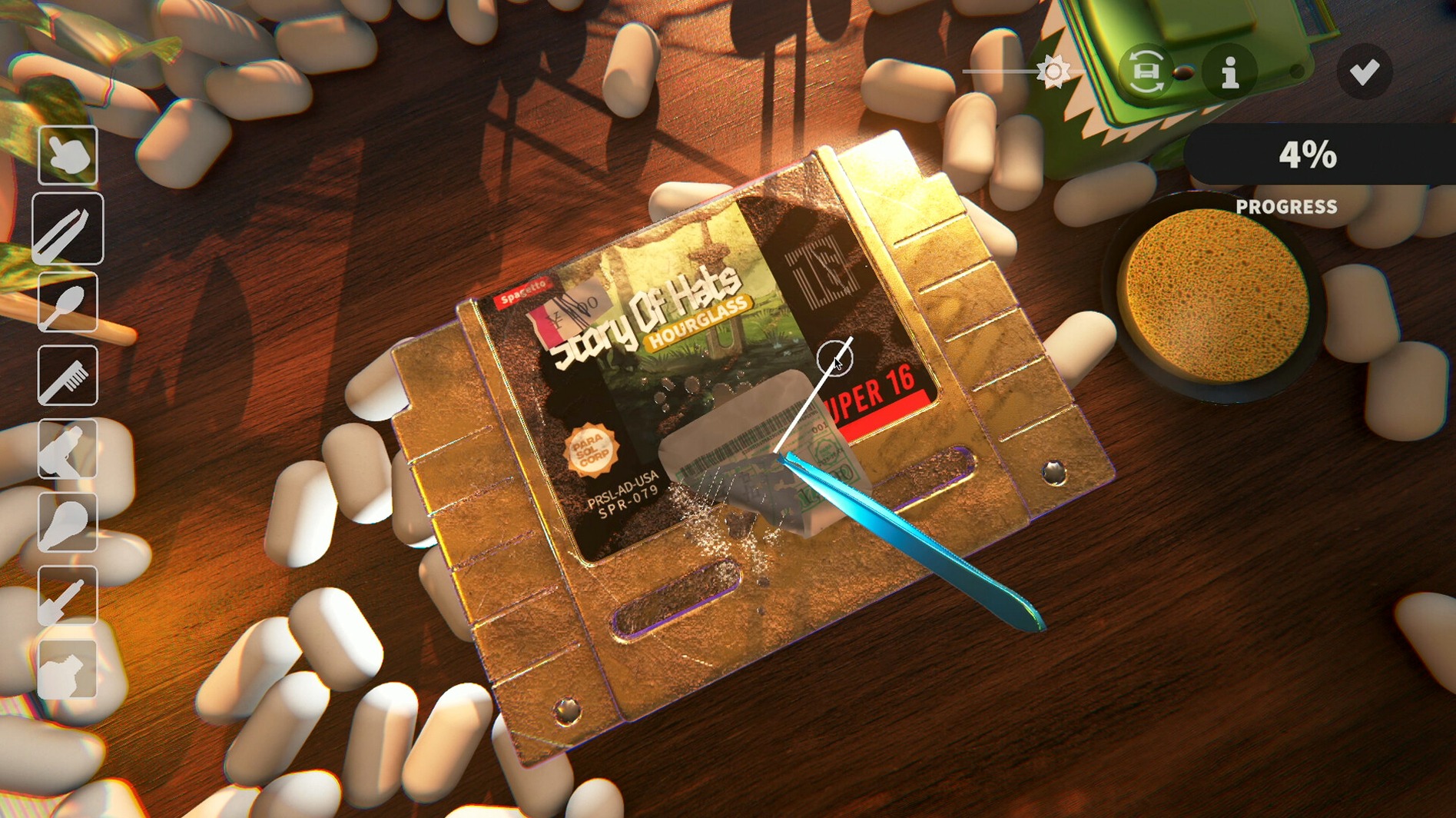
You sit down at your virtual workbench with a dusty cartridge from the 1980s. You clean the contacts with a cotton swab and isopropyl alcohol, replace a worn sticker with a fresh one from your supply, and test the board to see if it boots. Some cartridges have gold cases or unique stickers that require extra care. You work without a timer, so you can take your time with each restoration.
What you do minute to minute
Your main task is cleaning and restoring each cartridge you find. You examine the shell for dirt and scratches, clean the pins with the right tools, and decide whether to keep the original sticker or swap it for a new one. Some cartridges are part of a set, and completing a set earns you decorative items for your workspace. The game includes 108 unique titles inspired by games from the 1980s through the 2000s, so you never run out of cartridges to work on.
Collection and decoration tasks
Beyond cleaning, you collect cartridges and track which sets you have finished. Completed sets unlock decorative items that let you personalize your workshop. There is no pressure to finish quickly, and you can switch between cartridges whenever you like. The entire experience stays virtual, so no dust or glue gets on your real desk.
On a Mac this size of game rarely draws attention to itself. The developer lists macOS Golden Gate as a tested environment, and the game runs on both ARM and x86 64-bit systems. That means a Mac with an Apple Silicon chip or an older Intel-based model will handle it. The download is a single disk image, and the install steps are straightforward. You open the image, drag the application to the Applications folder alias, and after copying finishes, open it from Launchpad. No activation step, no account creation. The game does not demand hardware that is new or expensive, so a machine that is a few years old should work without trouble.
A typical afternoon in the workshop
You open the game from Launchpad and see a workbench with a small shipping package on it. You click to unwrap it and find a cartridge from a game you do not recognize. The shell has a faded sticker and a marker mark someone wrote across the label years ago. You pick a cloth from your tool rack and wipe the surface dust. The marker mark stays, so you switch to a different tool. It lifts the ink slowly. You rotate the cartridge and check the pins at the bottom. They look clean but you give them a gentle pass anyway. Then you decide on the sticker. The original is peeling at the corners, but the artwork is intact. You leave it. You set the finished cartridge on a shelf to your right, and the game adds it to your collection log. You glance at the log and see you have two more cartridges in that set to find. The whole process takes as long as you want it to. There is no timer and no wrong move that ends the run.
Taking a break to try a regional variant
You unwrap another package and the cartridge inside has a different label style, a European version of a game you restored earlier. The shell is a different color and the sticker art is slightly changed. You clean it the same way, but you notice the glue residue is thicker near the top edge. You pick a solvent from your supplies and work it in small circles until the residue lifts. The regional variants keep the work interesting because you never know which shape or condition a cartridge will arrive in.
Does this game need an internet connection to start?
Does this game need an internet connection to start?
No. The disk image is a one-time download, and after you copy it to your Applications folder, the game runs locally. There is no activation step and no online check when you launch it.
Can I play it on an older Mac with an Intel processor?
Yes. The game supports x86 64-bit architecture, which covers Intel Macs. The developer tested on an Apple Silicon Mac with macOS Golden Gate, but the game is built for both processor types.
How many languages are available in the menus and subtitles?
Twenty languages, including English, German, Spanish, French, Japanese, Korean, Russian, Simplified and Traditional Chinese, and several European languages. Voice language is English only. That covers most classrooms and home setups where someone prefers reading in their native language.
Is there a failure state or a game over screen?
No. You can make choices that leave a cartridge with a worn sticker or a faint mark, but nothing ends the game or punishes you. You can also set a cartridge aside and come back to it later.
Does it work on a MacBook with limited storage?
The game is not large by modern standards. The disk image is a single file, and after installation it takes up a modest amount of space. If you have a few gigabytes free, you should be fine.
A scenario from a retro game collector
Ingrid teaches media studies at a college in Berlin. She collects original Game Boy cartridges at flea markets and spends weekends cleaning and testing them. She found Cozy Game Restoration after searching for a way to practice techniques without risking her real collection. She loads it on her MacBook and works through the 108 titles, trying out different tools and seeing how each reacts to marker marks and faded labels. After a few sessions, she notices she has become more confident with the cleaning chemicals she uses on real cartridges. She also enjoys the collection log, which tracks which sets she has completed, and she uses it as a reference for which games she wants to search for at the next market.
Start with the gentlest tool on your first cartridge
- When you unwrap your first cartridge, try the gentlest tool first. You can always switch to something stronger if the dirt does not come off. The game lets you experiment without losing progress.
- Keep an eye on the collection log early on. It helps you see which cartridges belong to a set. Completing a set unlocks decorative items that change the look of your workshop, and that makes later sessions feel more personal.
- If a cartridge has a sticker you like, consider leaving it intact even if it is slightly worn. The game does not require you to replace every sticker, and some original labels look better with age.
- Regional variants appear as you go. If you see a cartridge with a label color you have not seen before, it is a variant. Treat it the same way you treat any other cartridge, but take a moment to notice the differences in the artwork. They add variety without extra difficulty.
- You can switch between cartridges at any time. If a particular restoration feels repetitive, unwrap a new package and work on that one instead. The game saves your progress on each cartridge individually.
- macOS version: not specified by the developer
- Architecture: Intel (x86) and Apple Silicon (ARM)
- Other: none listed
Questions I keep getting
How many cartridges are in the game?
The game includes 108 unique titles inspired by games from the 1980s to the 2000s.
Is there a timer or time limit?
No, the game has no timer. You can work at your own pace.
Can I decorate my workspace?
Yes, completing sets of cartridges grants decorative items for your workshop.
How to install
- Open the downloaded disk image.
- Drag the app to the Applications folder alias.
- After copying finishes, open the app from Launchpad.
Similar games






Sign in or join the club to leave a comment.
Nobody has commented yet.