
- Version
- 2026.10.17
- Studio or maker
- Sugarpunch Games
- Languages
- English, Hungarian
- Activation
- Not required
- Chip type
- Apple Silicon, Intel 64-bit
- Tried out on
- macOS Golden Gate, Mac mini 2024 M4
- First released
- 30.09.2026
- Voice languages
- English
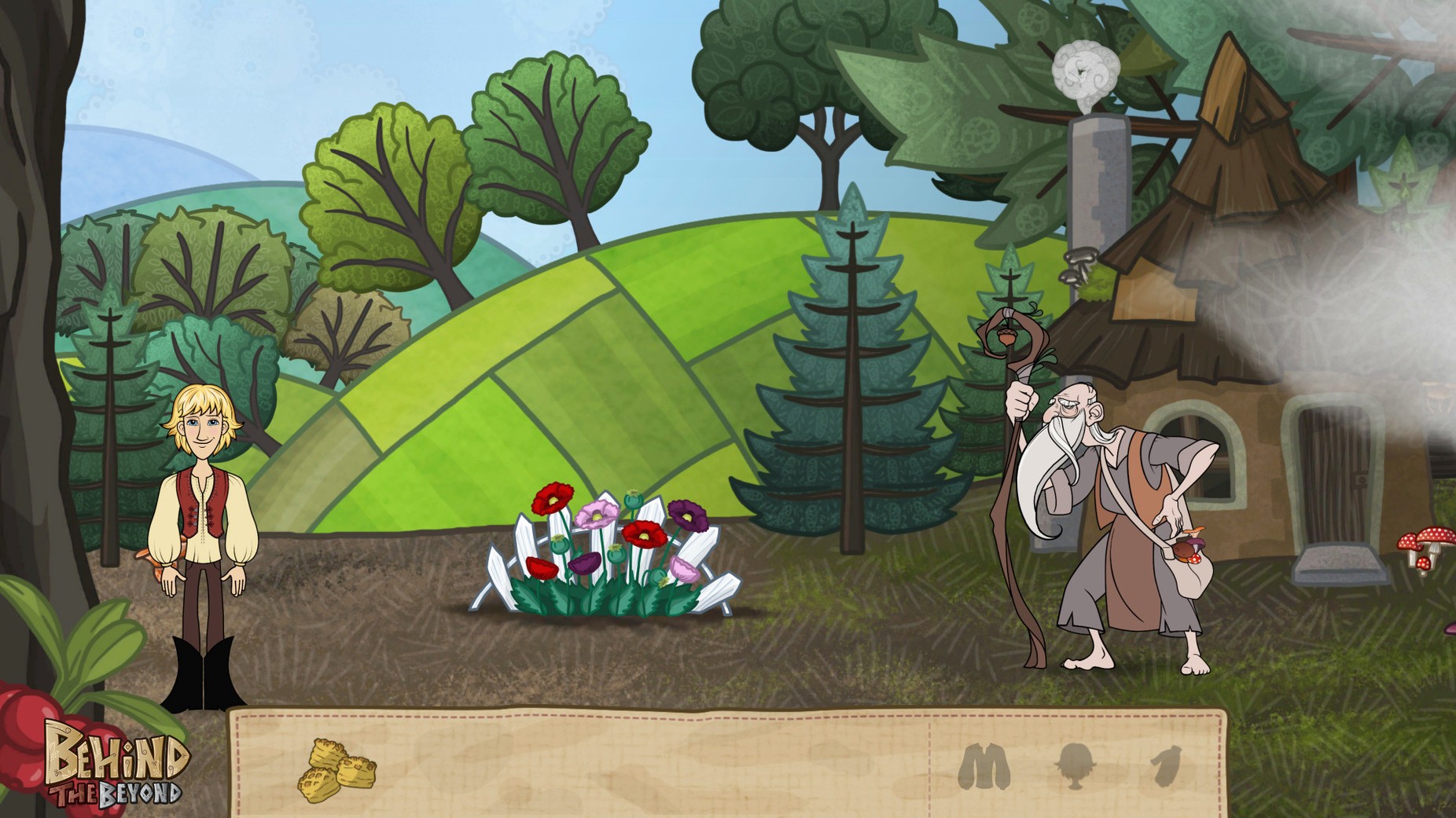
The 2026.10.17 version of Behind the Beyond brings no new features but stabilizes the experience for players who like their folklore with a bit of puzzle logic. If you already know the game, you know what you are getting: a point-and-click adventure where you control two characters with different abilities, and the world changes depending on the time of day.
- Try the opening chapter. You meet Jánoska, the youngest son of a poor man, and a mysterious Fox. The Fox can find hidden paths, detect illusions, and affect the surrounding world. If you enjoy switching between characters to solve problems, this setup will click early.
- Check how you feel about time-sensitive content. Some events and quests are available only at night or disappear at dawn. If you prefer to explore at your own pace without missing things, the day-night cycle may feel restrictive.
- Make a choice and see what happens. Your decisions affect later events and available options. The game does not telegraph consequences loudly. If you like replaying to see different outcomes, that works well. If you want a single clear path, it might frustrate.
Behind the Beyond includes English voice acting and a streamer mode. It is a good fit for players who appreciate folktale-inspired settings, character-switching puzzles, and branching narratives. It is less suited for those who dislike time windows on content or prefer linear stories without consequence.
A few things that catch people off guard at first
A few things catch people off guard during the first couple of sessions. None are hard to fix once you know what to look for.
The Fox won't use its scent ability on a path you're sure is there
Make sure you have switched to the Fox first. Jánoska cannot see the hidden paths at all. Click on the Fox icon in the character panel, then move her cursor over the area. The scent trail only appears when the Fox is active. If it still does not show, try moving a step or two away and coming back. The game checks line-of-sight for the ability.
A quest giver is missing at night
Some villagers go indoors after dark. Check inside houses and barns instead of looking in the village square. If you are stuck on a daytime quest and cannot find the next step, sleep through the night at an inn or campfire spot. The day resets certain interactions, but the quest log keeps your progress.
The Ulti card game tutorial does not trigger
The tutorial appears only when you talk to the card player near the mill for the first time. If you walked past him, go back and start the conversation again. The game remembers that you spoke to him, so the tutorial should start on the second attempt.
Streamer mode changes the cursor and nothing else
That is intentional. Streamer mode removes the character name overlays and some visual cues that could reveal story beats on a stream. It does not affect gameplay or puzzles. If you expected more options, you are not missing a hidden menu.
Let me walk you through one complete task from start to finish.
- Speak to the village elder at the fountain during the day. He asks you to retrieve a lost charm from the old mill. Accept the task.
- Walk to the mill entrance. The door is locked. Jánoska cannot open it. Switch to the Fox.
- Use the Fox's scent ability near the mill wall. A hidden opening appears on the left side. Enter with the Fox.
- Inside the mill, find the charm on a high beam. The Fox cannot reach it. Switch back to Jánoska.
- Climb the ladder in the corner. Jánoska's dexterity lets him balance on narrow beams. Walk across to the charm and pick it up.
The whole thing takes about ten minutes if you know the steps. The point is not the speed, but the rhythm of switching characters. Most puzzles in the game follow a similar pattern: one character spots the problem, the other solves it.
Save files that are more reliable across sessions
This version is a stabilization release. There are no new areas, puzzles, or characters. What you get is a game that behaves more predictably across different Mac configurations.
- Save files are more reliable across sessions. Earlier versions sometimes lost the most recent autosave if you quit too quickly. The 2026.10.17 update writes the save before closing the game, so you do not lose progress.
- The Fox's illusion detection works in more weather conditions. A previous bug caused the ability to fail during the rain effect in the swamp area. That is fixed now.
- Text scaling on high-resolution screens is consistent. Dialog boxes no longer cut off the bottom line on 4K displays. This matters for the Hungarian text option, where the longer words were most affected.
- Streamer mode activates without a restart. You can toggle it in the main menu and it applies immediately.
If you played the launch version and stopped because of a save or display issue, this is the point to come back.
Set the text language to English or Hungarian first
The defaults are fine for most people, but a few adjustments make the game more comfortable from the start.
- Set the text language to English or Hungarian. The game offers both. Voice acting is English only regardless of which text language you pick. If you want the folk tale atmosphere in the original language, switch to Hungarian text and keep English voices.
- Disable the hint overlay if you prefer to solve puzzles yourself. The game shows a small icon near interactive objects by default. You can turn that off in the accessibility section of the settings menu. It is not labeled as a difficulty option, but it effectively controls how much the game guides you.
- Check the autosave interval. The game saves automatically at key events, but you can also save manually from the pause menu.
- Toggle streamer mode if you plan to record or stream. It hides character name tags and some story cues. You can turn it on and off freely, so try both and see which one you prefer.
- macOS version not specified by the developer.
- Architecture: Intel and Apple Silicon.
How to install
- Open the downloaded file.
- In Finder, open the Applications folder.
- Move the game to the Applications folder.
- Launch the game from Launchpad.
Similar games




Sign in or join the club to leave a comment.
Nobody has commented yet.