
- Version
- 2.8.6 fix
- Studio or maker
- The Label
- Languages
- Russian, English, German, Arabic, Spanish, Italian, Chinese (Traditional), Chinese (Simplified), Korean, Portuguese, Turkish, French, Japanese
- Activation
- Not required
- Chip type
- Apple Silicon, Intel 64-bit
- Tried out on
- macOS Sequoia, MacBook Air (M1. 2020)
- First released
- 21.02.2023
- Voice languages
- Music only
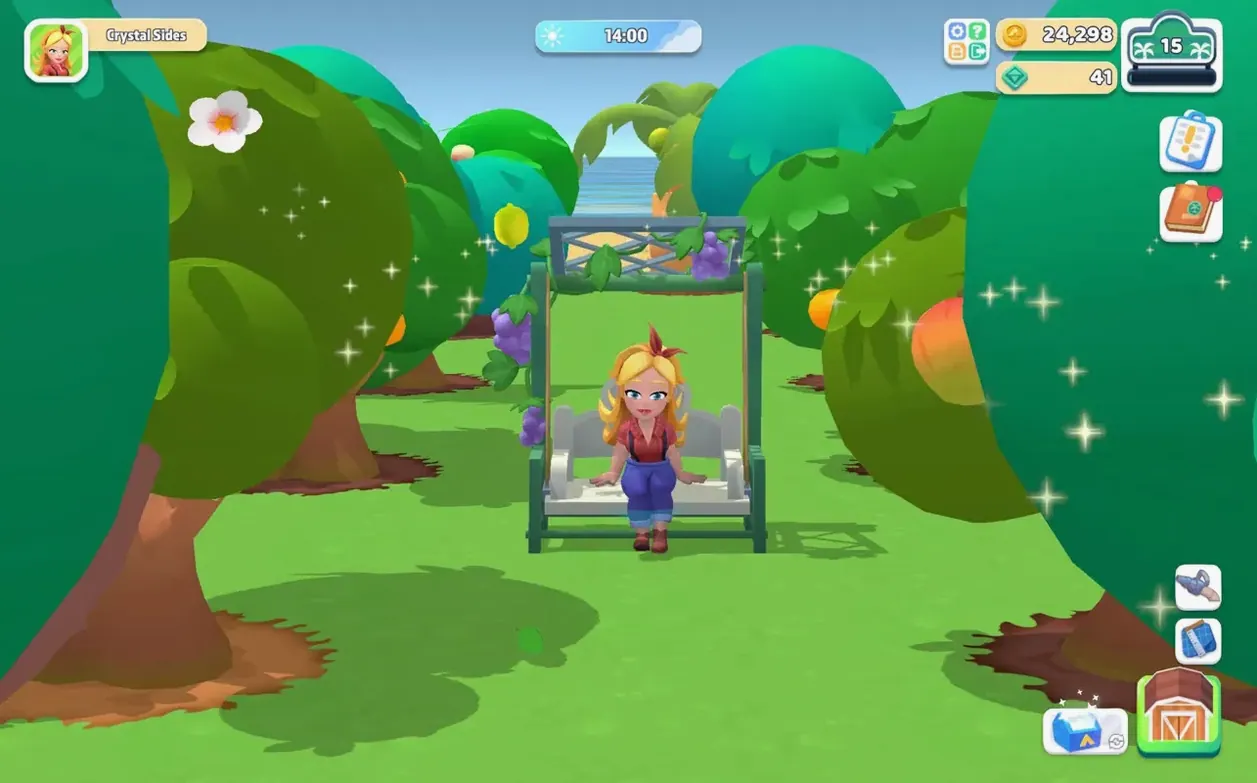
The automatic lamps are the first thing you notice. At dusk they click on across the farm, and the whole place glows while you keep working. Farmside is a quiet, satisfying loop: dig plots, plant crops, harvest them, repeat. Chickens, cows, and other animals need feeding and tending, and the barn and house can be recolored with stickers, so the place slowly becomes yours.
Lay out paths and unlock decorations by leveling up
Lay out paths, arrange hundreds of unique decorations, and unlock more by completing tasks and leveling up. The game supports thirteen languages, including English, German, and Russian, so it fits a multilingual classroom or household.
How the game runs on Mac
Farmside works on both ARM and 64-bit Intel Macs, and was tested on macOS Sequoia on a MacBook Air (M1, 2020). The current version adds a seasonal event, two new quests, a higher level cap, and a new decorative reward.
Set the language before planting your first row
Before you plant your first row, open the options and set the language once. With thirteen languages available, it’s easy to switch to something familiar or, if you’re teaching, to a second language for a bit of gentle practice. The game remembers your choice, so you won’t have to dig through menus again.
If you tend to play in the evening, look for the lamp setting early. The automatic lamps are lovely, but some players prefer to adjust how soon they come on so the farm doesn’t light up while you’re still working the far fields. It’s a small tweak, yet it changes the whole feel of a late session.
Launch from Applications folder, not the disk image
The most frequent hiccup people hit is the copy step. Dragging the app to the Applications folder alias takes a moment, and if you launch the game from the disk image instead, it may not save your progress properly. Make sure you drag, wait for the copy to finish, then open from Launchpad.
Another one: fences. Chickens will wander, and if you forget a gate or leave a gap, you’ll chase them around the orchard. Place fences first, then add the gate, and your morning rounds get much calmer.
Start small and follow local resident orders
Start with a small plot. Dig a few beds, plant something quick, and harvest before you expand. The early orders from local residents are a good guide to what to grow, so keep an eye on the request list rather than planting everything at once.
Use paths from the beginning. They cost a little time to lay, but they keep your farm tidy and make it easier to see where you’ve already walked. That matters more once the island opens up and you’re running between the orchard and the animal pens.
If you’re playing with kids or students, let them pick the stickers for the barn. It’s a low-stakes decision that makes the farm feel shared, and it costs nothing to change later. Farmside offers a gentle, rural simulation for unwinding after a busy day.
Mount the downloaded disk image, drag the app to the Applications folder alias, and open it from Launchpad. That’s it.
- A seasonal event was added.
- Two new quests were added.
- The level cap was increased.
- A new decorative reward was added.
- macOS 11.0 or later
- Apple Silicon or 64-bit Intel
Questions I keep getting
What languages does Farmside support?
The game supports Russian, English, German, Arabic, Spanish, Italian, Traditional and Simplified Chinese, Korean, Portuguese, Turkish, French, and Japanese.
Does Farmside run on Apple Silicon Macs?
Yes, Farmside supports both ARM and 64-bit Intel Macs, and was tested on macOS Sequoia on a MacBook Air (M1, 2020).
What is new in version 2.8.6?
The update adds a seasonal event, two new quests, a higher level cap, and a new decorative reward.
How to install
- Open the downloaded disk image.
- Drag the app to the Applications folder alias.
- After copying finishes, open the app from Launchpad.
Similar games
Sign in or join the club to leave a comment.
Nobody has commented yet.