- Version
- 1.0.5
- Studio or maker
- Game Atelier
- Languages
- Russian, English, German, Spanish, Italian, Chinese (Simplified), Korean, Polish, Portuguese, French, Japanese
- Activation
- Not required
- Chip type
- Apple Silicon
- Tried out on
- macOS Tahoe, Mac mini 2024 M4
- First released
- 25.07.2019
- Voice languages
- Music only
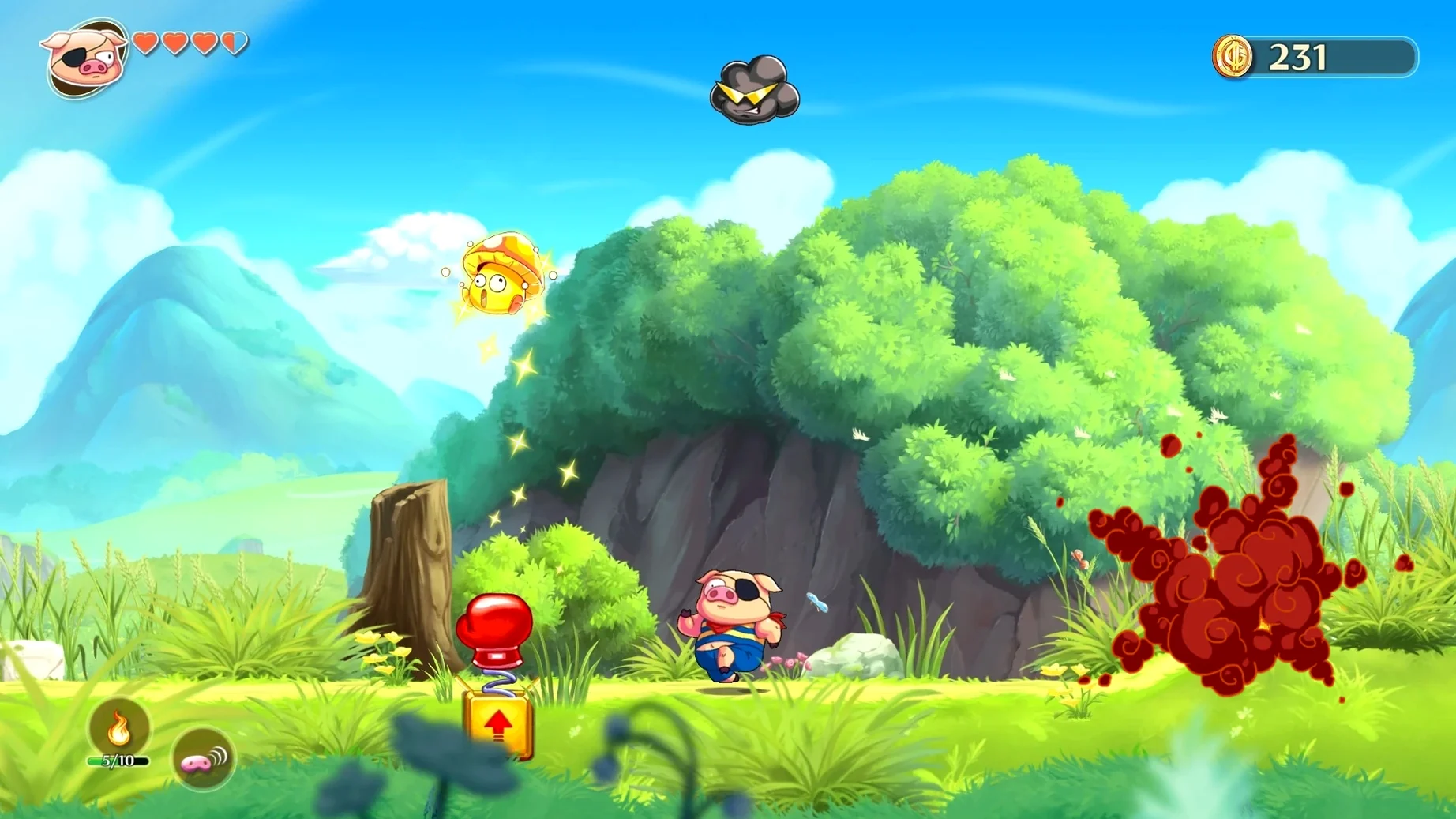
Turning into a pig, a frog, or a snake isn't usually how you start a Saturday, but Monster Boy and the Cursed Kingdom makes it feel natural. You explore a single interconnected world, each animal form opening new paths and secrets — the pig sniffs out hidden items, the frog sticks to walls, the snake fires projectiles. Special equipment upgrades your reach and power, and the hand-drawn animation gives every area a storybook feel. The soundtrack alone, composed by five legendary game musicians including Yuzo Koshiro and Motoi Sakuraba, is worth lingering over.
What macOS and hardware do I need
The game runs on Apple Silicon only. If you have an Intel Mac, it will not start. The build was tested on macOS Tahoe with a Mac mini M4.
Installing from the disk image with no extra setup
Open the downloaded disk image, drag the app into the Applications folder alias, then launch from Launchpad. No extra setup required.
What you can expect on an Apple Silicon Mac
Because the build uses ARM architecture, the app starts directly without emulation. If your Mac runs the same or a later macOS version, the game should launch the usual way — no Rosetta, no extra compatibility layers. The developers released a separate build for Apple Silicon devices, so you are working with the intended version.
The game is version 1.0.5 and was released in July 2019. The single interconnected world loads as you explore, and the hand-drawn characters and environments render at the display's native resolution.
Apple Silicon required: the game won't run on Intel Macs
A few things tend to trip people up. Here are the most common ones.
- Game does not start. Check that your Mac has an Apple Silicon processor. The game will not run on Intel Macs. Also confirm that your macOS version is Tahoe or newer — older versions may lack compatibility.
- No sound. Unlikely on a standard setup, but if it happens, check your system volume and make sure the app is not muted in the sound mixer. Restarting the game sometimes clears it.
- Controller not responding. Try disconnecting and reconnecting the controller before launching the game. Some Bluetooth controllers need to be re-paired in macOS settings first.
- Game window is small or large. The game should adapt to your display, but if it looks off, check the display settings in the in-game menu. No graphics options are exposed at the system level.
- Save data missing. The game saves progress automatically. If you think progress is lost, make sure you quit through the in-game menu and not by force-closing the window. The save location is inside the app's folder structure, so do not move or delete the game folder manually.
A student reveals multiple hidden routes on one map
I run the after-class game club at a secondary school. One afternoon, a student who loved old platformers wanted to show the group how a single map could hide multiple routes. We opened Monster Boy on a school Mac mini M4. The hand-drawn style caught everyone's attention right away. The student switched to pig form, sniffed out a buried key, then changed to frog to climb a wall that had been invisible earlier. Another student asked why the game looked different from modern 3D adventures. That led to a short conversation about hand-drawn animation and the work behind it. The club ended with several students asking if they could try the snake form next week. The game ran without any setup fuss, and the controller worked from the first button press.
Yes. Interface text is available in English, German, Spanish, French, Italian, Polish, Portuguese, Russian, Japanese, Simplified Chinese, and Korean.
- Architecture: Apple Silicon only
- macOS: Tahoe or later (tested on M4 Mac mini)
Questions I keep getting
Is this the same game as the original Wonder Boy series?
It's a spiritual successor created with Ryuichi Nishizawa, the original Wonder Boy in Monster World creator, so it shares that classic feel but is a standalone title.
Can I play it on an Intel Mac?
No, the macOS release requires Apple Silicon. It was tested on a Mac mini M4 running macOS Tahoe.
How to install
- Open the downloaded disk image to mount it.
- Drag the app icon into the Applications folder alias inside the disk image.
- Wait for the copy to finish, then open Launchpad and start the game.
Similar games


Sign in or join the club to leave a comment.
Nobody has commented yet.