- Version
- 1.0.1.0.22733456 [Wineskin]
- Studio or maker
- Chaotic Games
- Languages
- Russian, English, French
- Activation
- Not required
- Chip type
- Apple Silicon
- Tried out on
- macOS Tahoe, Mac mini 2024 M4
- First released
- 10.04.2026
- Voice languages
- English
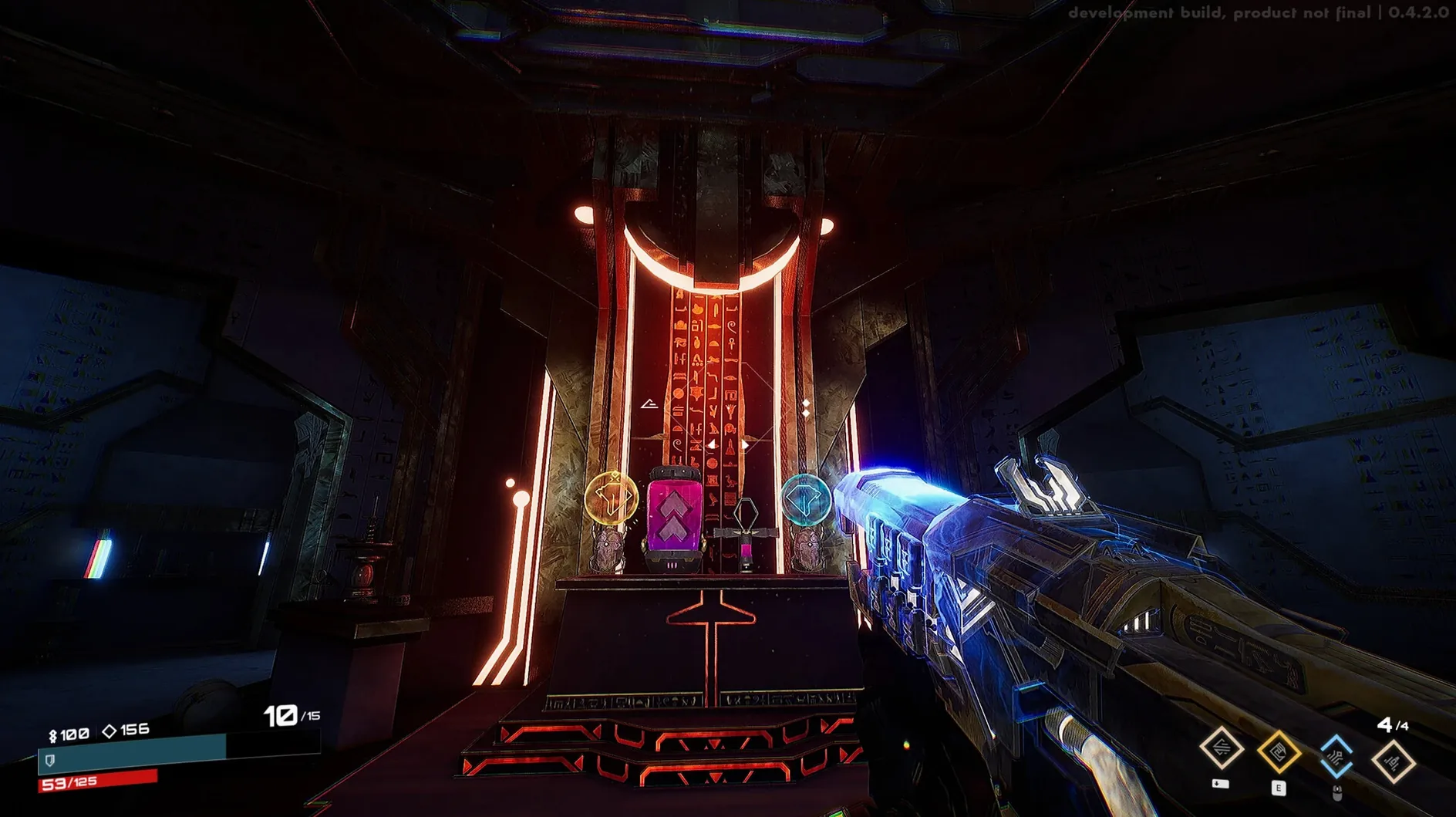
Version 1.0.1.0.22733456 of Seth is now available as a Mac Wineskin wrapper, bringing fresh abilities and random challenges to this roguelite FPS. You play as Seth, the Egyptian god of storms and chaos, in a world that mixes ancient mythology with science fiction.
| Detail | Value |
|---|---|
| Genre | Roguelite first-person shooter |
| Theme | Egyptian mythology + science fiction |
| Combat style | Fast, aggressive |
| System tested | Mac mini M4, macOS Tahoe |
| Architecture | Apple Silicon only |
| Languages | Russian, English, French |
This game will appeal to players who enjoy quick runs, stacking power combinations, and aggressive combat with a mythological twist. If you prefer slower, methodical shooters or games with a deep narrative, the rogue-lite structure and fast pace may not suit you. It is a Wineskin wrapper, so expect the usual quirks of a translation layer.
The game saves automatically between runs
Seth has a few quiet design touches that you might overlook on your first run. The game automatically saves your progress between runs, so you can quit mid-session and pick back up without losing the abilities or rewards you earned. There is no manual save button or menu option — it happens in the background.
The interface language can be changed from within the game's settings menu. English is the default on this Wineskin build, but if you prefer Russian or French, switch it before you start a campaign. The voice language stays English regardless, which is consistent across all language options.
When you die and restart, the game keeps certain permanent upgrades you unlocked during earlier runs. This is the roguelite loop — each death makes the next attempt a little easier. You do not start from scratch every time.
Adjust mouse sensitivity before facing Apophis's legions
Before you jump into the battle against Apophis's legions, open the settings menu and adjust a few things. The game defaults to a fairly high mouse sensitivity, which suits the fast-paced action but might feel twitchy if you are used to slower shooters. Lower it a notch and test it against the first enemies you encounter.
The field of view slider is worth checking too. A wider FOV helps you track enemies that spawn from the sides, especially during chaotic encounters. I set mine to around 90 degrees, but personal preference matters more than any number.
Audio balance is another early adjustment. The game's soundtrack and sound effects are mixed to emphasize impact sounds — gunfire, explosions, and ability activations. If you want to hear the ambient environmental cues or the voice lines, turn the SFX volume down slightly and raise the master volume.
Starting a session from Launchpad after the Fix file is applied
Let me walk through what a typical session looks like. I open the game from Launchpad after the disk image has been copied and the Fix file applied during the initial setup. The menu screen shows the single-player campaign option, so I select that.
Each run begins with Seth in a central hub area. I choose my starting ability from a small selection — the game offers a few different powers at the outset, each tied to one of Seth's storm or chaos themes. I pick one that matches how I want to play this run: something that deals area damage for clearing groups quickly.
The first few rooms are straightforward. Enemies spawn in waves, and I move through corridors and open arenas, shooting and dodging. Between rooms, I get a choice of a new ability or a reward. The game presents two or three options, and I pick the one that complements my current loadout. If I already have a lightning-based attack, I look for a power that adds a stun effect or increases attack speed.
As the run progresses, the challenges escalate. Random modifiers appear — enemies move faster, projectiles split on impact, or the environment changes. I adapt by switching to a more defensive playstyle or leaning into the aggressive combat the game encourages. The cycle of fighting, choosing rewards, and facing new modifiers repeats until I either defeat the legions of Apophis or fall. After a death, I check which permanent upgrades I unlocked and start the next run slightly stronger.
This loop is the core of Seth. It rewards experimentation and quick thinking, and it never forces you into a single strategy. If you search for seth mac torrent to find this version, you will get the same Wineskin build with all the abilities and random challenges included — no additional downloads or activation steps.
- macOS version not specified by developer
- Apple Silicon (M1 or later)
Questions I keep getting
What is the setting of Seth?
The game combines ancient Egyptian mythology with science fiction. You play as Seth, the god of storms, war, destruction, and chaos.
How to install
- Open the downloaded disk image to see its contents.
- Drag the app into the Applications folder shortcut inside the disk image.
- Once copying finishes, launch the game from Launchpad.
- If the game shows an error at startup, run the file named Fix that is also in the disk image.
Similar games




Sign in or join the club to leave a comment.
Nobody has commented yet.