
- Version
- 2.59 Native
- Studio or maker
- Hinterland Studio Inc.
- Languages
- Russian, English, German, Spanish, Italian, Chinese (Traditional), Chinese (Simplified), Korean, Dutch, Norwegian, Polish, Portuguese, Turkish, Finnish, French, Swedish, Japanese
- Activation
- Not required
- Chip type
- Apple Silicon, Intel 64-bit
- Tried out on
- macOS Sequoia, MacBook Air (M1. 2020)
- First released
- 22.09.2014
- Voice languages
- English
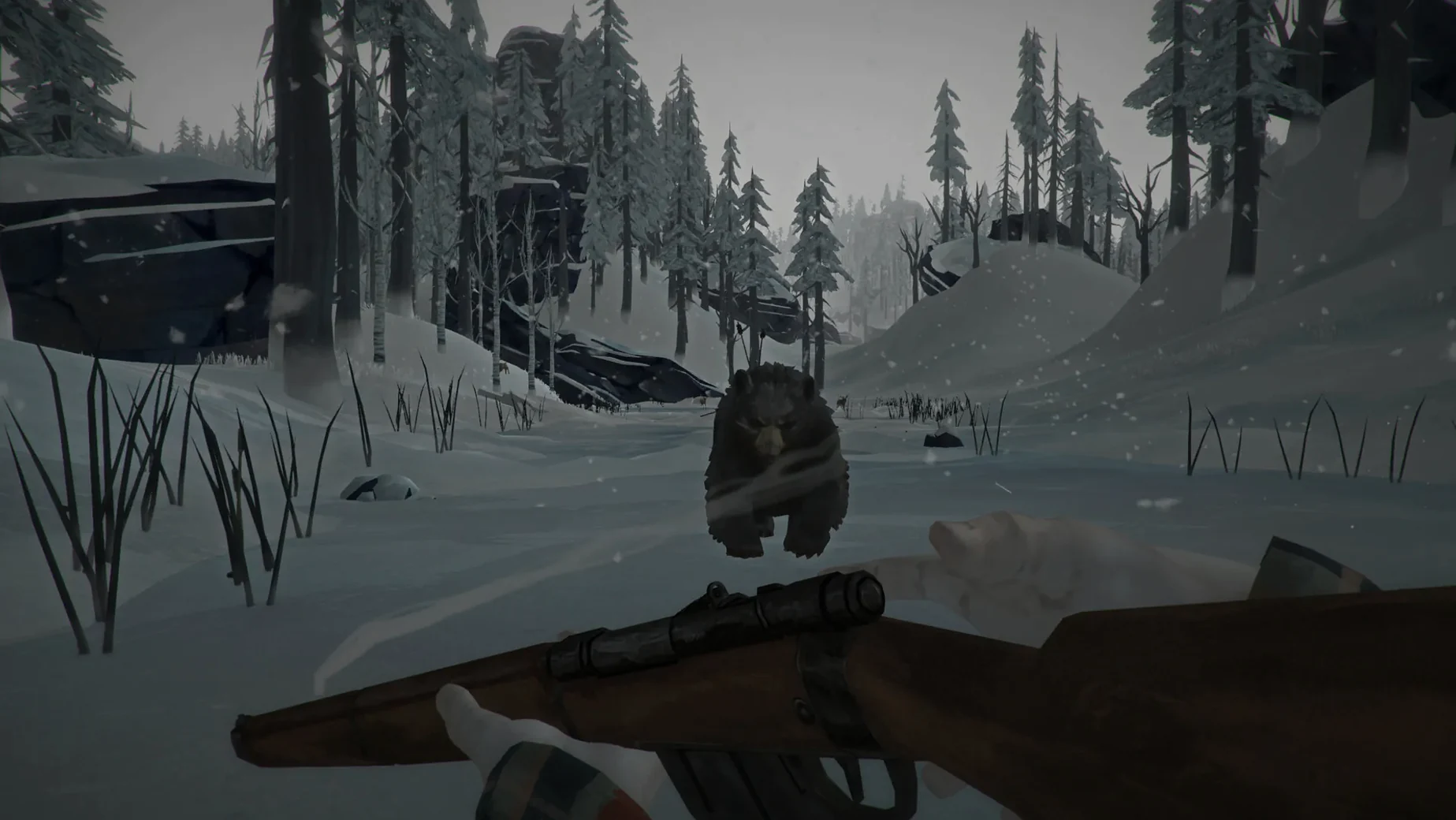
You wake up in a snow-covered landscape. The sky is grey, the wind is steady, and there are no other people in sight. This is the world after a geomagnetic disaster, and your only task is to stay alive. The Long Dark for macOS is an exploration-survival game that asks you to manage cold, hunger, thirst, and fatigue while you move through a vast, quiet wilderness.
Start with Wintermute for direction
Wintermute is the episodic story mode. It gives you a clear goal and introduces the game's systems one at a time: how to find shelter, how to read a map, how to tell when a wolf is too close. A newcomer benefits from this structure because the open sandbox mode can feel overwhelming. Wintermute teaches you the rhythm without punishing every mistake.
Learn the quiet rules of survival
There are no zombies in The Long Dark. The danger comes from cold, exhaustion, and the occasional wild animal. You learn to check your clothing, to plan a route before the sun sets, and to listen to the wind. The game rewards patience and observation more than quick reflexes. A new player should spend the first few hours simply walking, looting, and learning what each item does.
The Long Dark takes a different approach from Don't Starve
If you have played other survival games on Mac, you will notice that The Long Dark takes a different approach. Games like Don't Starve lean on a distinct art style and a constant need to manage meters that drain quickly, with a heavy dose of fantasy creatures. The Long Dark keeps its threats natural and grounded. There are no monsters, only weather and wildlife. The pace is slower, and the world feels more real.
Another comparison is Subnautica, which also focuses on exploration and resource management. Subnautica gives you an alien ocean to navigate, with a clear story driving you forward. The Long Dark replaces water with snow and ice, and the story mode is structured in episodes rather than a single open-ended narrative. The silence of the frozen landscape is a character in itself, something Subnautica cannot offer.
Project Zomboid is a third point of reference. It shares the solo survival focus and the need to manage your character's physical state, but it adds zombies and a larger focus on base building. The Long Dark strips away the undead threat entirely. For a player who wants survival without combat pressure, it is a cleaner experience.
Fix white noise by forcing the OpenGL core
One issue that comes up when starting The Long Dark on a Mac is white noise appearing instead of game audio or video. The fix is straightforward: open Terminal and enter the command /Applications/tld.app/Contents/MacOS/tld -force-glcore. This forces the game to use an older graphics path that avoids the problem. If you have moved the app to a different folder, adjust the path accordingly.
Another snag is the game not opening at all after dragging it to Applications. This usually happens because the disk image was not properly ejected before launching, or because the app is blocked by macOS security settings. The simplest solution is to right-click the app in Applications, select Open from the menu, and confirm that you want to run it. This bypasses the first-time gatekeeper check.
Some players find that the game runs but feels sluggish on older Intel Macs. The Long Dark was built for both ARM and x86 64-bit architectures, so it will run on a range of machines. The game does not require an internet connection or an activation key, so there is no need to worry about online checks slowing things down.
Works on Apple Silicon and Intel Macs, tested on M1 MacBook Air
The Long Dark supports both Apple Silicon and Intel 64-bit Macs, so it works on any recent machine. The version tested was macOS Sequoia on a 2020 MacBook Air with an M1 chip, which confirms compatibility with the current operating system. The game does not require a specific macOS minimum beyond what the developer listed, so it should run on systems that support Metal or OpenGL.
Installation is simple. You open the downloaded disk image, drag the app into the Applications folder, then launch it from Launchpad. No activation, no account creation. The game's voice language is English only, but the interface and subtitles are available in seventeen languages including German, French, Spanish, Italian, Russian, Chinese, and Japanese. This makes it accessible to a wide range of players in a classroom or personal setting.
The game does not rely on a persistent online connection after you have the files. You play alone, in your own time, without interruptions. The world is large, and the survival mechanics are deep enough to keep you learning for many hours. If you prefer story-driven play, the first two episodes of Wintermute give you about fifteen hours of guided content before you move into the open Survival Mode.
- Apple Silicon Mac
- Intel 64-bit Mac
Questions I keep getting
Does The Long Dark have a story mode?
Yes, Wintermute is the episodic story mode that guides you through the game’s world and survival mechanics.
Are there monsters or zombies in the game?
No. The threats are natural: cold, hunger, thirst, and wild animals.
What languages does the game support?
The game supports seventeen languages including English, German, Russian, Spanish, French, and Japanese.
How to install
About 9.5 GB of frozen wilderness sits ready for your Intel or Apple Silicon Mac. Three straightforward steps and you are facing the quiet apocalypse on Great Bear Island.
- Open the downloaded disk image. A Finder window will appear showing the game icon and a shortcut to your Applications folder.
- Drag the game app onto the Applications shortcut. macOS copies the whole game to your local drive, so it runs fast and keeps its settings.
- Launch the game from Launchpad or your Applications folder. If the screen shows white noise or glitched graphics, open Terminal and run
/Applications/tld.app/Contents/MacOS/tld -force-glcore— this tells the engine to use a more compatible graphics layer on modern Macs.
Similar games





Sign in or join the club to leave a comment.
Nobody has commented yet.