
- Version
- 9.2.1
- Studio or maker
- Nektony
- Languages
- English
- Activation
- Included
- Runs on macOS
- macOS 10.13 or later
- Chip type
- Apple Silicon, Intel 64-bit
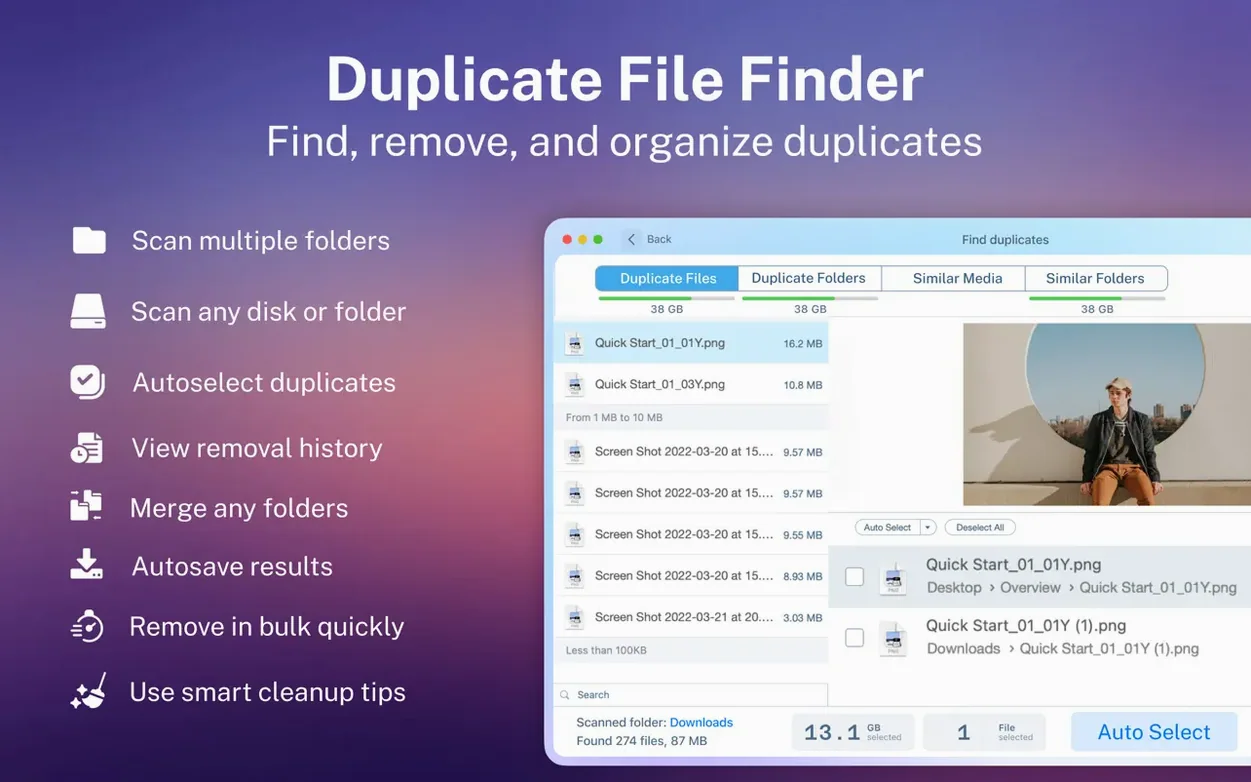
Duplicate File Finder Pro is a Mac utility that scans your drives for duplicate files and helps you remove them to free up space.
Before you download, here is what matters for your Mac:
- Runs on macOS 10.13 or later, on both Intel and Apple Silicon Macs.
- Works with external hard drives and network folders, so you can clean more than just your internal disk.
- Finds duplicates in hidden folders and can restore files you removed by mistake.
- Sorts results by name, size, total size, type, and duplicate count, and groups them by category like images, video, or documents.
- Previews individual files before you delete, and lets you select multiple duplicates with one button.
- Also finds similar folders, so you can merge them instead of just deleting copies.
If you use a Finder window to browse a Dropbox folder, this app can help you spot duplicate files that hide in cloud-synced folders too.
Start with a single folder you know well
Once you have Duplicate File Finder Pro up and running, start with a single folder you know well, like your Downloads or Documents folder. A small scan helps you understand how the app presents results without being overwhelmed by hundreds of files. After that first scan, use the category tabs — images, video, music, archives, documents — to see how duplicates are grouped.
Before deleting anything, use the preview feature to check a few files. It sounds obvious, but seeing a file before removing it builds confidence in the app's accuracy. When you find a set of duplicates you want to clean up, try the smart selection tool: it picks the copies most likely to be redundant, usually leaving one original behind.
Avoid scanning your entire system drive right away
The most frequent mistake is scanning the entire system drive right away. Your Mac's system files and caches contain temporary copies that look like duplicates but are needed for normal operation. Stick to user folders and external drives until you are comfortable reading scan results.
Another mistake is deleting duplicates without checking the file locations. Two files with the same name and size might sit in different project folders, each needed for its own purpose. The app shows you the path for every duplicate, so take a moment to glance at where each copy lives before you select them all with the "select all" button.
New users also tend to ignore the restore feature until they need it. Duplicate File Finder Pro can restore removed duplicates, but only if you have not emptied the Trash yet. If you move files to Trash instead of deleting permanently, you give yourself a safety net for the first few cleaning sessions.
Version 8.5.2 adds folder merging to duplicate finding
The current version, 8.5.2, continues to support both Intel and Apple Silicon Macs. For daily use, the most noticeable change is how the app handles folder merging alongside duplicate finding. Earlier versions focused mostly on file duplicates; now you can spot similar folders and merge them in the same workflow, which saves time if you maintain multiple backup folders or synced directories.
Activation is included in the package, so there is no separate license file to track.
For anyone who uses a duplicate file finder mac torrent search to find this tool, the 8.5.2 build runs the same way whether you scan a network folder or an external hard drive. The interface has not changed drastically, so if you used an earlier version, you will find the layout familiar. The main improvement is stability when scanning large folders with thousands of files, which is a practical benefit for teachers and students cleaning shared drives at school.
- Version 8.5.2.
- macOS 10.13 or later
- Intel or Apple Silicon
Questions I keep getting
Can Duplicate File Finder Pro scan external hard drives?
Yes, it works with external hard drives and network folders, so you can clean duplicates on more than just your startup disk.
What happens if I delete a file by accident?
The app includes a restore feature, so you can get back files you removed during a scan.
How to install
- Open the downloaded package.
- Follow the included install and activation instructions.
Similar apps




Sign in or join the club to leave a comment.
Nobody has commented yet.