
- Version
- 4.0.4
- Studio or maker
- Nektony
- Languages
- Russian, English, German, Spanish, Italian, Chinese (Simplified), Dutch, Ukrainian, French, Japanese
- Activation
- Not required
- Runs on macOS
- macOS 10.13 or later
- Chip type
- Apple Silicon, Intel 64-bit
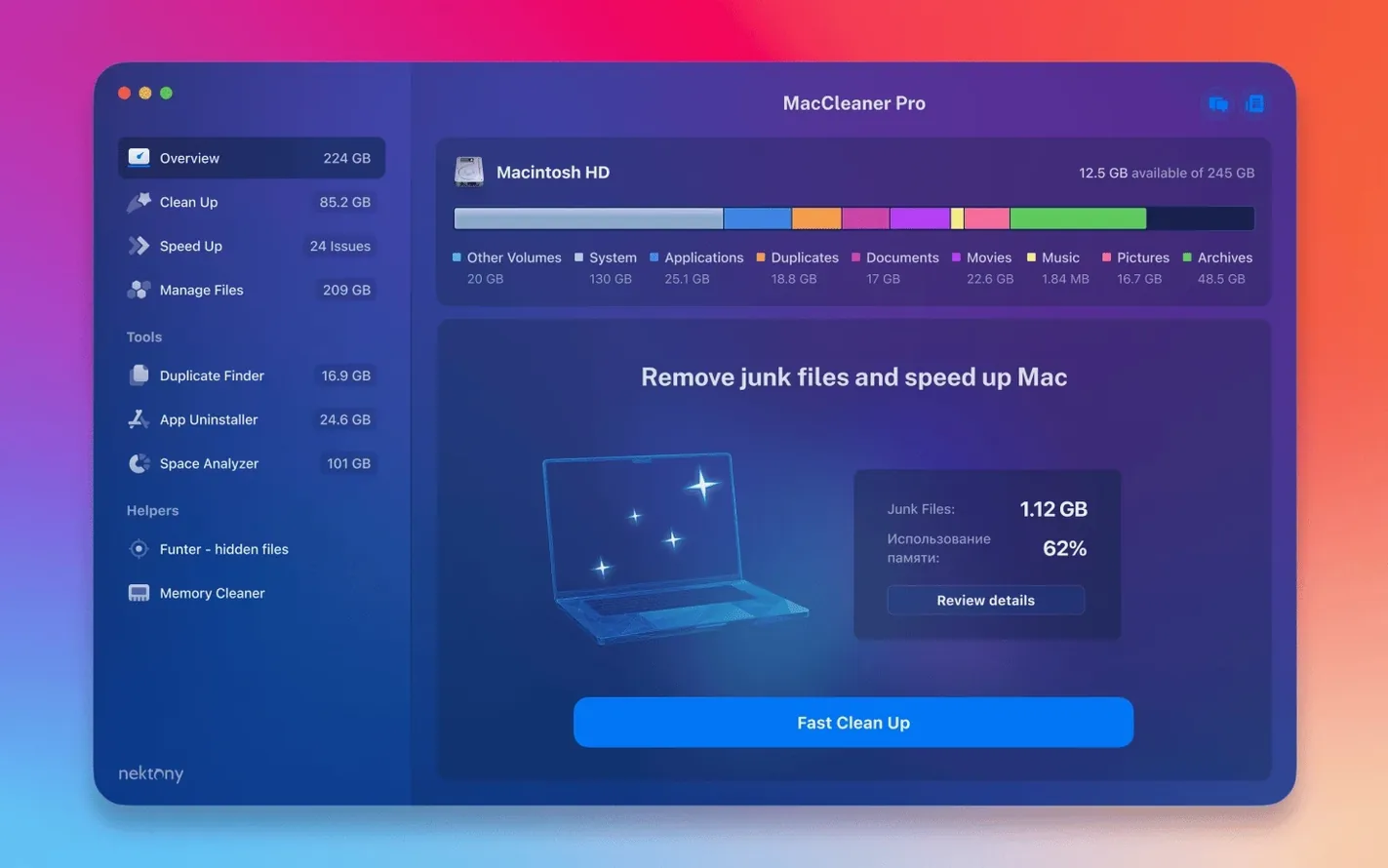
Version 4.0.2 of MacCleaner Pro arrived in May 2026 with a sharper eye for items tucked inside your iCloud folder and a few interface fixes. Before you download, it helps to know what this Mac will ask of your machine.
Runs on Intel and Apple Silicon Macs
MacCleaner Pro supports macOS 10.13 and later, so both Intel and Apple Silicon Macs are covered. That means a 2017 iMac and a 2023 MacBook Pro can both run the suite, though the interface is English only.
Six utilities including duplicate finder and RAM cleaner
Beyond the core cleanup tools, the suite adds six utilities in one. Duplicate-file finder, disk analysis, memory cleaning, and hidden-file management are all included. Memory Cleaner watches your RAM and clears inactive memory when you need a boost. Disk Space Analyzer PRO maps where your storage went and points out large files. Funter helps you locate and manage hidden files that Finder leaves out of sight.
How to install
- Open the installer package included in the download.
- Follow the installation instructions that come with it.
- Complete activation using the steps described in the package.
The whole thing works as a single download, so you do not have to piece together separate tools. If your Mac runs macOS 10.13 or later, MacCleaner Pro 4.0.2 should feel right at home.
Walk through each tool before your first cleanup
When you open MacCleaner Pro for the first time, take a moment to look through each of the six tools rather than jumping straight into a cleanup. The suite is designed so you can work through one area at a time.
Start with Disk Space Analyzer PRO. It scans your whole drive and shows you which folders and files take up the most room. This gives you a clear picture before you decide what to remove. The scan might take several minutes on a larger drive, so let it finish before you act on the results.
Next, run Duplicate File Finder PRO. It searches your selected folders for files that share the same name and content. If you keep multiple copies of photos or documents spread across folders, this tool will find them. Preview results before deleting anything; it is easy to mark a whole group at once, but a quick check saves time later.
Memory Cleaner is worth trying early on. It shows your current memory usage and gives you a button to clear inactive RAM. You can run it when your Mac feels sluggish and see if it helps. It does not require a full scan, so it works quickly.
A cleanup workflow from start to finish
Here is one way to use the tools in sequence, especially if your goal is to free up disk space and remove apps you no longer use.
- Open App Cleaner & Uninstaller PRO and let it list all your applications. Browse the list and mark any apps you have not used in months. The tool also shows associated service files and extensions, so you can remove everything related to an app in one pass. Confirm the removal and move to the next step.
- Switch to Duplicate File Finder PRO and select your Documents, Downloads, and Desktop folders for a scan. When the scan finishes, review the group results. You can select entire groups of duplicates and delete them at once, but check a few files in each group to be sure you are keeping the right copy.
- Open Disk Space Analyzer PRO and scan your main drive again. The map will now show the space you freed up after removing apps and duplicates. Look for any large folders you missed, such as old project files or cached data from browsers.
- If you want to clear hidden clutter, use Funter to show hidden files in your home folder. You can delete items you recognize as leftovers from old software, such as preference files or caches. Be careful with files you do not recognize.
- Finish with Memory Cleaner. Let it monitor your memory for a few minutes, then clear inactive RAM if your memory pressure is high. This does not free disk space, but it can make the system feel more responsive while you work.
This order avoids wasted effort. Removing apps first reduces the number of leftover files that a duplicate finder would otherwise pick up later.
Better iCloud file detection in version 4.0.2
The detection of items saved in an iCloud folder was enhanced by version 4.0.2. If you keep files in iCloud Drive and sync them to your Mac, the duplicate finder and the disk analyzer can now see those items more reliably. That matters because iCloud files can appear on your drive and in the cloud at the same time, and older versions of the tools sometimes missed them.
The same update also improved detection of items inside a custom Home folder. If you store data outside the standard Documents and Downloads folders, the scans should now cover those areas more thoroughly.
Funter works as a separate utility, but it integrates with the suite's approach. Instead of toggling hidden files on and off through the Terminal, you can browse them in a Finder-like interface and manage them directly. It is a small time saver if you often need to find preference files or application support folders.
No part of the bundle requires an account or an online login. Activation is handled through the included instructions, so you can use the tools offline once they are installed.
Same interface on Intel and Apple Silicon Macs
Since the suite supports macOS 10.13 and later, it runs on both older Intel Macs and newer Apple Silicon models. The interface is consistent across both architectures, so the layout and controls look the same whether you use an Intel or an M-series Mac.
Each tool opens in its own window, which keeps workflows separate. Disk Space Analyzer PRO needs time to scan a drive with many files; the progress bar updates as it works, so you can see how far along it is. Duplicate File Finder PRO uses a similar scan approach, and the time depends on how many files you select to search.
Memory Cleaner is lighter than the others. It runs as a small window or a menu bar item and does not need a full disk scan. App Cleaner & Uninstaller PRO lists your applications immediately after it loads, so you can start selecting items without waiting for a scan to finish.
The English interface is straightforward. Labels, buttons, and confirmation dialogs use plain terms such as Scan, Remove, and Clean. There are no extra languages to toggle, which keeps the layout uncluttered.
- Improved detection of items stored in an iCloud folder.
- Enhanced detection of items in a custom Home folder.
- Fixed several minor interface issues.
- macOS 10.13 or later
- Apple Silicon or Intel 64-bit
- Interface language: English
How to install
- Open the installer package included in the download.
- Follow the installation instructions that come with the package.
- Complete activation using the steps described in the included instructions.
Similar apps




Sign in or join the club to leave a comment.
Nobody has commented yet.