- Version
- 15.7.3.564
- Studio or maker
- Wondershare Technology
- Languages
- Russian, English, German, Arabic, Greek, Spanish, Italian, Catalan, Chinese (Simplified), Korean, Dutch, Polish, Slovak, Thai, French, Hindi, Czech, Swedish, Japanese
- Activation
- K'ed by TNT team
- Runs on macOS
- OS X 10.11 or later
- Chip type
- Apple Silicon, Intel 64-bit
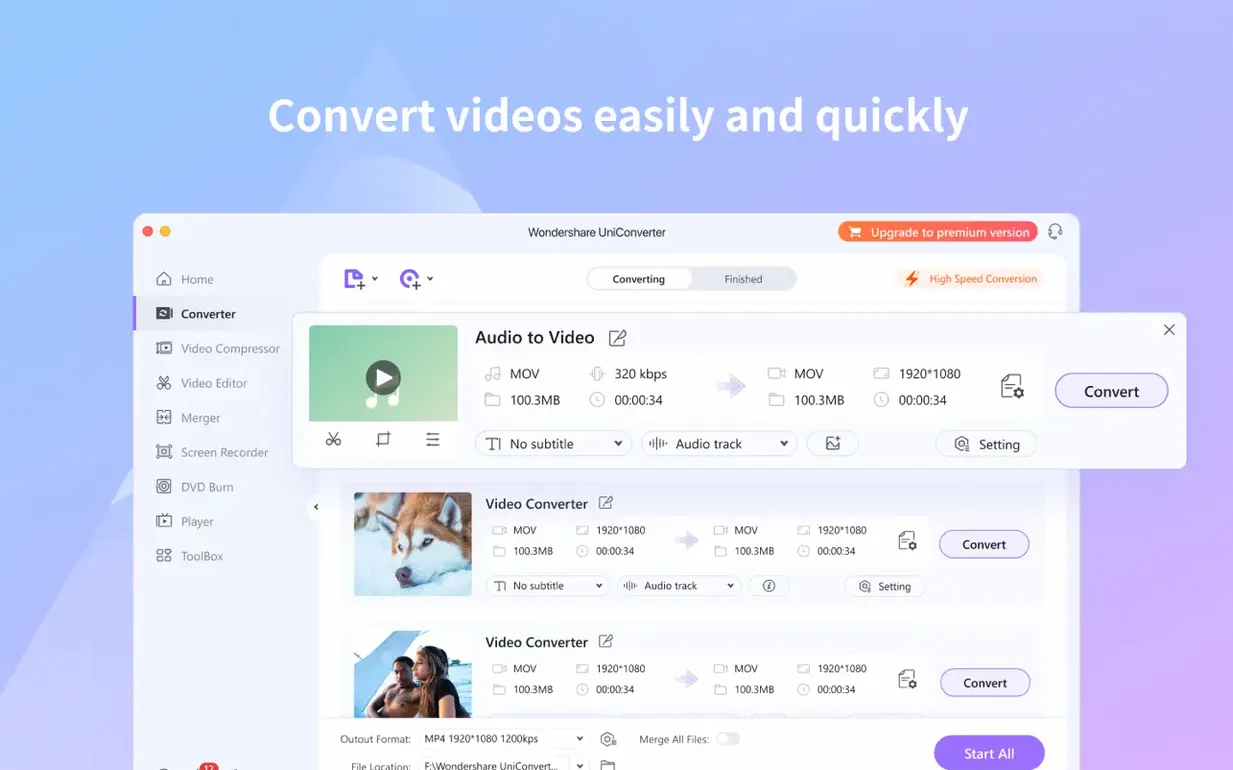
Video files come in so many formats these days that it is easy to run into a file your Mac simply will not open. Wondershare UniConverter handles that problem by providing a single application that converts, edits, downloads, burns, organizes, captures video, and plays media. Teachers running a school video project or parents trying to get a home movie onto a tablet will appreciate the wireless transfer feature, which sends files to Apple and Android devices without any USB cable.
| Detail | Value |
|---|---|
| Version | 15.7.3.564 |
| Category | Utilities |
| Architecture | Intel 64-bit + Apple Silicon (ARM) |
| Interface languages | Russian, English, German, Arabic, Greek, Spanish, Italian, Catalan, Chinese (Simplified), Korean, Dutch, Polish, Slovak, Thai, French, Hindi, Czech, Swedish, Japanese |
Inside the app you will find a built-in video editor that can crop unwanted black bars from a recording, split a long file into shorter chapters, or merge several clips into one timeline. Batch conversion and 4K support are included, along with a codec library that supplies native codecs for iMovie and Final Cut. If you still work with physical discs, the burning module can write DVD video or common video files to a disc. The tool also converts DRM-protected files when you have the legal right to do so.
Whether UniConverter replaces your current video tools
People often ask whether UniConverter replaces the free video players and converters already on their Mac. The short answer is that it can, but it does more than a single-purpose app like HandBrake or VLC. Those programs focus on one task — converting or playing — while UniConverter combines conversion, editing, download, DVD handling, and wireless transfer in one window. You do not need to switch between three different applications to get a video from your camera onto an iPad or to trim the start and end of a clip before sharing it.
Another common question: does it work on Apple Silicon Macs without extra steps? Yes. The application itself is a single disk image that mounts on the desktop, and the activation process is handled by the TNT team, meaning you do not need to enter a license key or connect to an online account. After dragging the app into your Applications folder, it is ready to open.
Some users wonder about the language choices. The interface supports 18 languages, including Japanese, Korean, Arabic, Hindi, and both Simplified and Traditional Chinese. If your school has students or colleagues who prefer working in their native language, the app can switch to suit them.
Three types of Mac users who benefit most
I see three kinds of Mac users who benefit especially. First, anyone who regularly receives video files from students, colleagues, or family members — a teacher collecting project submissions, for example. Formats vary wildly, and UniConverter can read most of them. Second, people who still own a DVD collection or need to create a disc for a school event, a wedding, or a training session. The DVD ripping and burning modules are not something most free converters offer, so if discs are part of your workflow, this app is the only tool you need for that task. Third, users who want to move video between devices without hunting for cables. The wireless transfer sends files over your home or school network to an iPhone, iPad, or Android device directly from the app.
If you edit in iMovie or Final Cut, the built-in codec library saves you the trouble of searching for extra codecs online. The library includes native codecs that those editors recognize, so you can import converted files without a second thought.
What UniConverter adds that HandBrake and VLC lack
HandBrake is probably the most well-known free video converter for Mac. It does one thing — convert video between formats — and does it reliably. But HandBrake has no video editor, no downloader, no DVD burning, and no wireless transfer. If your needs are limited to converting an MKV to MP4, HandBrake is fine. If you also need to crop, split, or burn to disc, you will end up adding extra software.
Another option is Movavi Video Converter, which covers conversion, basic editing, and DVD work. The main difference is that Movavi does not include a download module for grabbing online video from YouTube and similar sites, and it does not offer wireless transfer to phones or tablets. UniConverter combines those missing features in the same window, so you can download a clip, trim it, and send it to a phone without leaving the app.
Apple’s own QuickTime Player can play and convert some formats, but it is limited to the codecs Apple ships with macOS. For anything outside that set, you need third-party software. UniConverter, with its 159+ format support and codec library, covers the gaps QuickTime leaves open.
How wireless transfer works with your Mac's network
The wireless transfer feature uses your local network, which means it works alongside macOS’s own sharing tools. You do not need to enable anything special — just make sure the target device is on the same Wi-Fi network. The app sends the file over the air, and the receiving device saves it to its storage. This fits well into a classroom scenario where a teacher wants to distribute a short video to a row of tablets without connecting each one with a cable.
The iTunes integration is another macOS-specific touch. When you transfer a converted file to your iTunes library, the app can extract metadata and update the library automatically. That is useful if you are organizing a collection of home videos or music videos and want them to appear with correct titles in iTunes. The feature also works when you sync media to an iPhone or iPad through iTunes.
For users who edit in Final Cut Pro or iMovie, the native codec library means you can convert a file from a less common format directly into something those editors understand, then import it without re-encoding. That saves time and preserves quality because the conversion happens once, not twice. The app also supports batch conversion, which lets you queue several files and walk away while it works.
If you search for wondershare uniconverter mac download or uniconverter torrent, you will find this version packaged as a disk image that mounts like any standard macOS installer. The same applies if you look for wondershare uniconverter mac torrent or wondershare uniconverter torrent — the file structure is the same, and the installation steps remain simple.
- macOS OS X 10.11 or later
- Intel 64-bit or Apple Silicon (ARM) processor
Questions I keep getting
Does Wondershare UniConverter work on Apple Silicon Macs?
Yes, version 15.7.3.564 supports both Apple Silicon (ARM) and 64-bit Intel Macs, and it is compatible with OS X 10.11 and later.
Can I transfer videos to my phone without a cable?
Yes, the app supports wireless transfer to Apple and Android devices, so you can send files without connecting a USB cable.
How to install
1. Mount the disk image and launch the app using the Open Gatekeeper friendly option. 2. Press Enter in Terminal to bypass Gatekeeper. 3. Drag the app into the Applications folder. 4. The app is ready to use.Similar apps


Sign in or join the club to leave a comment.
Nobody has commented yet.