
- Version
- 1.1
- Studio or maker
- CableGuys
- Languages
- English
- Activation
- k'ed by GUISEPPE
- Runs on macOS
- macOS 10.13 or later
- Chip type
- Apple Silicon, Intel 64-bit
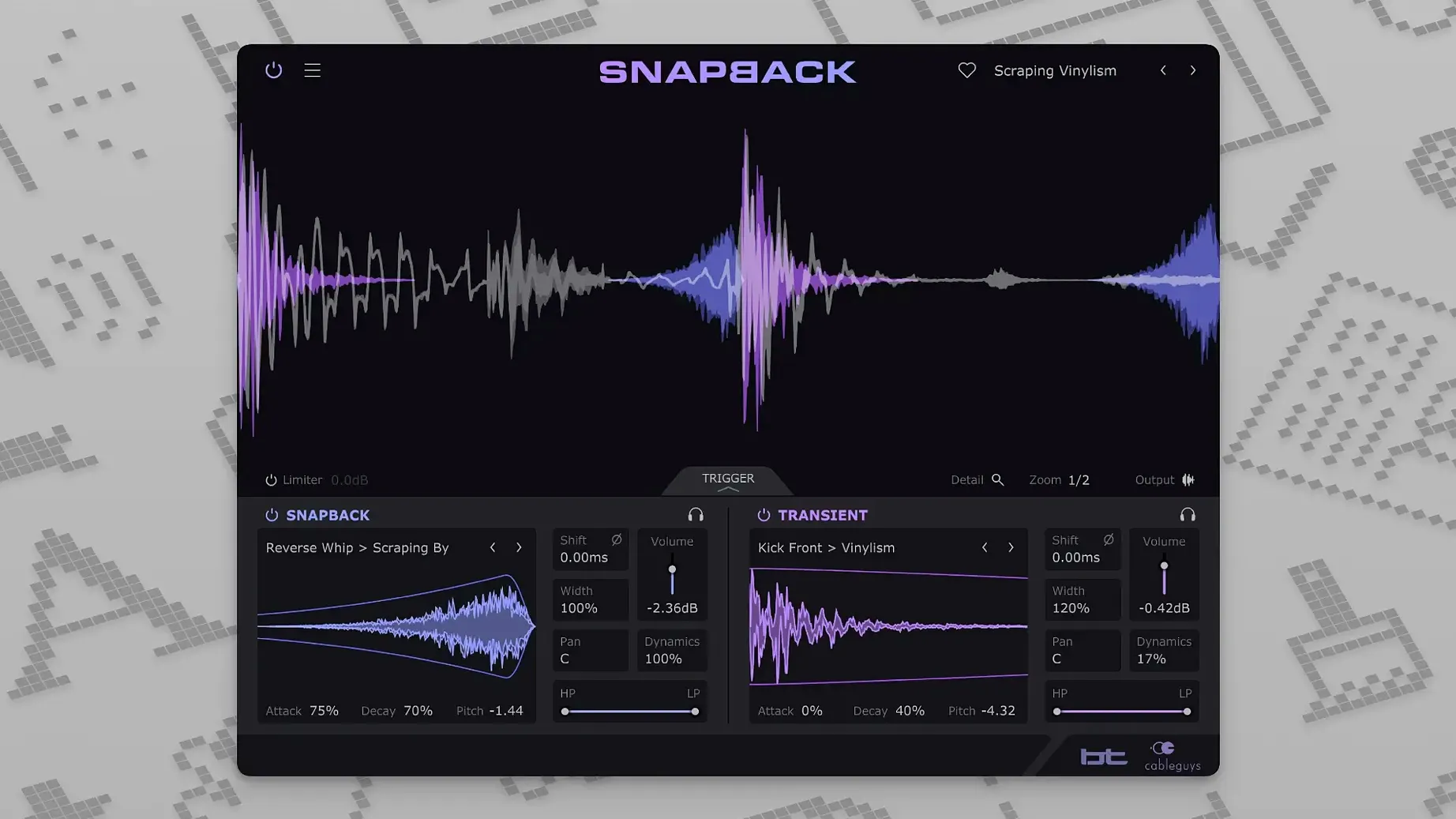
Anyone making beats with drums that need more weight or texture will find a place for Snapback in their session. It works on individual drum tracks or a bus, aligning a layered sample to the attack of the original hit so the two sound like one. The plugin includes pitch and phase adjustment plus envelopes to shape the layered sound, and the built-in library holds more than 200 ready-made samples covering kicks, snares, and percussion. Developed in collaboration with BT, it handles both Intel and Apple Silicon Macs in any VST 2, VST 3, AU, or AAX host DAW.
Suits beatmakers building drum sounds from scratch
Snapback suits a few different kinds of Mac users, but the common thread is anyone who works with drum sounds at a sample level. Beatmakers who build hip-hop or electronic tracks from scratch will appreciate how fast it adds punch to a kick or snare without hunting through folders for the right sample. Mix engineers working on recorded drums can use it to reinforce weak hits or add a controlled transient that cuts through a dense mix. Producers who layer sampled drums with synthesized percussion also benefit, because Snapback handles the timing alignment automatically rather than requiring manual nudging of audio regions.
Drum programmers who use drum machines or sampler plugins will find Snapback useful as an insert effect that catches every hit, including rolls and ghost notes, without missing a transient. And anyone collaborating remotely or working fast in a studio setting will like that it keeps the layered sample locked to the original performance, so you do not need to re-align things after moving or editing the track.
Runs natively on Intel and Apple Silicon Macs
Snapback runs on macOS 10.13 or later, and the official requirements specify macOS 10.15 as the recommended starting point. Either way, it works on Intel Macs and Apple Silicon models through native support, so no Rosetta translation is needed on M-series machines. The plugin comes in VST 2, VST 3, AU, and AAX formats, which means it slots into any modern DAW without extra wrappers or workarounds. The interface is in English only, and the current version is 1.1, which added a Reverse button and expanded MIDI port support from 16 to 256 ports for advanced setups.
Because it is a real-time plugin rather than a standalone application, Snapback loads inside your DAW's mixer or instrument chain. It does not require a separate installer beyond the standard procedure, and it does not rely on background services or additional audio drivers. The waveform visualizer shows how the layered sample aligns to the original hit, giving you a visual reference without needing to zoom into the timeline.
Inserts as a regular audio effect in your DAW chain
Snapback works inside your DAW as a regular audio effect insert, so it interacts naturally with the rest of your plugin chain. You can place it before an EQ or compressor to shape the layered drum sound further, or after a gate if you want to control which hits trigger the sample. The plugin responds to automation from your DAW as well, so you can automate the sample selection or pitch over time for variation across a section.
On macOS itself, Snapback behaves like any other Audio Unit or VST plugin. It respects system audio routing and does not interfere with Core Audio or aggregate devices. If you use multiple Macs or share sessions between machines, the plugin settings and sample choices save with your project file, so the alignment is preserved when you move the session. The expanded MIDI port support in version 1.1 is useful if you run complex setups with many MIDI channels, like a hardware drum controller or a multi-output sampler.
Adds punch to a flat kick and snare pattern
I opened a project in my DAW that had a simple kick and snare pattern I had programmed with a sampled drum machine. The kick had a solid low end but felt a little flat in the attack, so I inserted Snapback on the kick track. The plugin immediately detected the first kick hit and showed the waveform in its visualizer. I browsed the built-in library and picked a short kick sample with a sharp transient that added a click on top of the original. The alignment was automatic, and I could hear the two sounds lock together as one.
I wanted the layered sample to hit slightly before the original transient for a tighter feel, so I adjusted the timing offset. The waveform updated in real time so I could see the sample moving relative to the attack. Then I used the filter to roll off some low end from the layered sample so it did not muddle the sub frequencies. The pitch adjustment let me tune the sample to match the key of the track, which helped it blend rather than clash.
On the snare, I used a different approach. I imported a clap sample from my own library and let Snapback align it to the snare hits. The envelopes let me shape the clap to fade in slightly slower and cut off before the next hit, which gave the snare a layered, electronic feel. I also used the Reverse button from version 1.1 on a few hits for a build-up effect before the drop, which added movement without needing to edit audio regions manually.
After the session, I saved the project and the Snapback settings were stored with it. When I reopened the project later on a laptop, everything loaded and aligned exactly as I left it, with no extra work to realign the samples to the drum hits. That consistency is the main reason Snapback stays in my drum processing chain.
- Reverse button added in version 1.1.
- Addressable MIDI ports expanded from 16 to 256.
- macOS 10.13 or later
- Intel or Apple Silicon processor
- VST 2, VST 3, AU, or AAX host DAW
- Interface language: English
Questions I keep getting
What DAWs does Snapback work with?
It works with any DAW that supports VST 2, VST 3, AU, or AAX plugins.
What Macs are supported?
It runs on Intel and Apple Silicon Macs with macOS 10.15 or later.
Does it include any samples?
Yes, it comes with more than 200 ready-made samples for kicks, snares, and percussion.
How to install
- Run the standard installer for your system.
Similar apps
Sign in or join the club to leave a comment.
Nobody has commented yet.