
- Version
- 7.0.1-6772
- Studio or maker
- Arturia
- Languages
- English
- Activation
- K'ed by MORiA
- Runs on macOS
- macOS 11 or later
- Chip type
- Apple Silicon, Intel 64-bit
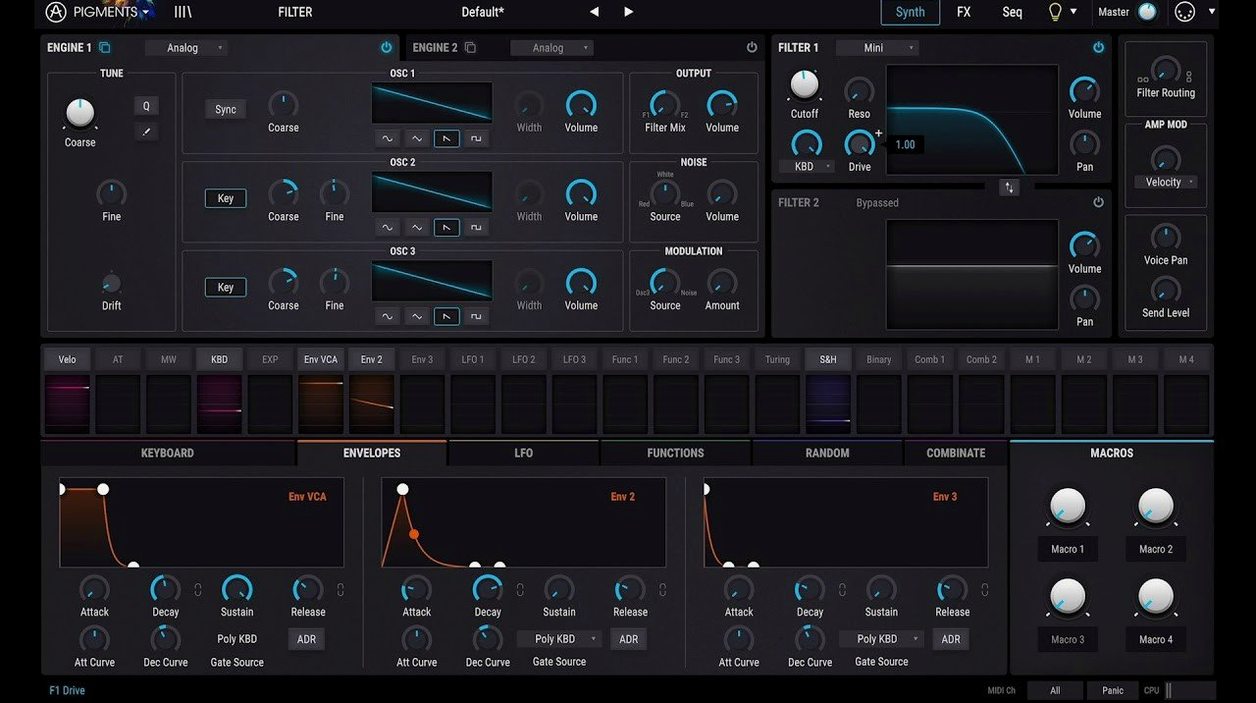
If you have spent time with a modular synth, you know the feeling of patching cables between modules and hearing the signal come alive. Pigments 7 does that on screen, but without the cable clutter. The drag-and-drop modulation lets you click a source, pull it to a destination, and watch the sound change as you move the dial. It is a direct, tactile way to shape a patch, and it makes the extensive modulation options feel approachable even when you are new to synthesis.
The six engines cover a lot of ground, from analog-style warmth to wavetable and granular textures. On top of that, the built-in effects and the new filters — Rage, Ripple, and Reverb — give you plenty of color to push a sound into a mix. The Corroder effect adds grit and distortion when you want something rougher. And the generative sequencing means you can set a pattern in motion and let it evolve, which is handy for finding ideas you would not have thought of on your own.
Version 7.0.1-6772 runs on macOS 11 and later, and supports both Apple Silicon and Intel Macs. The redesigned Play Page makes performance and tweaking easier, and the 150 new factory presets give you a fast start when you just want to play.
How Pigments 7 compares with similar Mac synthesizers
When you are choosing a software synth for a Mac, Pigments 7 sits in a category that mixes several synthesis methods in one plugin. Two other popular options for Mac users are Native Instruments Massive X and Ableton Live's built-in Wavetable. All three are capable, but they go about things differently.
Massive X is focused on wavetable synthesis with a distinct, aggressive character. Its modulation system is powerful but requires some menu diving to set up complex routings. Pigments 7, by contrast, lets you drag a modulation source straight to a knob — no menus, no right-click, just a visual patch cable that appears on screen. For someone still learning how modulation works, that visual feedback is a big help. Massive X also does not include granular or additive engines, so if you want those, you would need a second plugin.
Ableton Wavetable is clean and tightly integrated if you use Live. It offers wavetable and waveform morphing, and its modulation is built into Live's own system. But it stays inside Ableton. Pigments 7 works as a standalone plugin in any DAW that accepts AU or VST formats, which makes it more flexible for people who switch between Logic Pro, Cubase, or Studio One. The color-coded interface in Pigments also helps when you have a dozen modulation routings active — you can see at a glance which destinations are connected to an envelope or an LFO.
Another synth worth mentioning is u-he Zebra, which is a modular-style synth with excellent sound. Zebra gives you a lot of freedom to build patches from scratch, but its interface is dense and takes time to learn. Pigments 7 is more guided, with the drag-and-drop approach and the redesigned Play Page that keeps performance controls visible. For a student or a teacher introducing synthesis, Pigments tends to be the one that clicks faster.
Check preset effects before layering more
One mistake I see often is loading a preset and then layering effects on top without checking what the preset already has. Pigments 7 includes built-in effects as part of every patch. If you add a reverb plugin on the track without listening to the synth first, you can end up with a muddy sound. The better approach is to solo the synth, turn off your track effects, and audition what Pigments is already doing. You might find that the Corroder effect or the new Reverb filter is already giving you the texture you need.
Another common slip is ignoring the generative sequencer when starting a new patch. The generative engine can create rhythms and note patterns that evolve on their own. Some people jump straight into drawing automation lanes in their DAW, not realizing that Pigments can generate a moving pattern from a single note held on a keyboard. That can save time and spark ideas faster than clicking in notes by hand.
A third mistake is underusing the sample-based engine. The 30 new samples in version 7.0.1 are meant to be layered with wavetable or analog engines, not used alone. Beginners sometimes drag in a sample and wonder why it sounds thin. The trick is to blend it with a second engine — say, a virtual analog pad underneath the sample — and use the modulation to crossfade between them. The color coding on the interface helps you see which engine is active and how they are mixed.
Play Page puts performance controls front and center
The redesigned Play Page is the most visible change. In earlier versions, the Play Page was simpler — basically a preset browser with a few macro controls. The new Play Page puts performance parameters front and center, so you can adjust filters, effects, and modulation amounts without switching tabs. If you play live or record quickly, that saves a few clicks per tweak.
The three new filters — Rage, Ripple, and Reverb — add new ways to shape the sound. Rage is a distortion filter that can get aggressive; Ripple is a comb-style filter that creates a metallic resonance; and the Reverb filter acts as a resonant reverb. These are not just additional options. They change the character of a patch in distinctive ways that the older filters could not do.
The Corroder effect is a bit-crusher and lo-fi processor. In earlier versions, you had to patch in an external effect plugin for that kind of sound. Now it is built in and can be modulated the same way as any other parameter. Drag an LFO to the Corroder's mix control, and the sound degrades in a rhythmic pattern.
The 150 new factory presets, 50 wavetables, 30 samples, and 20 noises are not just filler. They are designed to show off the new filters and the Corroder effect. Browsing through them is a fast way to learn what the new features sound like. The in-app tutorials, also new in 7.0.1, walk you through the Play Page and the new filters step by step. For someone new to Pigments or to synthesis in general, that is a real time-saver.
Color-coded modulation cables show the source at a glance
The color-coded interface is more than a visual aid. Each modulation source has its own color: red for an envelope, blue for an LFO, green for a function, and so on. When you drag a modulation connection, the cable and the destination knob both light up in that source's color. If you come back to a patch after a few days, you can see at a glance which modulations are active and which source is driving them.
The drag-and-drop modulation also works the other way. You can drag a destination onto a source, and Pigments creates the connection for you. That is useful if you are thinking in terms of what you want to control rather than what you want to use to control it.
The generative sequencer includes a randomize button that creates a new pattern with one click. It is not hidden, but it is easy to overlook if you are focused on programming notes by hand. Clicking it a few times can give you a pattern you would not have written, and you can then tweak the individual steps.
Finally, the activation process is straightforward. The package includes both installation and activation instructions, so even if this is your first time setting up a plugin on a Mac, you have a clear path to follow.
- Redesigned Play Page for easier performance and tweaking.
- New Rage, Ripple, and Reverb filters.
- Corroder effect added.
- 150 new factory presets, 50 wavetables, 30 samples, and 20 noises.
- macOS 11 or later
- Apple Silicon or Intel 64-bit Mac
- Interface language: English
Questions I keep getting
What does the Corroder effect do?
The Corroder effect adds distortion and grit to your sound, useful for aggressive textures and lo-fi character.
Does Pigments 7 run on Apple Silicon Macs?
Yes, version 7.0.1-6772 supports both Apple Silicon and Intel 64-bit Macs, and requires macOS 11 or later.
How to install
- Open the package and read the included installation instructions. They explain where to place the plugin files.
- Follow the activation instructions in the package to get the plugin running. They show you how to authorize it on your Mac.
Similar apps
Sign in or join the club to leave a comment.
Nobody has commented yet.