- Version
- 1.0.1 [GUISEPPE]
- Studio or maker
- Supertone
- Languages
- English
- Activation
- K'ed by MORiA
- Runs on macOS
- macOS 10.13 or later
- Chip type
- Apple Silicon, Intel 64-bit
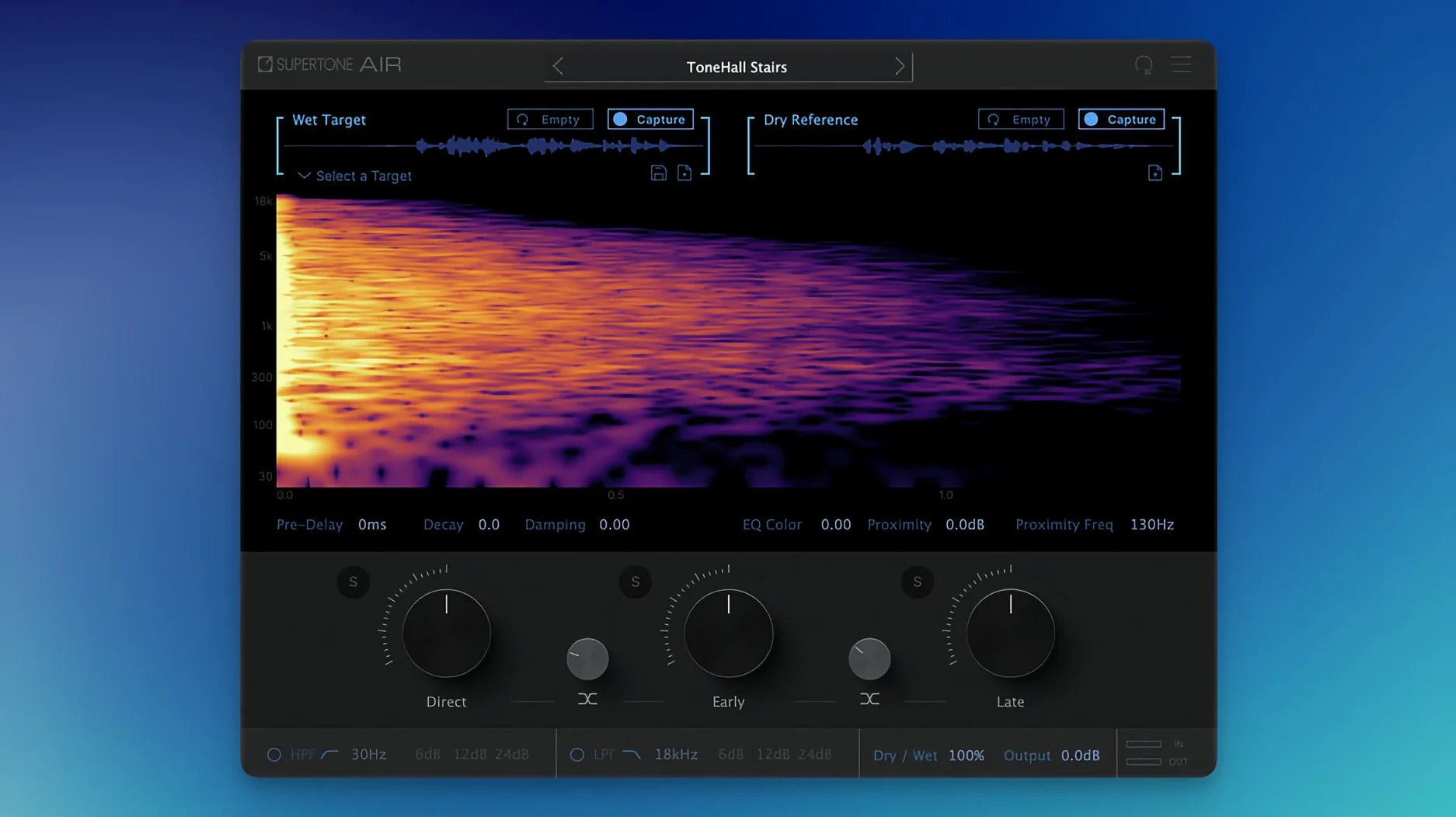
When two dialogue takes sound like they were recorded in different rooms, matching them by ear takes too long. Supertone Air handles that job: it captures the reverb and EQ of a reference take and applies that character to a new recording.
Tracks — Air sits on dialogue tracks in Pro Tools AudioSuite (offline processing only). Select a reference clip, capture its profile, then apply that profile to the target clip. The plug-in works on a clip-by-clip basis, not in real time.
Buses — Not used here. Air is a clip processor, not a bus insert. You process the clip directly, then the result plays back through your normal mix bus chain.
Typical jobs — ADR matching is the main use: a line recorded in a booth gets the same room signature as the production audio. It also works for cleaning up inconsistent boom and lav recordings in documentary or interview work. Exported Air profiles (WAV files) can be saved, shared, or reused across sessions.
The GUISEPPE update fixes a loading conflict with Sound Particles Air
The update to 1.0.1, called GUISEPPE, fixes one practical problem and renames the plug-in to avoid confusion. If you already had Sound Particles Air installed on the same Mac, the previous version could fail to load or show up in your plug-in list. That issue is resolved now — both plug-ins can sit side by side without conflicts. The plug-in file itself was renamed from "Air" to "Supertone Air," which makes it easier to find in your AudioSuite menu and clearer when you are scanning your plug-in folder.
For everyday use, nothing else changed in how the plug-in operates. The neural network, the controls for early and late reflections, the reverb parameters — all work the same way. If you have been using an earlier version, you can update without re-learning any workflows.
A typical session: matching ADR for a short film
A dialogue editor is finishing a five-minute short film. The lead actor recorded most of their lines on location, but three lines were too quiet and had to be re-recorded in a small vocal booth. The booth is dry — almost no natural reverb — while the location audio has a noticeable room sound with a short decay and a slight low-mid bump from the wood-paneled room.
Instead of reaching for a convolver and a separate EQ, the editor opens a clip of the location audio in Pro Tools AudioSuite, selects Supertone Air, and captures the profile with one pass. Then they open each booth-recorded clip, apply the saved profile, and process offline. The three clips now carry the same room signature and the same tonal balance as the rest of the dialogue. No manual tweaking of reverb time or EQ curves was needed, and the editor moves on to the next scene in under ten minutes.
The same workflow applies when matching dialogue from two microphones on the same subject — say, a boom and a lavalier recorded simultaneously. Capture the boom track's profile, apply it to the lav track, and the two sound sources sit together more naturally.
You can use it in Pro Tools, but also any DAW with AAX, VST3, or AU
Do I need Pro Tools to use this?
The plug-in is optimized for offline processing in Pro Tools AudioSuite, and that is the intended workflow. It also works as AAX, VST3, and AU in any DAW that supports those formats, but real-time use may behave differently depending on your system and buffer settings. For the fastest results, Pro Tools AudioSuite is the recommended route.
Can I match music or sound effects, not just dialogue?
The plug-in is designed for dialogue — specifically, matching the reverb and EQ of speech recordings. It will analyze any audio you feed it, so you could try it on voiceover or a spoken word recording. For music or complex sound effects, the neural network is trained on dialogue characteristics, and results may not be as convincing.
Will it work with my old Mac that still runs High Sierra?
Yes, as long as your system is macOS 10.13 or later. The plug-in supports both Intel and Apple Silicon natively. Sample rates up to 96 kHz are supported.
Can I save and share a room profile?
Yes. Air profiles can be exported as WAV files and imported in another session or on another system. This is useful when you are working across multiple editing rooms or handing a project to another mixer — the same room signature can be applied consistently.
Does the plug-in change the timing or sync of the clip?
No. The processing adds reverb and EQ but does not shift the audio in time. The processed clip remains in sync with the rest of the session.
- Plug-in file name changed from Air to Supertone Air.
- Fixed an installation issue affecting users who had Sound Particles Air installed.
- macOS 10.13 or later
- Apple Silicon or Intel processor
- Supported sample rates: 44.1 kHz, 48 kHz, 96 kHz
- Formats: AAX, VST3, AU
How to install
- Download the installer and run it on your Mac.
- Follow the included installation and activation instructions to authorize the plug-in.
Similar apps

Sign in or join the club to leave a comment.
Nobody has commented yet.