- Version
- 8.30.26103.11002
- Studio or maker
- obert McNeel & Associates
- Languages
- Russian, English, German, Spanish, Italian, Chinese (Traditional), Chinese (Simplified), Korean, Polish, Portuguese, French, Czech, Japanese
- Activation
- K'ed by TNT team
- Runs on macOS
- macOS 12.4 or later
- Chip type
- Apple Silicon, Intel 64-bit
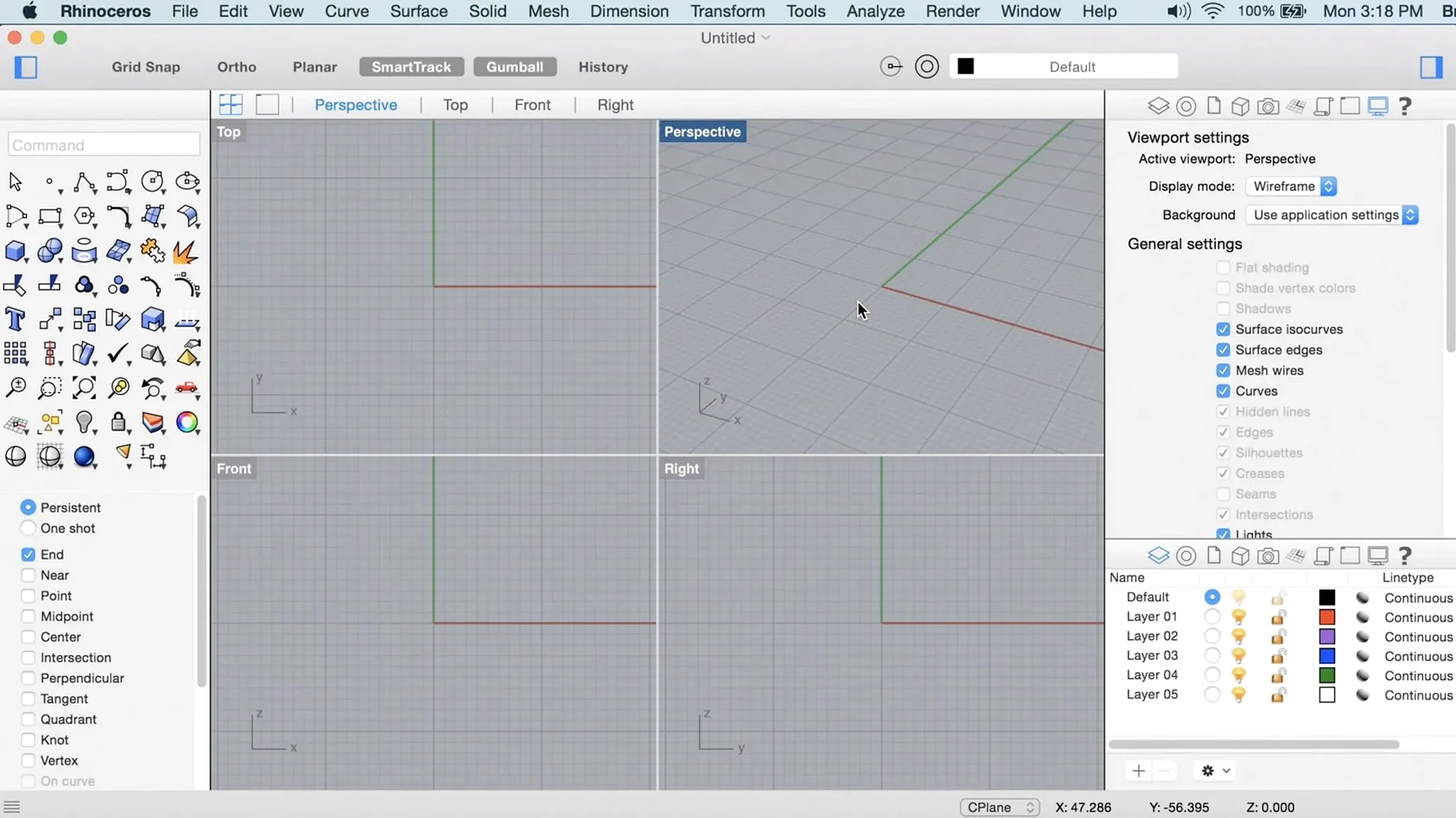
You have a 3D modeling task in front of you — maybe a product design, a piece of jewelry, or a building detail. Rhino 8 for Mac runs natively on both Apple Silicon and Intel machines, and it's ready to help you shape curves, surfaces, solids, point clouds, and polygon meshes. Here are three things a newcomer should try first.
Try ShrinkWrap on a messy mesh
Open a mesh that has holes or overlapping parts. Choose the ShrinkWrap command — it wraps a clean, watertight surface around the original, saving you time when you need a printable or simulatable result.
Use PushPull to edit solids directly
Select a face on a solid, then push or pull it with the mouse. The geometry updates without extra steps. It works on boxes, extrusions, and SubD objects, and it's a fast way to explore shape variations.
Customize the interface for Mac
Right-click any toolbar or panel to rearrange it. The Mac version now lets you save custom layouts, so you can keep your most-used tools visible without clutter. The Metal-based viewport also feels snappier when orbiting large models.
Architects and product designers benefit from NURBS-based surfaces
Architects working on complex building forms will appreciate the NURBS foundation. Curved walls, freeform roofs, and organic structural elements are where Rhino's math-based surfaces shine. You get smooth geometry that stays editable, not a fixed mesh.
Product and industrial designers often jump between concept sketches and quick 3D mockups. The PushPull workflow means you can start with a simple box, push a face into a curve, and have a working prototype shape in minutes. No need to rebuild from scratch each time you change an idea.
Jewelry and small-object modelers work with tight tolerances. The SubD Creases let you define sharp edges on a subdivision surface without adding extra polygons. That keeps file size manageable and makes it easier to send the model to a 3D printer or CNC mill.
Grasshopper users — the visual programming environment for generative design — get new data types in Rhino 8. If you automate repetitive tasks or explore parametric patterns, those new types let you handle more kinds of geometry inside the same node-based workflow.
Teams sharing large models across Windows and Mac find the native Apple Silicon build reassuring. It runs without emulation, which matters when you open a multi-gigabyte project from a colleague. The file format stays identical between platforms, so you don't have to convert or re-export.
Customizable UI layouts for modeling and visualization
The more customizable user interface is subtle but practical. You can save different layouts for different tasks: a minimal one for modeling, another with all the render panels visible for visualization. Switching layouts takes a couple of clicks, and each layout remembers which toolbars are open.
The faster render engine is not about a completely new look. It makes test renders finish sooner, so you can iterate on lighting and materials without waiting. That matters when you are adjusting a product shot or an architectural daylight study and need to see the result quickly.
Apple Metal display technology means orbiting, panning, and zooming feel responsive even with dense geometry. The viewport redraws using the GPU directly. It is not a speed benchmark claim; it is simply a change that makes everyday navigation less jumpy on a modern Mac.
Gatekeeper may block the app on first launch
The install instructions include a step to bypass this: run the script called Open Gatekeeper friendly, then press Enter in the Terminal window. After that, drag Rhino to Applications. The app will launch normally afterward.
If the interface looks different from a Windows coworker's screen, that is expected. The Mac version has its own layout and tool organization. You can still open the same .3dm files and exchange Grasshopper definitions. The geometry is identical; only the interface layout differs.
Large files with many SubD or ShrinkWrap objects may take a moment to open. If you work with several hundred SubD objects, give the file a few seconds before you interact with the viewport.
When using PushPull, make sure you are in the correct selection mode. If the command does not respond, check that you clicked a face — not an edge or a vertex. The cursor changes when you hover over a selectable face. A little practice makes the workflow automatic.
Treating NURBS like a polygon mesh leads to editing mistakes
A common one is treating NURBS like a polygon mesh. NURBS surfaces are mathematical curves; you can reshape them by moving control points, not by pulling individual vertices. If you try to edit a NURBS surface with mesh tools, the results will look rough. Use the dedicated Surface tools instead.
Another mistake is ignoring the layer system. Beginners sometimes draw everything on the default layer, then struggle to select or hide objects later. Getting into the habit of naming layers early makes a big difference when the model grows to dozens of parts.
Pressing Undo too many times. Rhino has a multi-level undo, but it is easy to undo past a point you meant to keep. Save versions of your file at key stages — before ShrinkWrap, before a major PushPull move — so you have a fallback without relying only on undo history.
Finally, some new users skip the ShrinkWrap command because they think it is for advanced cleanup only. In practice, it works well on any messy or incomplete mesh, including scans or imported STL files. If a surface looks rough or has holes, try ShrinkWrap with a low tolerance setting first. It often gives a usable result faster than manual repair.
- ShrinkWrap for watertight surfaces from messy meshes.
- Metal-based graphics on Mac for a smoother viewport.
- More customizable interface on Mac with saved layouts.
- macOS 12.4 Monterey or later
- Apple Silicon or Intel processor
- 8 GB RAM recommended
- 10 GB available disk space
- Multi-button mouse with scroll wheel recommended
Questions I keep getting
Does Rhino 8 run on Apple Silicon?
Yes, the Mac version runs natively on Apple Silicon and Intel Macs.
What interface languages are available?
The interface is available in Russian, English, German, Spanish, Italian, Traditional Chinese, Simplified Chinese, Korean, Polish, Portuguese, French, Czech, and Japanese.
How to install
- Mount the disk image.
- Run the Open Gatekeeper friendly tool.
- Press Enter in Terminal to bypass Gatekeeper.
- Drag the app to the Applications folder.
- Launch the app.
Similar apps




Sign in or join the club to leave a comment.
Nobody has commented yet.