
- Version
- 2026.3.1
- Studio or maker
- Bohemian Coding
- Languages
- English, Chinese (Simplified)
- Activation
- K'ed by TNT team
- Runs on macOS
- macOS 14 or later
- Chip type
- Apple Silicon, Intel 64-bit
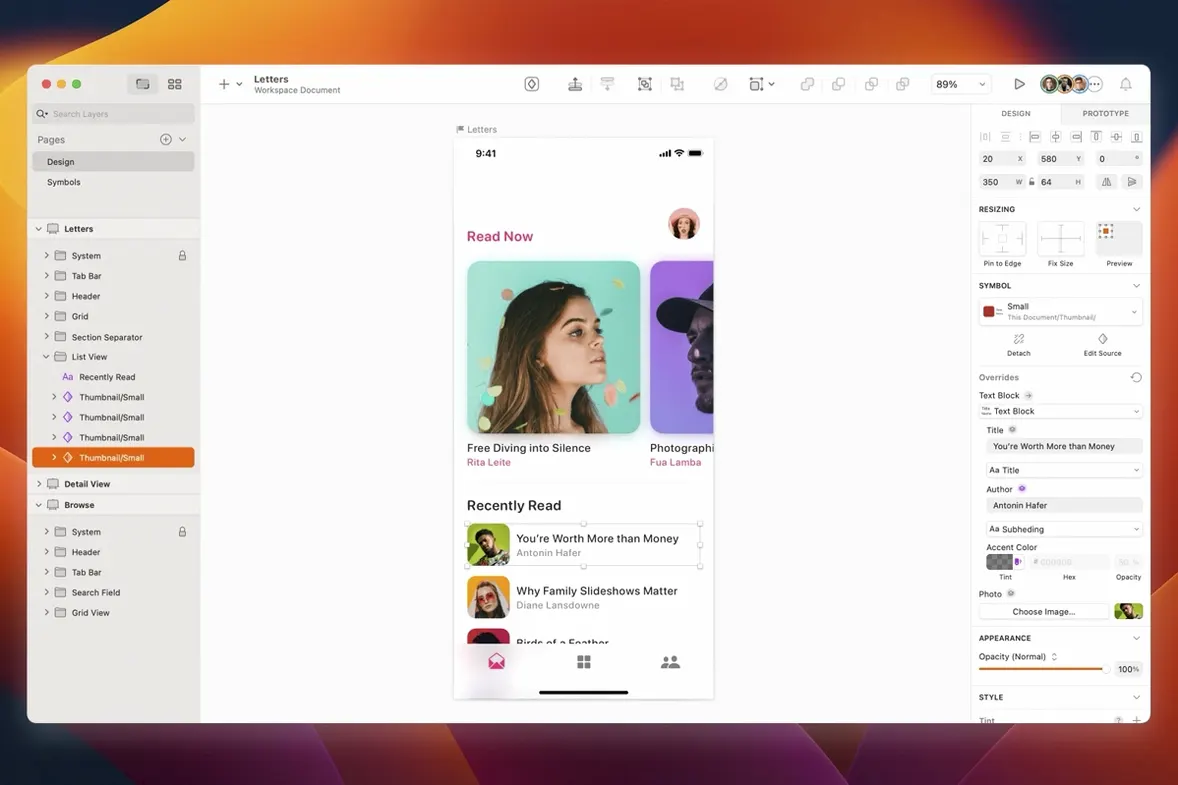
You have a screen design to mock up — a website, an app interface, an icon set — and you need a tool that stays focused on the job from early wireframes to production-ready artwork. That is what Sketch was built for: a vector design app for Mac that keeps the canvas clear and the export pipeline direct.
What you get and how it works
Sketch handles the full shape-and-layer workflow for screen design. You draw with vector tools, build symbols and reusable components, and hand off assets to developers or to prototype apps. The app supports third-party plugins, so you can speed up repetitive tasks or connect it to collaboration tools your team already uses. Version 2026.3.1 brings the Florence release features, enhancements for macOS 27 Golden Gate, and fixes like a stack layout bug with text layer minimum width and a blank canvas issue when using Writing Tools in the latest macOS.
For designers and developers creating websites, icons, and interfaces
This is mainly for designers and developers creating websites, icons, and interfaces for desktop and mobile devices. If you work on a Mac and need a vector tool that exports cleanly for production, Sketch fits that space.
Quiet improvements in version 2026.3.1 that affect daily work
If you already use Sketch, the jump to version 2026.3.1 brings a few quiet improvements that affect how you work day to day. The Florence release features are part of this update, though the changes that matter most are the ones you notice during normal use. Document windows now use the system corner radius, which means they match the standard macOS window shape. That sounds small, but when you have multiple documents open, the visual consistency keeps your focus on the canvas instead of on window shapes that feel out of place.
The bug fixes in this version address real annoyances. A stack layout bug involving the minimum width of a text layer is now gone. If you have ever had a text layer suddenly refuse to shrink the way you expected inside a stack, that problem is resolved. Tooltip clipping near the screen edge in macOS Golden Gate no longer happens, which matters if you work with panels or palettes positioned at the display margins. And the text alignment issue in the Rename Selected Layers sheet on that same macOS version has been corrected. The blank canvas content issue while using Writing Tools in macOS Golden Gate is also fixed.
Runs on both Apple Silicon and Intel 64-bit Macs
This version of Sketch runs on both Apple Silicon and Intel 64-bit Macs, so it covers the full modern range. If you are on an Apple Silicon machine, you get the native performance the app was designed for. If you are still on an Intel Mac, you are not left behind — the app supports that architecture too.
The designers who benefit most are those who work in teams that already use prototype and collaboration apps. Sketch integrates with those tools, so you can move from wireframes to clickable prototypes without switching applications. For solo designers who handle everything from initial sketches to final exports, the plugin support means you can build your own shortcuts for tasks like batch renaming or color palette management. Beginners find the tool approachable because it focuses on screen design rather than trying to be everything. Professionals value the export pipeline and the symbol system for maintaining consistency across large projects.
Adjust the canvas to your screen size and resolution after installing
After installing, take a few minutes to adjust the canvas to your screen size and resolution. The system corner radius for document windows means that what you see on screen is closer to the final output on standard macOS interfaces. Open a test file and check that your layers behave as expected, especially if you work with stacks. The bug fix for text layer minimum width means you can now shrink text layers in stacks more freely than before.
If you use plugins, install them early and test one workflow — for example, exporting assets or naming layers — to see if the plugin saves you time. The app supports third-party plugins, so explore the available options for your typical tasks. For team projects, set up shared symbols and layer styles before you start heavy work. Sketch handles reusable components well, and having those ready from the beginning reduces rework later.
System corner radius aligns Sketch windows with other macOS apps
The Florence release features include enhancements that are not flashy but make daily use smoother. The system corner radius for document windows is one example. It aligns Sketch windows with other macOS applications, reducing visual noise when you switch between tools. The tooltip clipping fix means you can place palettes anywhere on screen without losing feedback from the tooltips that appear near the display edge. That is a small thing, but if you work on a laptop with a smaller display, it saves you from repositioning panels constantly.
The stack layout fix for text layers matters more than it sounds. When you have a text layer inside a stack, the minimum width previously could lock it at a size you did not want. Now you can adjust it freely, which gives you more control over responsive or flexible layouts. And the Writing Tools fix for blank canvas content ensures that when you use macOS Writing Tools — like spelling or grammar suggestions — the canvas stays visible. That is one of those bugs that only appears in specific situations, but when it happens, it stops your flow. It is good to have it corrected.
- Includes the Florence release features, enhancements for macOS 27 Golden Gate, and minor improvements and bug fixes.
- Document windows now use the system corner radius.
- Fixes a stack layout bug involving the minimum width of a text layer.
- Fixes blank canvas content while using Writing Tools in macOS Golden Gate.
- macOS 14 or later
- Intel or Apple Silicon Mac
- Interface languages: English, Simplified Chinese
How to install
- Mount the disk image — double-click the .dmg file so it appears on your desktop.
- Open Gatekeeper friendly — run the provided command in Terminal to bypass the Gatekeeper check for this app.
- Drag to Applications — copy the Sketch icon into your Applications folder.
- Start using it — launch Sketch from Applications.
Similar apps






Sign in or join the club to leave a comment.
Nobody has commented yet.