
- Version
- 2.5.0
- Studio or maker
- Serato
- Languages
- English
- Activation
- k'ed by Team V.R
- Runs on macOS
- macOS 10.14 or later
- Chip type
- Apple Silicon, Intel 64-bit
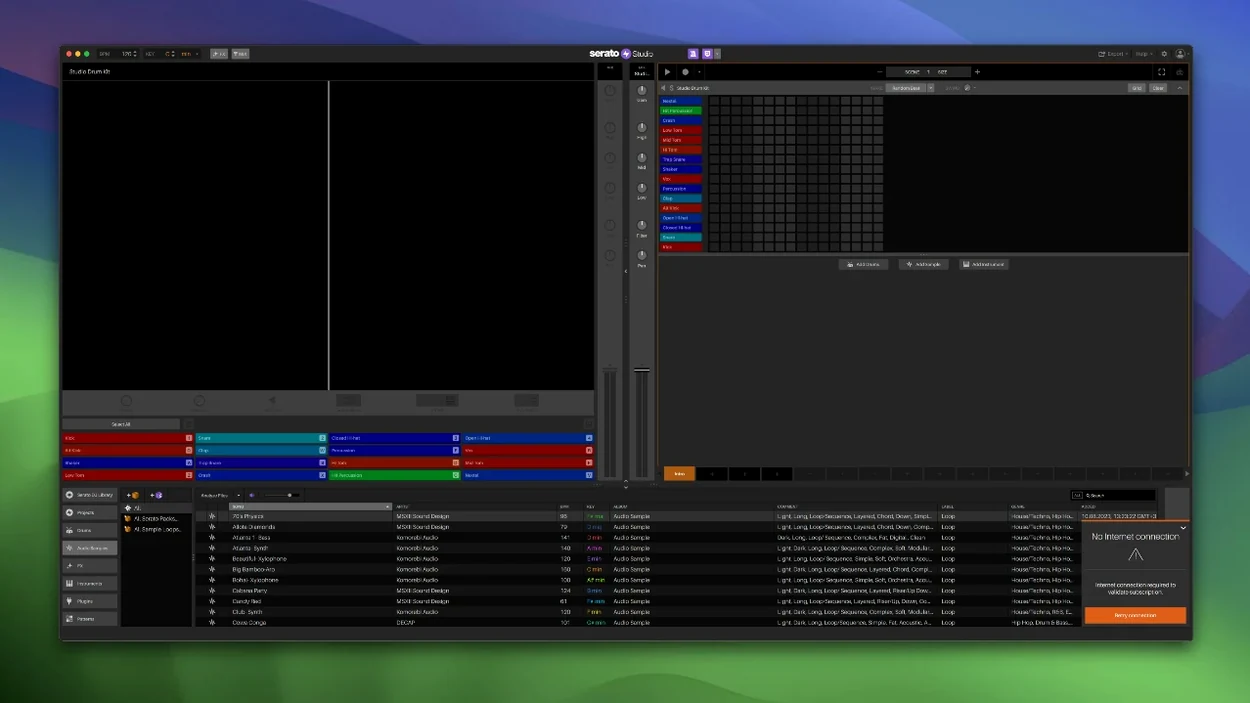
If you already know Serato DJ, Serato Studio 2.5.0 feels familiar from the start. The same library, the same colors, but now aimed at building beats rather than mixing them. Here is one realistic task from start to finish: building a short beat from scratch, then exporting stems.
Set up a scene and pick a drum pattern
Open Scene View and choose a ready-made drum pattern from the built-in kits. BPM is already synced to your project tempo. If you use an AlphaTheta SLAB controller, version 2.5.0 maps it natively, so you can tap patterns in without mouse clicks.
Add instruments and adjust stems
Drag in a loop or a one-shot from the included samples. Use the color-coded waveform to see where your kick and snare land. In the Sample Deck, you can now automate Stems On/Off and adjust individual levels for acapella, melody, bassline, and drums. This is useful if you want to bring a vocal stem in at the second bar.
Export stems and check the mix
When the arrangement feels right, use the stem export feature. Each stem comes out as a separate file. Open the mixer channel to check levels and add effects before you export. The patch installer for 2.5.0 is a separate step after the main package, so follow the install order exactly.
Native AlphaTheta SLAB support in 2.5.0
The version 2.5.0 update touches a few specific parts of the workflow. The most visible change for anyone using a controller is native support for the AlphaTheta SLAB. Before this version, you would have mapped controls manually or worked without hardware feedback. Now the SLAB connects directly and responds to Studio's layout, which saves a few minutes of setup each session.
For users who work with stems inside Sample Decks, the new individual level controls matter more. You can now adjust acapella, melody, bassline, and drum stems separately rather than treating the whole deck as one volume. Combine this with the new automation lanes for Stems On/Off and individual levels in Scene View, and you can build dynamic arrangements without extra track layers.
The library update is smaller but practical. Track Rating lets you mark favorites, and Favorite Crates plus Crate Search cut down browsing time. If you reuse the same sample packs often, this saves a few clicks. The Reverse Pad Order option in the setup screen is a polite addition for left-handed users or anyone who prefers a different controller layout.
Version 2.5.0 also adds support for macOS 26 Tahoe. If you are on that system, the install works without workarounds.
Shared Serato DJ library eliminates importing
Serato Studio shares its library and file structure with Serato DJ, which sets it apart from other beat-making software. If you already organize samples in Serato DJ, you can open them in Studio without importing or converting. The built-in drum patterns and one-touch key switching come pre-configured for DJ-oriented production, so you can build a beat from a loop you had in a crate.
Comparing it to Ableton Live Lite, the two tools serve different moments in a workflow. Live Lite is built for arranging clips on a timeline and offers deeper MIDI editing and audio warping. Serato Studio's Scene View and Sample Deck approach feels faster for sketching a four-bar loop, especially if you are used to Serato's color coding. Ableton Live Lite requires a separate library and sample management system.
Against Logic Pro, the difference is scope. Logic Pro is a full DAW with extensive mixing and mastering tools, a large effects suite, and complex routing. Serato Studio is narrower: it focuses on beat creation with drum kits, loops, and chord generation. For a producer who wants to export stems and finish a track in Logic Pro, Studio works as a quick sketching stage. For a DJ who wants to make a custom beat for a set without learning a full DAW, Studio is more direct.
Native Instruments Maschine software is probably the closest competitor in focus. Both tools center on drum patterns and sample-based beat making. Maschine's hardware integration is deeper if you own a Maschine controller. Serato Studio's advantage is the shared library with Serato DJ and the native AlphaTheta SLAB support in version 2.5.0. Maschine has no equivalent for the one-touch key switching or Auto Chord mode that Serato Studio includes.
Reverse Pad Order and Crate Search setup
After installing, open the setup screen. The Reverse Pad Order option is worth checking if you use hardware pads and prefer them arranged differently than the default. This saves adjusting controls in every session.
In the library, use Crate Search and Favorite Crates to pin the sample packs you rely on. If you work with stems, check the Stem Level controls in a Sample Deck early. Adjusting a single drum stem or vocal stem independently is a small setup step that changes how you build arrangements later.
Auto Chord mode is enabled by default, but it is worth selecting a project key early. The chord generation follows whatever key you set, so picking one first avoids rewriting progressions later.
Export stems from Studio to Serato DJ decks
Serato Studio works alongside Serato DJ because both applications share the same library. You can prepare a beat in Studio, export stems, and load them into a Serato DJ deck for performance. Stem export is the bridge here: each instrument, drum, and sample becomes its own audio file.
The VST and AU plugin support means you can use your existing effects and instruments inside Studio. If you have favorite compressors, synthesizers, or reverb plugins in VST or AU format, they appear in the mixer channel. This keeps the sound processing consistent between Studio and a full DAW.
On macOS, the standard installer package and the separate patch installer follow the expected disk-image workflow. The application runs on both Intel and Apple Silicon systems, so it fits into any Mac setup without compatibility concerns. The color-coded waveforms and mixer channel work with macOS accessibility features like high contrast mode if you prefer a different visual style.
For sample management, the library update with Track Rating and Crate Search integrates with how macOS handles file tagging and search. If you organize your sample folders with Finder tags, the Serato library picks up those file names and folder structures.
The current version 2.5.0 includes the features described here, so it is worth matching the version number when you look for it.
- macOS 10.14 or later
- Intel or Apple Silicon
Questions I keep getting
Does Serato Studio work with third-party plugins?
Yes, version 2.5.0 supports both VST and AU plugins, so you can add your own synths and effects alongside the built-in instruments.
How to install
1. Open the downloaded disk image. 2. Run the standard installer package named Serato Studio 2.5.0 Without Core Pack.pkg. 3. Run the patch installer named Serato Studio 2.5.0 patch.Similar apps



Sign in or join the club to leave a comment.
Nobody has commented yet.