- Version
- 1.14.0
- Studio or maker
- tw93
- Languages
- English, German, Spanish, Italian, Chinese (Traditional), Chinese (Simplified), Korean, French, Japanese
- Activation
- Not required
- Runs on macOS
- macOS 14 or later
- Chip type
- Apple Silicon, Intel 64-bit
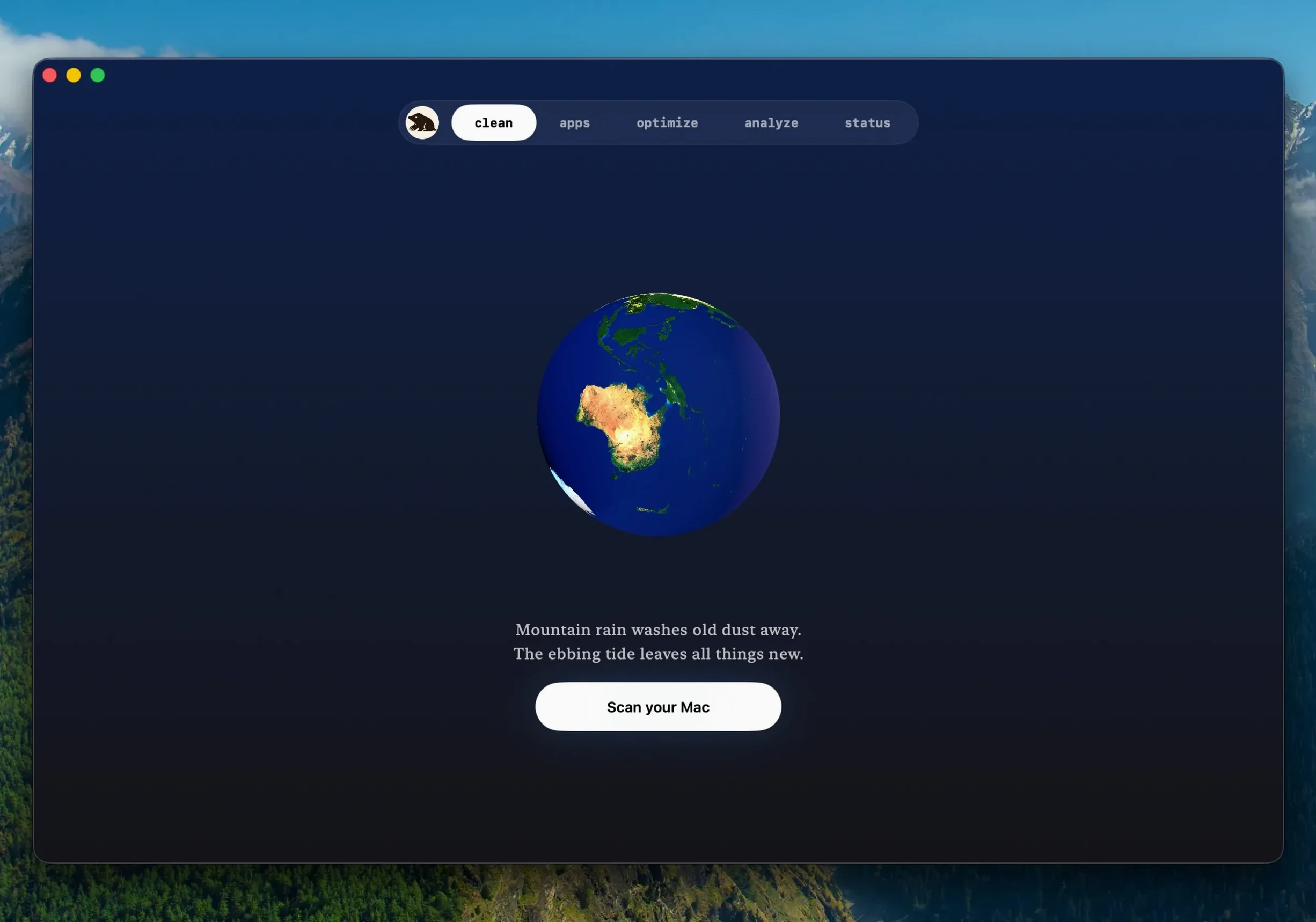
Software updates for apps you downloaded from websites can now run inside Mole itself. Build 1.14.0 identifies a more recent release of the identical version, prompts before closing an active application, and restarts it once the update is complete. That is one less detour to the browser for a clean update.
Remove application leftovers
When you drag an app to the Trash, support files and caches often stay behind. Mole finds those leftovers, shows a list of files with their sizes, and waits for your confirmation before removing anything. Scanning happens locally by default, and file contents or browsing history are never uploaded.
See what your system is doing
It is a quick way to spot what is using resources without opening Activity Monitor.
Clean up startup items and system junk
Startup items in the Dock that slow your login can be removed from the same interface. The app combines cleaning, removal, optimization, analysis, and system status checks, so you do not need four utilities for routine maintenance.
First-time users miss files without full disk access
Most questions I hear from colleagues and club members come from a few predictable places. First-time users sometimes grant standard permissions, then wonder why the scan finds fewer files than expected. Mole supports deep scanning with full disk access. If you see a short list, open System Preferences > Privacy & Security > File Permissions and check that Mole has been allowed the extended access. After that, rerun the scan.
Another snag happens when an app update inside Mole fails. The message might say "could not update" even though the download finished. That usually means the app was still open. Version 1.14.0 asks before quitting a running app, so if you dismissed that prompt, close the app manually, then try the update again. Mole employs an already-completed download rather than retrieving it anew, therefore the next try proceeds rapidly.
A few people have told me the system monitor shows no GPU reading. That depends on your Mac configuration. Mole reads whatever sensors the machine exposes. On some Intel models the GPU entry stays blank. It is not a bug, it is simply that the hardware does not report.
The cleanup tool skips suspicious items when there is doubt. If something looks missing or incomplete after a cleanup, check the skipped-items log. Nothing is deleted without your confirmation, so you can always review before proceeding.
Adds common maintenance tasks to one panel alongside system tools
Mole sits alongside the usual system tools without replacing them. Activity Monitor still shows per-process detail; Disk Usage in Finder still works for quick checks. What Mole adds is a single panel for the common maintenance tasks that otherwise need three or four different utilities.
It pairs well with the terminal cleanup scripts that some power users prefer. The free CLI project from the same developer does similar work from the command line, but the Mac app gives you a visual tree map for disk analysis and a cleaner interface for one-click maintenance. You can keep both installed and choose which fits the moment.
Version 1.14.0 also respects macOS security model. When an app downloaded from a website updates, Mole handles the file swap without asking you to navigate into system folders. The app reopens after the install, so you do not lose your place.
Scan results show a recent download before cleanup starts
The most common mistake is clicking through the scan results without looking. Before cleanup begins, Mole displays a list of files along with their size. Take the few seconds to glance at it. You will spot things like a recent download that you wanted to keep, or a cache folder you rely on.
Another mistake is assuming the first pass catches everything. If the scan was run with standard permissions, the results are correct but limited. Deep scanning with full disk access finds more, but it needs to be granted once in system settings. Many new users skip that step.
Some beginners think the system status monitor is a replacement for saving work. It shows real-time CPU, memory, GPU, and disk data, which is useful for awareness, but it does not back up files or warn about power loss. Keep your regular habits for saving and backing up.
People also forget that Mole handles software updates only for apps downloaded from websites. That is by design, not a limitation.
Choose one of nine languages before your first deep scan
Before your first deep scan, open the preferences and choose a language from the nine available. English, German, Spanish, Italian, or one of the others — the interface remembers it across sessions.
If you use the disk analysis feature often, take a moment to understand the tree map view. It shows folders as rectangles sized by their share of disk space. The view is interactive, so you can click into a large folder to see what fills it. No settings to adjust, just a different way to look at your storage.
For the system monitor, you can leave it on in the background. That is one less reason to open Activity Monitor during the day.
The one-click system maintenance runs a set of cleanup tasks that are safe to do regularly. I run it at the end of the week, but you can decide your own rhythm. The app does nothing without your confirmation, so there is no risk in trying it once to see what it finds.
- macOS 14 or later
- Intel or Apple Silicon
- Full disk access is supported
Questions I keep getting
Does Mole upload my files or browsing history?
No. File contents and browsing history are not uploaded to the network. Scanning and cleaning are performed locally by default.
Can I see what will be removed before cleaning?
Yes. Mole shows a list of files and their size before cleanup starts, and you must confirm an action before processing begins.
What macOS version does Mole require?
Mole requires macOS 14 or later. It supports both Intel and Apple Silicon Macs, and full disk access is supported.
How to install
1. Open the downloaded disk image. 2. Drag the app into the Applications folder alias. 3. After copying finishes, launch the app from Launchpad.Similar apps





Sign in or join the club to leave a comment.
Nobody has commented yet.