
- Version
- 2026.10.24
- Studio or maker
- 卓文 高
- Languages
- Russian, English, German, Vietnamese, Indonesian, Spanish, Italian, Chinese (Traditional), Chinese (Simplified), Korean, Portuguese, Thai, French, Japanese
- Activation
- Not required
- Runs on macOS
- macOS 13 or later
- Chip type
- Apple Silicon, Intel 64-bit
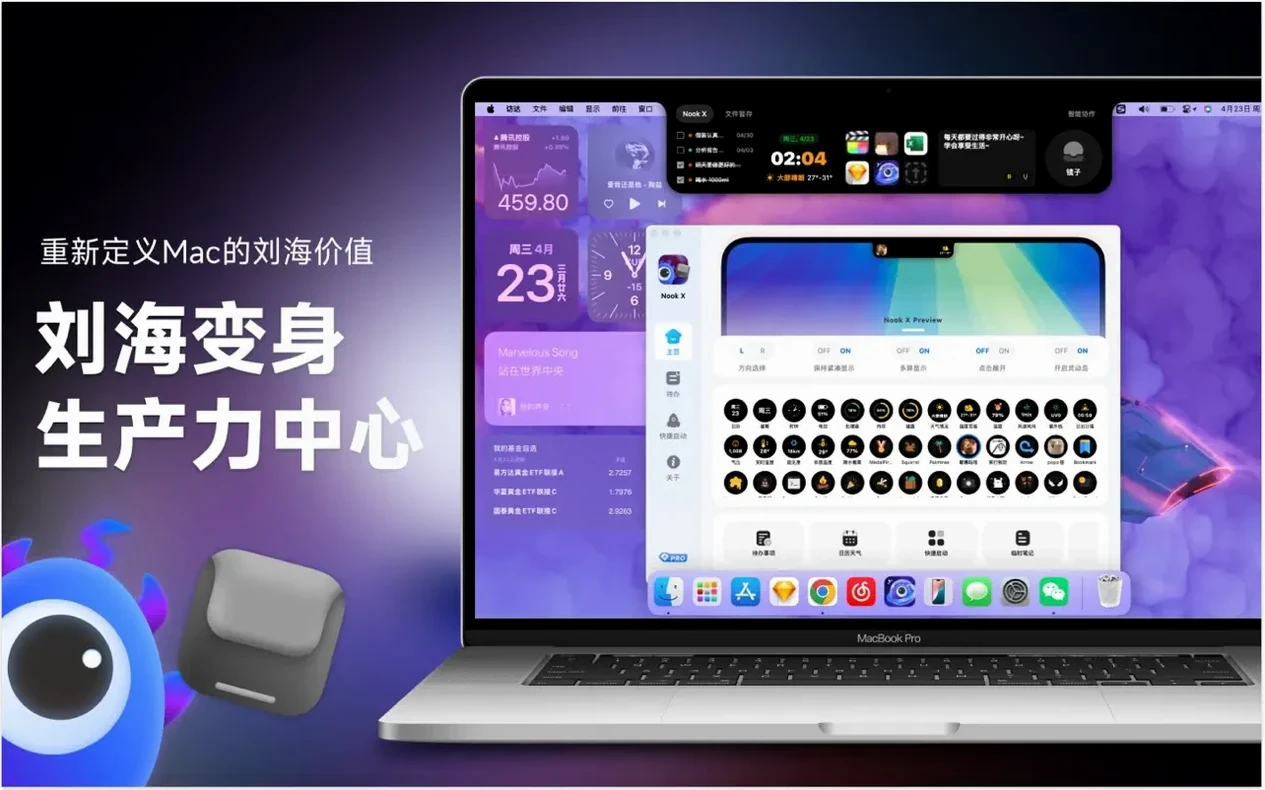
The notch is usually just a camera housing, but nookx mac turns it into a working strip of tools. If you keep a task list open, look up lyrics while a song plays, or jump into an AI chat mid-flow, this utility puts all three within reach without cluttering the menu bar.
What stands out for daily use is how the pieces connect. You can search for a song by typing a line of lyrics, then act on the result. Voice input works for tasks and chat, so you can dictate a reminder while your hands are busy. And when a chat answer contains something actionable, you can turn it into a task directly — no copy-paste, no switching windows.
It runs on macOS 13 or later on both Intel and Apple Silicon, and the interface covers 14 languages, which makes it practical in mixed-language classrooms or homes. The notch area stays compact, and the tools hide when you do not need them.
Common snags people hit and how to sort them out
The notch area does not show anything at first because it needs permission to draw there. A quick check in System Settings under Privacy and Security then Accessibility — grant screen recording permission to Nook X. Once allowed, the notch tools appear.
Sometimes the music player does not find audio files you know are on the drive. The player reads common formats, so the issue is usually a folder permission or a hidden path. Drag the song or the folder directly onto the Nook X window instead of using the file picker. That skips the permission block most of the time.
If lyrics scroll out of sync with the track, the karaoke mode depends on embedded or downloaded lyric files. A track with no lyric file shows nothing. Try a different source for the same song — some online libraries have better sync timing. The app does not fetch lyrics on its own, so you want files that include timestamps.
Voice input stops working occasionally after the Mac wakes from sleep. The fix is simple: quit Nook X from the notch menu and relaunch. The microphone reinitializes on startup. No settings are lost.
Which kinds of Mac users get the most out of it and why
People who manage multiple small tasks during the day benefit most. A teacher, for instance, might set reminders for lesson transitions, mark priority tasks during prep time, and later search for a song by its lyric line without opening a browser. The notch keeps everything visible without stacking windows.
Music listeners who want to know what is playing without switching apps find the lyric display useful. If you play local audio files often — podcasts, recorded lectures, language exercises — the built-in player and automatic lyrics reduce the need for a separate media app.
Anyone who likes voice dictation will appreciate the voice input working across both tasks and chat. You can say a reminder or ask a question without touching the keyboard. That helps when you are cooking, drawing, or just moving around the room.
Users with large music collections who remember a phrase but not the song title get a direct benefit from the search-by-lyrics feature. It saves the hunt through folders or playlists.
A typical working session with it, step by step, as a story
Wednesday morning. I open Nook X from Launchpad. The notch area shows three small icons — tasks, music, chat. I click the task icon and add a few items for the day: grade homework, prepare workshop handout, check the game club's board game inventory. I set a high priority on the handout because it is due tomorrow.
During a break, I want to hear a track I heard yesterday but I only remember a line from the chorus. I switch to the music panel and type the lyric fragment into the search field. The app finds the song in my local library. I play it, and the lyrics appear in karaoke mode, scrolling along. I notice the timing is a few beats off — that is the file, not the app — so I swap in another version from my collection. Now it syncs fine.
After lunch, I open the chat panel and ask the AI to draft a short email about the game club's next meeting. The reply comes back in a few seconds. The draft has a date and time but no location. I type "add the location from the club's calendar" and get an updated version. That text contains a reminder to bring game pieces. I highlight that line, choose "create task from chat," and it lands in my task list with medium priority.
Before leaving, I dictate a new task: "Pick up name tags for the tournament." I press the voice input button in the chat panel, speak, and the text appears. I convert it to a task. At the end of the day I glance at the notch — three of my five tasks are checked off. The two remaining ones show as high and medium priority. I adjust one to tomorrow and close the app.
How it compares with two or three similar Mac apps
Nook X sits in a niche that most utilities do not cover. Compared to a dedicated task manager like Todoist or TickTick, it offers fewer project views and no team sharing. But those apps do not include a music player with lyrics or an AI chat, so you end up running two or three windows side by side. Nook X combines the functions in one thin panel, which saves screen space.
Versus a standalone lyric display app such as Lyricify or Musixmatch, Nook X has fewer audio format options and no streaming service integration. Its strength is that the lyrics sit next to your tasks and chat, so you can switch context without leaving the notch.
AI chat clients like Ollama or ChatGPT Desktop run as separate windows or web pages. Nook X does not replace a full-featured chat client, but it does let you turn a chat answer into a task without moving data between apps. For quick questions or short drafts, it is faster than opening a browser or a dedicated app.
The notch-based approach is what sets it apart. Other tools live in the menu bar or as floating windows. Nook X uses the notch space, which stays out of the way until you click. That design works best for someone who wants lightweight access to a few tools rather than deep functionality in any single one.
- macOS 13 or later
- Intel or Apple Silicon
Questions I keep getting
Can nookx mac search for songs by lyrics?
Yes. You can type a line of lyrics and the app finds the matching song.
Does nookx mac support voice input?
Yes, voice input is available for tasks and AI chat.
How to install
- Open the downloaded disk image.
- Drag the app to the Applications folder shortcut.
- After copying finishes, launch the app from Launchpad.
Similar apps






Sign in or join the club to leave a comment.
Nobody has commented yet.