
- Version
- 8.24
- Studio or maker
- Eltima Software
- Languages
- English, German, Spanish, Italian, Chinese (Simplified), Korean, Dutch, Polish, French, Czech, Swedish, Japanese
- Activation
- K'ed by TNT team
- Runs on macOS
- macOS 10.12 or later
- Chip type
- Apple Silicon, Intel 64-bit
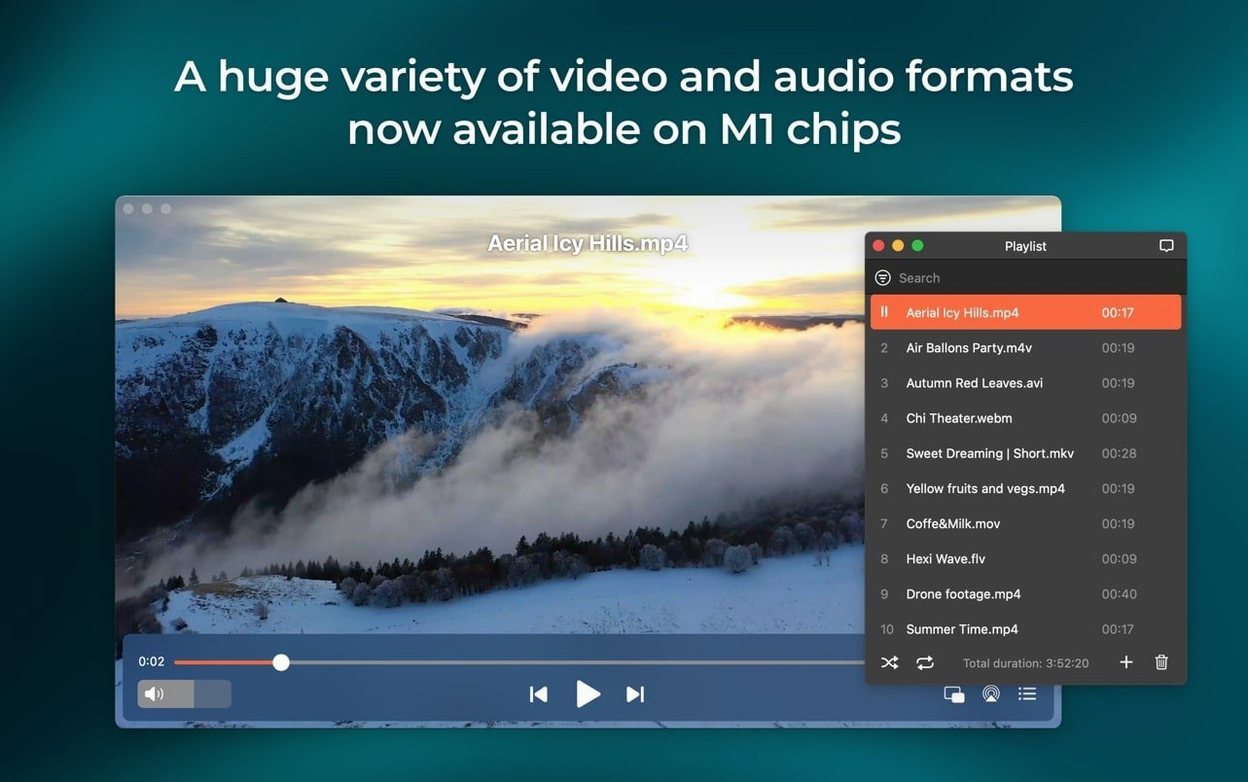
Elmedia Player Pro is a macOS media player that handles a wide range of video and audio formats, from FLV and SWF to MKV and FLAC.
Play any file without conversion
Hardware-accelerated decoding keeps HD playback smooth, and the player outputs audio to headphones, speakers, or other devices. It supports FLV, SWF, WMV, AVI, MOV, MP4, MP3, DAT, FLAC, M4V, MPG, and MKV, so most files you have will open without fuss.
Watch and download online video
The built-in web browser lets you stream from sites directly, and you can download online video and audio tracks for offline viewing. Version 8.24 also improved preventing the Mac from sleeping while streaming, so a long playlist won't be interrupted.
M4B audiobook file support in version 8.24
Version 8.24 is the current release, dated December 2025, and it brings a few practical changes. The most notable addition is support for M4B audiobook files. If you or your students listen to audiobooks in class or during preparation, you can now play those files directly without converting them first.
The minimum system requirement moved from macOS 10.12 to macOS 10.13. That means if you are still on an older macOS version, you will need to update before installing this release.
Another change that affects daily use is improved compatibility with macOS 26. For anyone running that newer system, the player should behave more predictably. The streaming side also got attention: Elmedia now prevents your Mac from sleeping while streaming, so a long video or audio stream can run through a lesson without the machine going to sleep mid-playback. A few fixes addressed streaming to certain devices and errors that appeared when opening the list of available devices for streaming.
Don't ignore the built-in browser
New users sometimes expect Elmedia Player Pro to behave like a simple double-click player, but it offers more than that. One common mistake is ignoring the built-in browser. People open a separate browser to find online video, then try to copy the URL into Elmedia, not realizing the player already has a browser inside. If you launch the browser from the player, you can stream and download directly without leaving the app.
Another slip is forgetting to check the audio output settings. The player can send audio to headphones, speakers, or other devices, and it supports two, four, or eight audio channels. Beginners often leave it on the default setting and then wonder why surround sound files sound flat. A quick look at the audio preferences lets you match the channels to your setup.
Some users also try to play a file, then immediately close the player without stopping the stream first. This can leave the Mac awake for a while because the streaming prevention feature keeps the system from sleeping. If you finish watching, stop the stream before quitting Elmedia.
Finally, people new to the player sometimes skip the download feature entirely. They stream a video online, forget about it, and later complain they cannot find it offline. The player can download both video and audio tracks from online sources, and it can download RTMP streams too. If a file is important for a lesson, grab it while you watch.
Runs on macOS 10.13 or later with Apple Silicon or Intel
Elmedia Player Pro runs on macOS 10.12 or later, and version 8.24 requires at least macOS 10.13. It works on both Apple Silicon and Intel x86 (64-bit) architectures, so it will run on older Macs with Intel chips as well as on newer M-series machines. There is no separate build for each architecture; one installer covers both.
The player is available in twelve languages: English, German, Spanish, Italian, Chinese (Simplified), Korean, Dutch, Polish, French, Czech, Swedish, and Japanese. That covers most classroom or home settings where English is not the primary language.
Hardware-accelerated decoding is built in, which means HD video uses your Mac's graphics hardware rather than relying solely on the CPU. You can also passthrough AC-3 and DTS-encoded DVDs if your audio path supports S/PDIF or HDMI, which is useful if you play DVDs in class.
The player can take screenshots during video playback and save them as TIFF, PNG, or GIF. If you need a still from a video for a worksheet or presentation, you can capture it without third-party tools.
Preparing a maths lesson on symmetry
Let me walk you through how a session might look in practice. Imagine I am preparing a maths lesson on symmetry. I have a short video in MP4 format from a previous year, and I also want to show a quick online clip about rotational symmetry that I found earlier.
I open Elmedia Player Pro and drag the MP4 file onto the player window. It starts playing immediately with hardware acceleration, so the video is crisp even on a large projector screen. Halfway through, I notice a good example of symmetry I want to use in next week's worksheet. I press the screenshot button, choose PNG as the format, and save it to my desktop. The screenshot is captured without stopping the video.
For the online clip, I open the built-in browser inside Elmedia instead of switching to Safari or Chrome. I navigate to the site, find the clip, and play it inside the player. Because I want to keep it for offline use, I use the download function to save both the video and its audio track. While it downloads, I continue playing the local MP4 in the background.
Later in the day, a colleague sends me an M4B audiobook file about mathematical puzzles. It plays directly in Elmedia Player Pro without conversion, which saves time. I listen to a chapter while grading papers, and the player keeps my Mac awake through the entire chapter because the streaming prevention feature is active.
At home, I stream a documentary from my Mac to an AirPlay-compatible speaker. I open the device list in Elmedia, select the speaker, and the audio plays through it. The version 8.24 fix for opening the device list ensures I do not see an error when I click that menu item.
Throughout the session, I never think about file formats, codecs, or conversion. The player just opens what I give it, and the few settings I changed once in the beginning stay that way. That is the kind of everyday use that makes Elmedia Player Pro a practical tool for school and home alike.
For older educational materials, the player can convert Flash EXE files to SWF, which is handy when you have legacy content from previous school projects.
- Added support for M4B audiobook files.
- Improved compatibility with macOS 26.
- Improved preventing the Mac from sleeping while streaming.
- Fixed streaming to certain devices.
- Fixed errors when opening the list of devices for streaming.
- macOS 10.13 or later
- Apple Silicon or Intel
Questions I keep getting
Can Elmedia Player Pro play audiobooks?
Yes, version 8.24 added support for M4B audiobook files, so you can listen to narrated titles directly in the player.
How to install
- Mount the disk image and run Open Gatekeeper friendly.
- Press Enter in the Terminal window to bypass Gatekeeper.
- Drag the app into the Applications folder.
- Use the app after installation.
Similar apps





Sign in or join the club to leave a comment.
Nobody has commented yet.